IPv6 Security · Topic 4 of 4
IPsec with IPv6
Learn how IPsec protects IPv6 traffic with AH and ESP, transport and tunnel mode, IKE negotiation, and how RouterOS sets up peers, identities and policies.
- 5 min
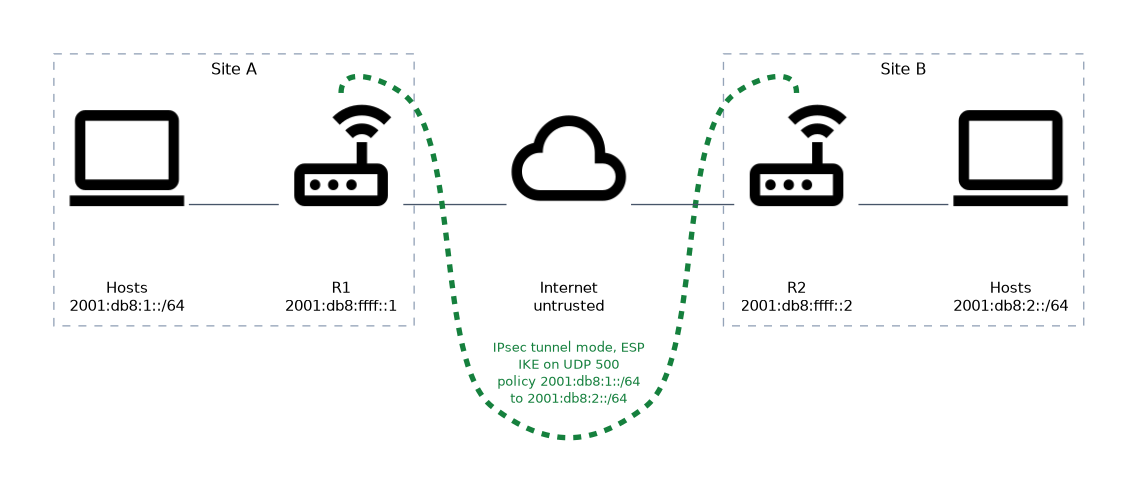
- Includes a diagram
- IPsec authenticates and encrypts IP packets at the network layer.
- AH is Next Header 51 and gives no encryption. ESP is 50 and does encrypt.
- Transport mode protects the payload. Tunnel mode wraps the whole packet.
What it is
IPsec is a set of protocols that authenticates and encrypts IP packets between two points.
It works at the network layer, so any application above it is protected without changes. IPsec was designed together with IPv6 and was once required for every IPv6 node. Today support is expected, but using it is a choice.
On RouterOS you can protect IPv6 traffic between two routers, or between a router and a remote host.
How it works
IPsec has two packet protocols, two modes, and a key exchange that sets everything up.
AH and ESP
IPv6 carries IPsec as extension headers. The two protocols are:
| Protocol | Next Header | What it gives |
|---|---|---|
| AH, Authentication Header | 51 | Integrity and authentication, no encryption |
| ESP, Encapsulating Security Payload | 50 | Encryption, plus integrity and authentication |
ESP is the one used in nearly every deployment, because most people want encryption. AH protects parts of the outer header too, which makes it fragile when the packet crosses devices that change it.
Transport and tunnel mode
| Mode | What is protected | Typical use |
|---|---|---|
| Transport | Only the payload of the original packet | Host to host |
| Tunnel | The whole original packet, inside a new one | Site to site |
In tunnel mode the router wraps the entire original packet in a new IPv6 packet with new addresses. Hosts behind the routers need no IPsec support at all.
Security associations and IKE
A security association, or SA, is a one way agreement on keys and algorithms. Two SAs are needed for traffic in both directions. The routers create them with IKE, the Internet Key Exchange.
IKE has two stages. In the first, the peers authenticate each other and make a secure channel.
In the second, they negotiate the SAs that protect the data. Because IPv6 has plenty of addresses, NAT between peers is rare, so NAT traversal is seldom needed.
Configuring IPsec for IPv6 on RouterOS
 IPsec sits in the
 /ip ipsec menu, and the same menu handles both IP versions. You give IPv6 addresses where an address is needed.
A configuration has five parts:
- Profile: the algorithms for the first IKE stage.
- Proposal: the algorithms for the second stage, which protects the data.
- Peer: the address of the remote router.
- Identity: how the peer authenticates, for example with a pre shared key.
- Policy: which traffic to protect.
/ip ipsec peer add name=siteB address=2001:db8:ffff::2/128 exchange-mode=ike2
/ip ipsec identity add peer=siteB auth-method=pre-shared-key secret=ChangeMe
/ip ipsec policy add src-address=2001:db8:1::/64 dst-address=2001:db8:2::/64 peer=siteB tunnel=yes sa-src-address=2001:db8:ffff::1 sa-dst-address=2001:db8:ffff::2
The policy states which traffic is protected.
The src-address and dst-address values are the inner networks, and sa-src-address and sa-dst-address are the tunnel endpoints. The other router needs the mirror image of every entry. The menus differ slightly between RouterOS v6 and v7, so check the one on your device.
Firewall rules
The firewall can block IPsec by accident. The router must accept the key exchange and the ESP packets, or the tunnel never forms. A common additional rule lets policy matched traffic through the forward chain.
/ipv6 firewall filter add chain=input protocol=ipsec-esp action=accept
/ipv6 firewall filter add chain=input protocol=udp dst-port=500 action=accept
The second rule allows the IKE key exchange on UDP port 500. Place both rules above the final drop rule.
Checking the result
/ip ipsec active-peers print
/ip ipsec installed-sa print
An active peer shows that the first stage worked. An installed SA shows that the data stage worked and keys are in use.
If the peer is active but no traffic flows, check that the policy networks mirror each other on both routers.
What to remember for the exam
Eight facts cover most questions on this topic.
- IPsec authenticates and encrypts IP packets at the network layer.
- AH is Next Header 51 and gives no encryption. ESP is 50 and does encrypt.
- Transport mode protects the payload. Tunnel mode wraps the whole packet.
- An SA is a one way agreement, so two are needed for two way traffic.
- IKE negotiates the keys and the SAs.
- RouterOS uses the
/ip ipsecmenu for IPv6 too. - A configuration needs a peer, an identity and a policy, plus profile and proposal.
- The firewall must accept ESP and the IKE traffic.
Policies must mirror each other on both ends. If the source and destination networks do not match, the SAs never carry traffic.
Common mistakes
These four mistakes appear often.
Looking for /ipv6 ipsec. IPsec is configured in /ip ipsec for both IP versions.
Blocking ESP or IKE in the firewall. The tunnel cannot form, and the logs show no reply from the peer.
Using different policies on each end. The source and destination networks must be swapped on the remote router.
Choosing AH and expecting encryption. AH only authenticates. Use ESP to encrypt.
Check yourself
Work through these three questions.
Which IPsec protocol encrypts the payload, AH or ESP?
ESP encrypts. AH only provides integrity and authentication.
What is the difference between transport mode and tunnel mode?
Transport mode protects only the payload, and tunnel mode wraps the whole original packet inside a new one.
Which RouterOS menu configures IPsec for IPv6 traffic?
The
/ip ipsecmenu, which handles both IP versions.
Topic 4 of 4 in IPv6 Security
Test yourself on IPv6 Security
The full MikroTik MTCIPv6E question bank has 486 questions, with timed practice exams and an explanation for every answer.
This study guide is independent and is not affiliated with, endorsed by, or sponsored by MikroTik. Vendor names, certification names and exam codes are trademarks of their respective owners and are used for identification only.