Interoperability · Topic 2 of 4
IPv6 Tunnels and Routing on RouterOS
Learn how to build an IPv6 tunnel on RouterOS and how to route IPv6 with static routes, RIPng, OSPFv3 and BGP, including the v6 and v7 differences.
- 6 min
- Includes a diagram
/interface 6to4builds a manual IPv6 over IPv4 tunnel.- The tunnel carries IPv4 protocol 41, so the IPv4 firewall must allow it.
- The tunnel interface needs an IPv6 address, and a route into it.
What it is
RouterOS can carry IPv6 across IPv4 networks with tunnel interfaces, and it can route IPv6 with static routes or routing protocols.
A tunnel interface behaves like any other interface. You give it an IPv6 address, and you route through it. The routing protocols then spread the prefixes between routers so that you do not have to type each route.
This page puts the earlier theory into configuration.
How it works
First you build the link, and then you decide how routes are learned.
A 6in4 tunnel with the 6to4 interface
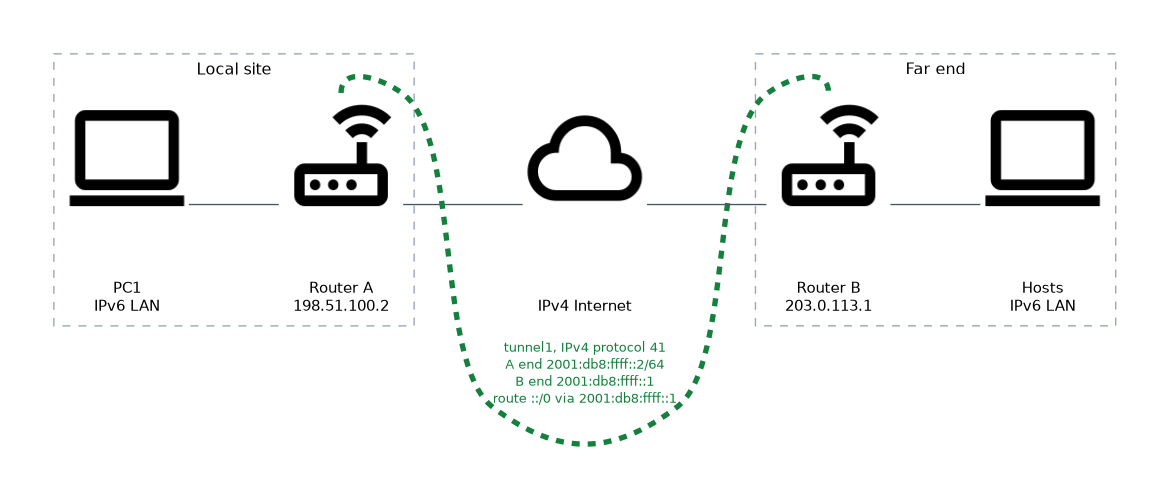 RouterOS builds a manual IPv6 over IPv4 tunnel with the
 /interface 6to4 menu. This is the form used by tunnel brokers. You give the IPv4 address of each end.
/interface 6to4 add name=tunnel1 local-address=198.51.100.2 remote-address=203.0.113.1
/ipv6 address add address=2001:db8:ffff::2/64 interface=tunnel1 advertise=no
/ipv6 route add dst-address=::/0 gateway=2001:db8:ffff::1
The first line creates the tunnel. The second gives the router its end of the tunnel network.
The third sends all other IPv6 traffic into the tunnel. The far end needs the mirror image, with the two IPv4 addresses swapped.
Check the tunnel with /interface 6to4 print and a ping to the far tunnel address.
/ping 2001:db8:ffff::1Allow the tunnel protocol in the IPv4 firewall, because the packets arrive as IPv4 protocol 41. Mind the MTU too, since the tunnel header takes space.
Other tunnel types
| Tunnel | Notes |
|---|---|
| 6to4 interface | IPv6 over IPv4 using protocol 41 |
| GRE and IPIP | Can carry IPv6 as the inner payload over an IPv4 tunnel |
| IPv6 transport tunnels | RouterOS v6 has versions of GRE and IPIP that run over IPv6, such as gre6 and ipipv6. Check the menus on v7 |
| PPP and VPN links | Can carry IPv6 when the link supports it |
The right choice depends on what you need to carry and what the outer network supports.
EoIP over IPv6
EoIPv6 (Ethernet over IPv6) carries whole Ethernet frames between two routers across an IPv6 network, so two remote LAN segments behave like one. The outer packet uses GRE (IP protocol 47). On RouterOS v6 EoIPv6 has its own menu, /interface eoipv6, and both ends need the same tunnel-id. Newer v7 releases may also take IPv6 addresses in /interface eoip, so check the add options on your version.
/interface eoipv6 add name=eoip1 local-address=2001:db8:1::1 remote-address=2001:db8:2::1 tunnel-id=10
/interface bridge port add bridge=bridge1 interface=eoip1
The second command bridges the tunnel with the LAN. The outer IPv6 header is 40 bytes, twice the IPv4 size, and EoIP adds its own header, so lower the MTU of the tunnel or the LAN accordingly. Allow protocol 47 in the IPv6 firewall, or the tunnel stays down. Set local-address to a global IPv6 address, not a link-local one, or the tunnel can fail.
Static routing
Static routes are the simplest method, and they suit small networks.
/ipv6 route add dst-address=2001:db8:20::/64 gateway=2001:db8:ffff::1The router then sends traffic for that /64 to the gateway. The remote router needs a route back. Static routes do not react to a failure, unless you use a feature that checks the gateway.
Dynamic routing protocols
Larger networks use a routing protocol, so that routers share prefixes and react to changes. RouterOS supports the IPv6 versions of the common ones.
| Protocol | IPv6 form | Notes |
|---|---|---|
| RIP | RIPng | Distance vector, uses UDP port 521 and the group ff02::9 |
| OSPF | OSPFv3 | Link state, uses IP protocol 89 and groups ff02::5 and ff02::6 |
| BGP | BGP with an IPv6 address family | Used between autonomous systems |
These protocols use link local addresses for neighbours and next hops. That is why a link local gateway needs an interface name.
OSPFv3 still uses a 32 bit router ID, written like an IPv4 address. It runs per link, not per subnet.
Configuration by version
The menus changed between RouterOS v6 and v7.
| Item | RouterOS v6 | RouterOS v7 |
|---|---|---|
| OSPF for IPv6 | /routing ospf-v3 | /routing ospf, with version 3 chosen in the instance |
| RIP for IPv6 | /routing ripng | Check the menu on your v7 release |
| BGP | /routing bgp peer, with the IPv6 address family | /routing bgp connection, with the IPv6 family chosen there |
For example, a simple OSPFv3 setup on RouterOS v6 looks like this.
/routing ospf-v3 instance set [ find default=yes ] router-id=10.255.255.1
/routing ospf-v3 interface add interface=ether2 area=backbone
The router ID is set once, and each interface that should take part is added to an area. On v7 the same steps use an instance, an area and an interface template.
Choosing between sources
When several sources offer a route for the same prefix, RouterOS uses the distance. A lower number wins. Typical defaults are connected 0, static 1, external BGP 20, OSPF 110, RIP 120 and internal BGP 200.
Verify with /ipv6 route print and the neighbour tables of each protocol.
Work in order. Get the tunnel pinging first, then add the route, then add the routing protocol. Each step proves the one below it.
What to remember for the exam
Eight facts cover most questions on this topic.
/interface 6to4builds a manual IPv6 over IPv4 tunnel.- The tunnel carries IPv4 protocol 41, so the IPv4 firewall must allow it.
- The tunnel interface needs an IPv6 address, and a route into it.
- The protocols for IPv6 are RIPng, OSPFv3 and BGP.
- OSPFv3 uses
ff02::5andff02::6, and RIPng usesff02::9. - OSPFv3 still uses a 32 bit router ID.
- OSPF for IPv6 is
/routing ospf-v3in v6, and/routing ospfwith version 3 in v7. - A lower distance wins between routes for the same prefix.
Routing protocols form neighbours over link local addresses. If the firewall blocks them, the neighbours never come up.
Common mistakes
These four mistakes appear often.
Forgetting protocol 41 in the IPv4 firewall. The tunnel packets are dropped and the tunnel stays down.
No route into the tunnel. An address on the interface is not enough. Traffic needs a route to use it.
Setting no router ID for OSPFv3. It needs an IPv4 style ID, even on a network with only IPv6.
Using v6 menu names on v7. Check the RouterOS version before copying a configuration.
Check yourself
Work through these three questions.
Which RouterOS menu builds a manual IPv6 over IPv4 tunnel?
The
/interface 6to4menu.Why does OSPFv3 need a 32 bit router ID?
OSPFv3 identifies routers with an ID in IPv4 format, even when the network carries only IPv6.
Which source wins when two routes for the same prefix have different distances?
The route with the lower distance wins.
Topic 2 of 4 in Interoperability
Test yourself on Interoperability
The full MikroTik MTCIPv6E question bank has 486 questions, with timed practice exams and an explanation for every answer.
This study guide is independent and is not affiliated with, endorsed by, or sponsored by MikroTik. Vendor names, certification names and exam codes are trademarks of their respective owners and are used for identification only.