Interoperability · Topic 1 of 4
IPv6 Pools, DHCPv6 and Prefix Delegation
Learn how RouterOS IPv6 pools hold prefixes, how the DHCPv6 client and server work, and how prefix delegation hands a prefix from an ISP to LAN interfaces.
- 5 min
- Includes a diagram
- An IPv6 pool stores a prefix and a
prefix-lengthfor the pieces taken from it. - Prefix delegation passes a prefix from an ISP router to a customer router.
- The DHCPv6 client uses
request=prefixandpool-nameto fill a pool.
What it is
An IPv6 pool holds a prefix that RouterOS can split into smaller prefixes, and DHCPv6 is one way to fill it.
An ISP does not give a customer a single address. It gives a whole prefix, such as a /56. The customer router must then share that prefix between its LAN interfaces.
Prefix delegation, or PD, is the DHCPv6 feature that passes the prefix down. The pool is the place where RouterOS stores it.
How it works
A pool stores a prefix, DHCPv6 fills or drains it, and addresses are built from it.
IPv6 pools
A pool is a prefix, plus a length that sets the size of each piece taken from it.
/ipv6 pool add name=lan-pool prefix=2001:db8:100::/48 prefix-length=64
/ipv6 pool print
/ipv6 pool used print
With this pool, each request receives a /64 out of the /48.
The used list shows which pieces are given out and to whom. A manual pool is useful for a prefix that you own. In many cases the pool is filled by a DHCPv6 client instead.
DHCPv6 basics
DHCPv6 is the IPv6 counterpart of DHCP, but it has important differences. Clients use UDP port 546, and servers and relays use UDP port 547. A client sends its first message to the multicast group ff02::1:2.
The default gateway is not given by DHCPv6. It comes from the Router Advertisement. DHCPv6 can supply addresses, prefixes and options such as DNS.
| Mode | How the host gets its address | DHCPv6 gives |
|---|---|---|
| SLAAC only | From the Router Advertisement | Nothing |
| Stateless DHCPv6 | From SLAAC | Other settings, such as DNS |
| Stateful DHCPv6 | From the DHCPv6 server | Addresses and other settings |
The router chooses a mode with the M and O flags in its advertisements. The M flag means to use DHCPv6 for the address, and the O flag means to use it for other settings.
A client is identified by a DUID, a unique ID, rather than a MAC address. The normal exchange has four messages: Solicit, Advertise, Request and Reply.
The DHCPv6 client and prefix requests
A client can ask for an address, a prefix, or both. A WAN interface that receives a delegated prefix usually asks for the prefix.
/ipv6 dhcp-client add interface=ether1 request=prefix pool-name=isp-pool pool-prefix-length=64 add-default-route=yes use-peer-dns=yesThe pool-name setting creates a dynamic pool with the delegated prefix.
The pool-prefix-length value sets the size of the pieces. The add-default-route option installs a default route toward the server. The use-peer-dns option takes the DNS servers from the reply.
Read the result with /ipv6 dhcp-client print. A status of bound means the client has a lease. The pool then appears in /ipv6 pool print.
Using the pool on LAN interfaces
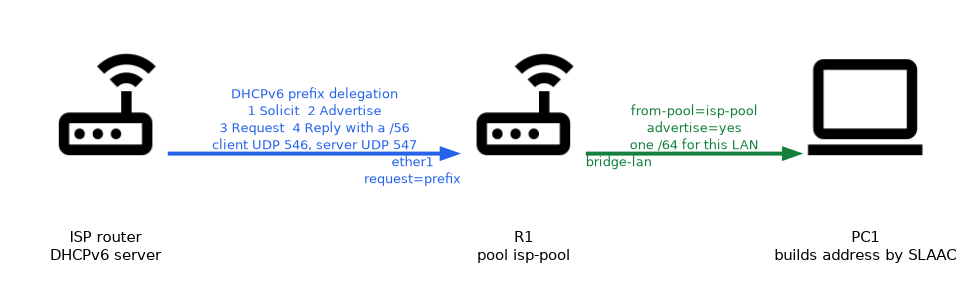 A LAN address is built from the pool instead of being typed in.
/ipv6 address add from-pool=isp-pool interface=bridge-lan advertise=yesThe address is taken from the pool, and the prefix is advertised to hosts for SLAAC. If the ISP later changes the delegated prefix, the pool changes and the addresses follow it. You do not have to retype anything.
The DHCPv6 server and downstream routers
A RouterOS DHCPv6 server is most often used to delegate prefixes to routers further down the network. The server hands out pieces of a pool.
/ipv6 dhcp-server add name=pd-server interface=ether3 address-pool=lan-pool
/ipv6 dhcp-server print
/ipv6 dhcp-server binding print
The client router on ether3 asks for a prefix and receives one /64 out of lan-pool. The binding table shows the active leases, including the DUID and the delegated prefix. Hosts on an ordinary LAN usually use SLAAC, and not the server.
Firewall note
The WAN firewall must allow DHCPv6 replies. Accept UDP port 546 from link local addresses in the input chain. If that rule is missing, the client cannot renew its prefix.
After a prefix changes, check /ipv6 pool print and /ipv6 address print. Addresses made from a pool show as invalid when the prefix has gone.
What to remember for the exam
Eight facts cover most questions on this topic.
- An IPv6 pool stores a prefix and a
prefix-lengthfor the pieces taken from it. - Prefix delegation passes a prefix from an ISP router to a customer router.
- The DHCPv6 client uses
request=prefixandpool-nameto fill a pool. /ipv6 address add from-pool=...builds addresses from a pool.- DHCPv6 clients use UDP port 546, and servers use UDP port 547.
- DHCPv6 does not give a default gateway. The Router Advertisement does.
- A DHCPv6 client is identified by its DUID.
- The WAN firewall must accept UDP port 546 from link local addresses.
A pool does not hold single addresses. It hands out prefixes, so each LAN gets its own prefix.
Common mistakes
These four mistakes appear often.
Expecting a gateway from DHCPv6. The default route comes from the Router Advertisement, or from add-default-route on the client.
Blocking UDP 546 on the WAN. The router cannot receive its prefix or renew it.
Typing a fixed prefix after the ISP delegates one. Use from-pool so that addresses follow the pool.
Mixing up the ports. The client uses 546 and the server uses 547.
Check yourself
Work through these three questions.
What does prefix delegation do?
It passes a prefix from an ISP router to a customer router, which stores it in a pool and shares it between its LAN interfaces.
How does a LAN interface get an address from the delegated prefix?
Use
/ipv6 address add from-pool=isp-pool interface=bridge-lan advertise=yesso the address is built from the pool.Which UDP ports does DHCPv6 use?
Clients use port 546 and servers use port 547.
Topic 1 of 4 in Interoperability
Test yourself on Interoperability
The full MikroTik MTCIPv6E question bank has 486 questions, with timed practice exams and an explanation for every answer.
This study guide is independent and is not affiliated with, endorsed by, or sponsored by MikroTik. Vendor names, certification names and exam codes are trademarks of their respective owners and are used for identification only.