MPLS · Topic 2 of 7
LDP, Penultimate Hop Popping and MPLS Traceroute
Learn how LDP distributes labels, why the penultimate router removes the label, and how MPLS changes traceroute output and the TTL propagation setting.
- 5 min
- Includes a diagram
- LDP distributes labels automatically for prefixes in the routing table.
- LDP uses UDP hellos and a TCP session, both on port 646.
lsr-idandtransport-addressshould be a reachable loopback address.
What it is
LDP is the protocol that hands out labels automatically, so you do not have to build every binding by hand.
Each router assigns a label to the prefixes in its routing table and tells its neighbours. The neighbours use those labels to build the paths.
Two related topics follow from this. Penultimate hop popping removes the label one hop early to save work, and MPLS changes what traceroute shows.
How it works
LDP finds neighbours, opens a session, and swaps label bindings for the prefixes in the routing table.
LDP operation
Routers on an MPLS link find each other with LDP hello messages sent as multicast over UDP. They then open a TCP session. Both protocols use port 646.
Over the session, each router sends the label it has assigned to each prefix. LDP builds on the interior routing protocol. It follows the best path in the routing table and does not choose paths itself.
Configuring LDP on RouterOS
/interface bridge add name=lo
/ip address add address=10.255.255.1/32 interface=lo
/mpls ldp set enabled=yes lsr-id=10.255.255.1 transport-address=10.255.255.1
/mpls ldp interface add interface=ether1
/mpls ldp neighbor printlsr-ididentifies the router in LDP. It should be a stable loopback address.transport-addressis the address the LDP session uses, normally the same loopback.mpls ldp interfaceenables hello messages on a link.mpls ldp neighbor printshows the sessions.
The loopback address of every router must be reachable through the interior protocol. If the transport address is not reachable, the session does not form.
Penultimate hop popping
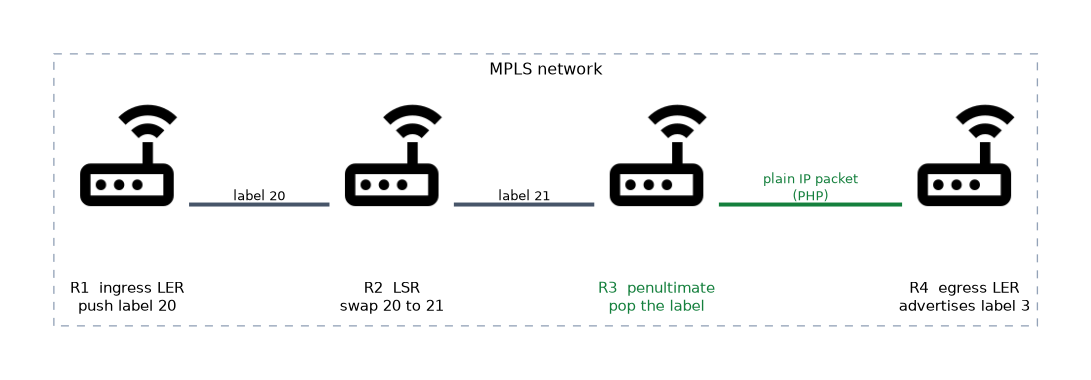 The last router, the egress, would normally have to remove the label and then look up the IP address. This is two jobs. Penultimate hop popping, or PHP, moves the label removal to the router just before the egress.
To ask for this, the egress advertises the special label implicit null, value 3, for its own prefixes. The penultimate router sees it and pops the label instead of swapping. The packet reaches the egress as a plain IP packet.
For VPN traffic the inner label stays on the packet, so the egress still sees its service label. Only the outer transport label is removed.
An alternative is explicit null, label 0. It keeps a label on the packet to the end, so that the traffic class marking survives. RouterOS can be set to advertise explicit null, but the default behaviour is PHP.
MPLS and traceroute
Traceroute works with the TTL field. In MPLS the TTL of the label can be copied from the IP packet at the ingress. That behaviour is controlled on RouterOS.
/mpls settings set propagate-ttl=yes
/tool traceroute 10.9.0.1| Setting | Traceroute shows |
|---|---|
propagate-ttl=yes | Every router in the LSP |
propagate-ttl=no | The core routers are hidden, and the path looks shorter |
With propagation on, each hop that expires the TTL appears in the output.
There can be a second difference. A core router that expires a labelled packet may have no route to the original sender, so the error message can be forwarded along the LSP to the egress, which routes it back. The reply times for core hops can then look similar.
If traceroute shows only the edge routers, check propagate-ttl before suspecting a failure in the core.
What to remember for the exam
Eight facts cover most questions here.
- LDP distributes labels automatically for prefixes in the routing table.
- LDP uses UDP hellos and a TCP session, both on port 646.
lsr-idandtransport-addressshould be a reachable loopback address.- LDP follows the routing table. It does not select paths.
- PHP removes the outer label at the penultimate router.
- The egress asks for PHP by advertising implicit null, label 3.
- Explicit null is label 0, and it keeps a label to the egress.
propagate-ttl=nohides the core routers from traceroute.
Hiding the core with propagate-ttl=no also hides the location of a fault from traceroute.
Common mistakes
These four errors are common.
Using an unreachable transport address. The LDP session never opens, so no labels are exchanged.
Expecting LDP to pick a different path. It follows the IP routing table, so a routing change moves the LSP.
Confusing implicit and explicit null. Implicit null is 3 and means pop. Explicit null is 0 and keeps the label.
Blaming the core for a short traceroute. The router may hide the core hops on purpose.
Check yourself
Work through these three questions.
How do LDP routers discover each other and exchange labels?
They find each other with hello messages over UDP, then open a TCP session, using port 646 for both. Over the session they send labels for the prefixes in their routing tables.
Why does the egress advertise label 3?
Label 3 is implicit null. It tells the penultimate router to pop the label, so the egress receives a plain IP packet.
What effect does
propagate-ttl=nohave on traceroute?The core routers are hidden and the path looks shorter. Only the edge routers appear.
Topic 2 of 7 in MPLS
Test yourself on MPLS
The full MikroTik MTCINE question bank has 475 questions, with timed practice exams and an explanation for every answer.
This study guide is independent and is not affiliated with, endorsed by, or sponsored by MikroTik. Vendor names, certification names and exam codes are trademarks of their respective owners and are used for identification only.