BGP · Topic 2 of 7
BGP Transport, Packet Types, iBGP and eBGP
Learn how BGP runs over TCP port 179, the four message types, the session states, and the key behavioural differences between iBGP and eBGP peers.
- 5 min
- Includes a diagram
- BGP uses TCP port 179.
- The message types are OPEN, UPDATE, KEEPALIVE and NOTIFICATION.
- The session is fully working only in the Established state.
What it is
BGP runs over TCP and uses a small set of messages to build sessions and exchange routes.
Because TCP gives reliable delivery, BGP needs no routing protocol of its own to ship updates. A session is simply a TCP connection between two configured peers.
A peer is eBGP when it sits in a different AS and iBGP when it sits in the same AS. The two behave differently in several ways that the exam tests.
How it works
A session moves through states, then peers trade UPDATE messages and watch each other with KEEPALIVE messages.
Transport
BGP uses TCP port 179. One router opens the connection and the other accepts it. If a firewall on either router drops that port, the session never forms.
This also means the peers must be able to reach each other by IP. For directly connected peers that is automatic. For others, a route must exist first.
The four message types
| Message | Purpose |
|---|---|
| OPEN | Starts the session. Carries the AS number, router ID and proposed hold time. |
| UPDATE | Announces new prefixes with their attributes, or withdraws old ones. |
| KEEPALIVE | Short message that proves the peer is alive and confirms an OPEN. |
| NOTIFICATION | Reports an error and closes the session. |
The hold time is negotiated in the OPEN messages. If no message arrives within the hold time, the peer is declared down. Keepalives are sent at a fraction of that time so the hold timer never expires on a healthy link.
Session states
A peer goes through Idle, Connect, Active, OpenSent, OpenConfirm and finally Established. Only in Established do UPDATE messages flow.
A session stuck in Active or Connect usually means the TCP connection fails. A session that bounces between states often means a mismatch in the OPEN message, such as the wrong remote-as.
iBGP versus eBGP
| Behaviour | eBGP | iBGP |
|---|---|---|
| Peer AS | Different from local | Same as local |
| AS path | Local AS is added | Not changed |
| Next hop | Normally set to the sending router | Passed on unchanged |
| Local preference | Not sent to the peer | Carried between peers |
| Typical administrative distance | 20 | 200 |
| Routes learned from this peer type | Sent to all peers | Not sent to other iBGP peers |
The last row is the iBGP split horizon rule. A route learned from one iBGP peer is not passed to another iBGP peer. This prevents loops inside the AS, because the AS path is not changed within it.
The rule means iBGP peers need a full mesh of sessions unless you use route reflectors or confederations. Those are covered on a later page.
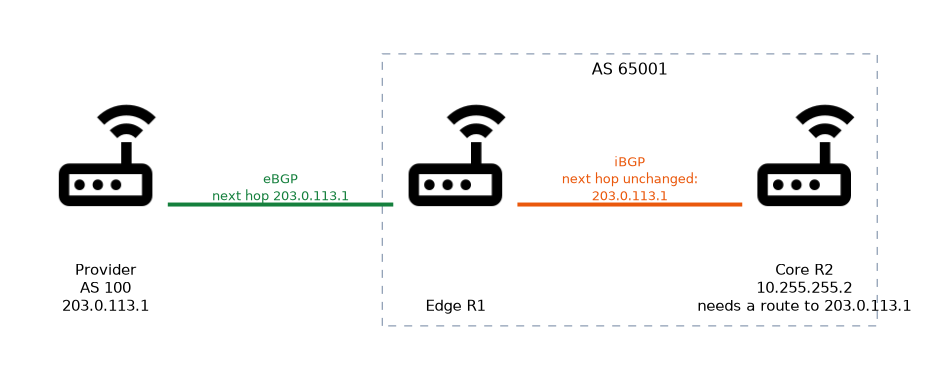
The unchanged next hop matters too. An iBGP router may receive a route whose next hop is an address in another AS. If it cannot reach that address, the route is unusable.
R2 must know how to reach 203.0.113.1, usually through an interior protocol or a static route.
/routing bgp peer add name=isp remote-address=203.0.113.1 remote-as=100
/routing bgp peer add name=r2 remote-address=10.255.255.2 remote-as=65001 nexthop-choice=force-self
/routing bgp peer print statusnexthop-choice=force-selfmakes the router put its own address as the next hop.- A peer whose
remote-asequals the local AS is treated as iBGP.
When an iBGP router shows a route as inactive, check first whether the next hop is reachable.
What to remember for the exam
Eight facts cover most questions here.
- BGP uses TCP port 179.
- The message types are OPEN, UPDATE, KEEPALIVE and NOTIFICATION.
- The session is fully working only in the Established state.
- eBGP adds the local AS to the AS path. iBGP does not.
- eBGP changes the next hop. iBGP leaves it unchanged.
- A route learned from an iBGP peer is not sent to another iBGP peer.
- iBGP therefore needs a full mesh, or reflectors, or confederations.
- Typical administrative distances are 20 for eBGP and 200 for iBGP.
Blocking TCP port 179 in a firewall chain is a common reason a peer never reaches Established.
Common mistakes
These four errors appear often.
Expecting iBGP to redistribute between iBGP peers. Routes learned from one iBGP peer stay there, so a partial mesh leaves some routers without routes.
Ignoring the next hop. The route may be present but not active because the next hop is not reachable inside the AS.
Blocking the transport. A firewall rule that drops TCP port 179 keeps the session in Active or Connect.
Confusing UPDATE with KEEPALIVE. Only UPDATE carries prefixes. KEEPALIVE carries no routing data.
Check yourself
Work through these three questions.
Which transport protocol and port does BGP use?
BGP uses TCP port 179.
What happens to a route that an iBGP router learned from another iBGP peer?
It is not advertised to any other iBGP peer. This is why iBGP needs a full mesh, route reflectors or confederations.
What does
nexthop-choice=force-selfdo on an iBGP peer?It makes the router set its own address as the next hop for the routes it sends. Other routers then do not need a route to the original external next hop.
Topic 2 of 7 in BGP
Test yourself on BGP
The full MikroTik MTCINE question bank has 475 questions, with timed practice exams and an explanation for every answer.
This study guide is independent and is not affiliated with, endorsed by, or sponsored by MikroTik. Vendor names, certification names and exam codes are trademarks of their respective owners and are used for identification only.