RF Wireless Characteristics · Topic 3 of 4
RF Environment, Roaming and Interference
Learn how walls and objects change radio signals, how interference and noise affect Wi-Fi, and how clients roam between access points on a network.
- 5 min
- Includes a diagram
- Absorption, reflection, refraction, diffraction and scattering change a signal.
- Multipath can cause fading.
- The noise floor is the background energy on a channel.
What it is
The RF environment is everything that changes a radio signal between the access point and the client.
Walls, furniture, people and other radios all affect the signal. Some weaken it and some add noise.
This page also covers roaming, which is how a client moves between access points, because interference and roaming problems often look alike.
How it works
Signals bend, bounce and fade, and clients decide when to move.
How a signal behaves
A radio wave meets objects and reacts in several ways.
| Behaviour | What happens |
|---|---|
| Absorption | The object soaks up energy and the signal gets weaker |
| Reflection | The wave bounces off a surface such as metal |
| Refraction | The wave bends as it passes into a different material |
| Diffraction | The wave bends around an edge |
| Scattering | The wave breaks into many weaker waves on a rough surface |
Multipath happens when a signal reaches the receiver along several routes. The copies arrive at slightly different times and can cancel each other, which causes fading.
Materials matter. Metal reflects, water absorbs, and thick concrete weakens the signal a great deal. Glass and thin wood weaken it less.
Interference and noise
Noise is unwanted energy on the channel. The noise floor is the level of that background energy.
| Type | Cause |
|---|---|
| Co channel interference | Two access points use the same channel and share the airtime |
| Adjacent channel interference | Access points use overlapping channels and corrupt each other |
| Non Wi-Fi interference | Other devices such as microwave ovens, Bluetooth devices or cordless phones |
Co channel interference lowers throughput but the devices still take turns. Adjacent channel interference is usually worse, because the signals are corrupted rather than shared. This is why 2.4 GHz networks use channels 1, 6 and 11.
Put neighbouring access points on the same channel or on well separated channels. Do not put them on neighbouring overlapping channels.
Client roaming
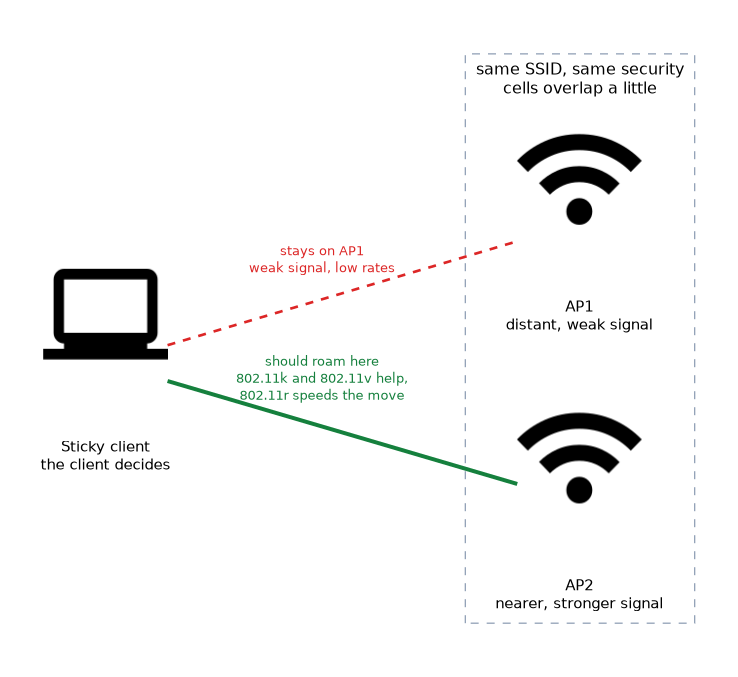 Roaming is a client moving its association from one access point to another. The client decides when to roam, not the network.
For roaming to work, the access points should use the same SSID and the same security settings. The cells should overlap a little, so the client hears the next access point before it loses the first.
A sticky client holds on to a distant access point although a nearer one is available. The result is a weak signal and low rates.
Helping clients roam
Several tools improve roaming.
- A signal limit on the access list stops a client from staying on an access point with a weak signal. The access list page covers this.
- 802.11r speeds up the reauthentication step when a client moves, and the wifi driver security profile carries the related
ftsetting. - 802.11k lets the access point tell a client about nearby access points.
- 802.11v lets the network suggest that a client moves to a better access point. The wifi driver has steering settings for these two.
The client must support the standard for the feature to help, and some clients ignore suggestions.
Station roaming (legacy wireless package, RouterOS v6)
On the legacy wireless package a station interface has the station-roaming setting. It is a RouterOS feature of the client side, so it works without any change on the access points.
/interface wireless set wlan1 mode=station station-roaming=enabledWith it enabled, the station keeps scanning in the background while connected. If it finds an access point with the same SSID and a better signal, it moves to that access point.
- It helps a mobile station, such as a vehicle unit, that passes through several cells.
- It applies only to station modes and to the 802.11 protocol.
- The access points must share the SSID and the security settings.
- The background scan briefly takes the radio off its channel, so traffic can stutter.
Checking the environment
You can see noise and neighbours from the router.
/interface wireless scan wlan1
/interface wireless monitor wlan1
/interface wireless registration-table printscanlists nearby networks and their channels and signal.monitorshows the current frequency and noise floor.registration-table printshows connected clients and their signal.
What to remember for the exam
Seven facts cover the environment and roaming.
- Absorption, reflection, refraction, diffraction and scattering change a signal.
- Multipath can cause fading.
- The noise floor is the background energy on a channel.
- Co channel interference shares airtime, and adjacent channel interference corrupts signals.
- Microwave ovens, Bluetooth and cordless phones can interfere with 2.4 GHz.
- The client decides when to roam, and roaming needs the same SSID and security.
- 802.11r speeds up roaming, and 802.11k and 802.11v help clients choose an access point.
The access point cannot force a client to roam. It can only suggest, or disconnect a client that falls below a signal limit.
Common mistakes
These four errors appear again and again.
Using overlapping 2.4 GHz channels. Channels such as 1, 3 and 5 overlap each other, and this raises interference.
Blaming the access point for a sticky client. The client chose to stay, so tune the signal limits and roaming support.
Using different SSIDs on neighbouring access points. The client sees separate networks, so it cannot roam smoothly.
Ignoring non Wi-Fi interference. A scan of Wi-Fi networks will not show a microwave oven.
Check yourself
Work through these three questions.
Which is usually worse, co channel or adjacent channel interference, and why?
Adjacent channel interference is usually worse. The signals are corrupted, while co channel devices still take turns.
What must be true of two access points for clients to roam between them?
They should use the same SSID and the same security settings. Their cells should overlap a little.
What does 802.11r do for roaming?
It speeds up the reauthentication step when a client moves to another access point.
Topic 3 of 4 in RF Wireless Characteristics
Test yourself on RF Wireless Characteristics
The full MikroTik MTCEWE question bank has 476 questions, with timed practice exams and an explanation for every answer.
This study guide is independent and is not affiliated with, endorsed by, or sponsored by MikroTik. Vendor names, certification names and exam codes are trademarks of their respective owners and are used for identification only.