RF Wireless Characteristics · Topic 4 of 4
Access Point Planning
Plan access point placement, channels, power and data rates for coverage and capacity, and apply the plan with band, channel width and frequency settings.
- 4 min
- Includes a diagram
- Coverage is the reach of the signal, and capacity is the number of clients served well.
- Capacity problems are solved with more access points and smaller cells.
- Mount access points high, in the open and away from metal.
What it is
Access point planning is deciding how many access points you need, where they go and how they are set.
A good plan gives enough coverage for every area and enough capacity for the people in it. Poor planning shows up as dead spots, slow Wi-Fi and constant roaming.
Planning starts on paper and is confirmed on site with a survey.
How it works
Planning moves from requirements to placement to settings.
Coverage and capacity
Coverage is whether the signal reaches every place that needs it. Capacity is whether the access point can serve all the clients in range at the speed they need.
A large quiet warehouse needs coverage. A busy lecture hall needs capacity. Capacity problems are solved with more access points of smaller cells, not with more power.
Gather requirements
Before you place anything, find out:
- the floor plan and the building materials
- the number of clients and the kind of devices
- the applications, such as voice, video or simple web use
- where cables and PoE power can reach
- the bands the client devices support
Voice and video need stronger signal and lower delay than web browsing.
Placement
Mount access points high, in the open and near the middle of the area they serve. Keep them away from metal and from thick walls.
Place them so that neighbouring cells overlap a little. Overlap supports roaming, but too much overlap wastes channels and raises interference.
A ceiling mount usually works better than a position in a cupboard or behind a metal door.
Channel plan
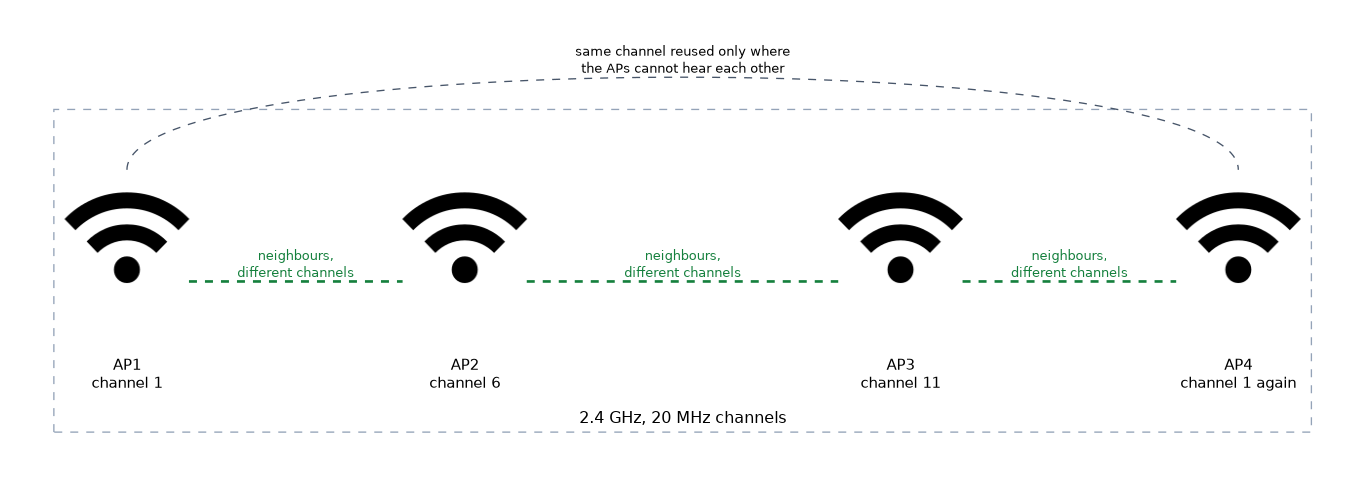 Give neighbouring access points different channels so they do not compete for airtime. On 2.4 GHz use channels 1, 6 and 11 at 20 MHz. On 5 GHz there are more channels, but wide channels use them up fast.
Repeat channels only on access points that cannot hear each other. Draw the plan so no two neighbours share a channel.
Power and cell size
Lower power makes smaller cells. Smaller cells mean fewer clients per access point and less interference with neighbours.
Do not set maximum power by habit. The client radio is weaker than the access point, so a cell larger than the client can reach causes poor uplink.
Data rates and SSIDs
Removing the lowest data rates makes clients leave a weak access point sooner, and it uses airtime more efficiently. On the legacy wireless package the rate settings are basic-rates-a/g and supported-rates-a/g.
Every SSID adds management traffic to the channel. Run only the SSIDs you need.
Applying the plan
/interface wireless set wlan1 band=2ghz-b/g/n channel-width=20mhz frequency=2437
/interface wifi channel add name=ch5 frequency=5180 width=20mhzband,channel-widthandfrequencyset the legacy radio.- On the wifi driver a channel profile holds
frequencyandwidth, and a configuration refers to it.
Choosing 2.4 GHz and 5 GHz
| Feature | 2.4 GHz | 5 GHz |
|---|---|---|
| Range | Longer | Shorter |
| Channels | Few | Many |
| Interference | Crowded | Usually lighter |
| Best for | Coverage and older clients | Capacity and speed |
Plan 5 GHz as the main band where clients support it, and keep 2.4 GHz for coverage and older devices.
What to remember for the exam
Seven facts cover planning.
- Coverage is the reach of the signal, and capacity is the number of clients served well.
- Capacity problems are solved with more access points and smaller cells.
- Mount access points high, in the open and away from metal.
- Neighbouring access points need different channels.
- Lower power gives smaller cells and less interference.
- Removing low data rates helps clients move to a better access point.
- 5 GHz has more channels and 2.4 GHz has more range.
A survey on site is the only way to confirm a plan, because walls and neighbours are never exactly as drawn.
Common mistakes
These four errors are common in plans.
Planning for coverage only. The signal reaches every room but too many clients share one access point.
Setting maximum power everywhere. Clients hear the access point but cannot answer it.
Reusing a channel on neighbours. Neighbouring access points then share airtime.
Running too many SSIDs. Each one adds overhead on the channel.
Check yourself
Work through these three questions.
What is the difference between coverage and capacity?
Coverage is whether the signal reaches every place. Capacity is whether the access point can serve all its clients well.
How do you fix a capacity problem in a busy room?
Add more access points with smaller cells. More power does not help.
Why avoid setting maximum power on every access point?
Client radios are weaker, so a large cell gives poor uplink. Lower power gives smaller cells and less interference.
Topic 4 of 4 in RF Wireless Characteristics
Test yourself on RF Wireless Characteristics
The full MikroTik MTCEWE question bank has 476 questions, with timed practice exams and an explanation for every answer.
This study guide is independent and is not affiliated with, endorsed by, or sponsored by MikroTik. Vendor names, certification names and exam codes are trademarks of their respective owners and are used for identification only.