Capabilities of Microsoft Security Solutions · Topic 5 of 5
Microsoft Defender XDR
SC-900 Microsoft Defender XDR: Defender for Office 365, Endpoint, Identity and Cloud Apps, Vulnerability Management, Threat Intelligence and the Defender portal.
- 6 min
- Includes a diagram
- Defender XDR unifies Defender for Office 365, Endpoint, Identity and Cloud Apps.
- Defender for Endpoint isolates devices. Defender for Identity watches on premises Active Directory.
- Defender for Cloud Apps is a CASB that finds shadow IT.
What it is
Microsoft Defender XDR is a unified defence suite. XDR means extended detection and response. It brings the signals from several Defender products together, joins related alerts into one incident, and can respond automatically. It was formerly called Microsoft 365 Defender.
The point of XDR is that a real attack crosses email, devices, identities and cloud apps. Looking at each in isolation misses the story.
How it works
The Defender products
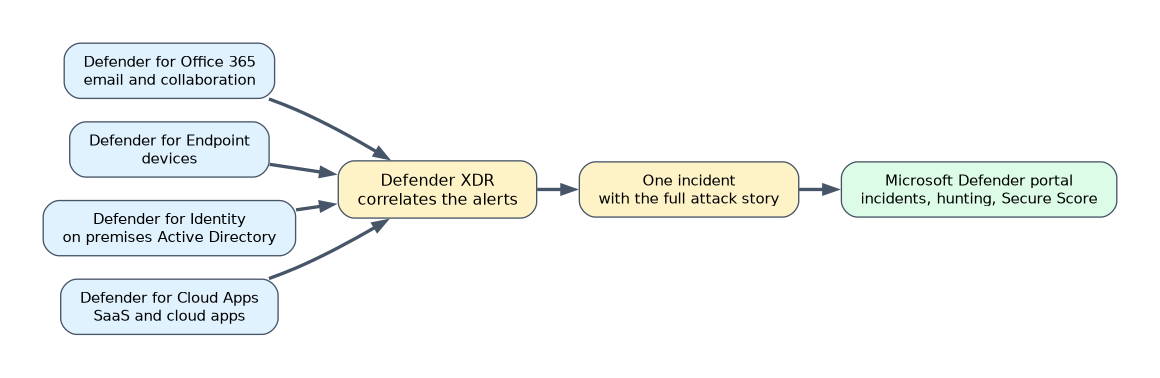
| Product | Protects | Examples of what it does |
|---|---|---|
| Defender for Office 365 | Email and collaboration | Blocks phishing and malicious attachments, rewrites unsafe links, holds blocked messages in quarantine |
| Defender for Endpoint | Devices such as laptops, servers and phones | Detects and responds to attacks on devices, and can isolate a compromised device |
| Defender for Identity | On premises Active Directory | Watches domain controllers for suspicious behaviour such as reconnaissance and lateral movement |
| Defender for Cloud Apps | SaaS and cloud apps | Finds the cloud apps people use, sets policies and controls sessions |
| Defender Vulnerability Management | Devices and software | Finds weak software and settings and ranks what to fix first |
| Defender Threat Intelligence | The whole defence | Provides information about attackers, tools and campaigns |
Defender for Office 365
It protects email, links and files in Microsoft 365. Safe Attachments opens attachments in a safe environment before delivery. Safe Links checks links when they are clicked. Anti phishing protection detects impersonation. It also includes attack simulation training, in which users receive harmless fake phishing messages. Messages it blocks are held in quarantine, where an administrator can review them.
Defender for Endpoint
It is the endpoint detection and response (EDR) product. It collects activity from devices, detects attacks, and shows the full path of an attack. It can investigate and fix problems automatically, and an analyst can isolate a device from the network, find every device a malicious file ran on, and collect forensic data. It also reduces the attack surface with rules that block risky behaviour.
Defender for Identity
It uses sensors on domain controllers to watch signals from on premises Active Directory. It detects attacks such as reconnaissance, stolen credentials, and an attacker moving from one machine to another, which is called lateral movement.
Defender for Cloud Apps
It is a cloud access security broker (CASB). It discovers which cloud apps employees use, including unsanctioned ones, which is called shadow IT, rates their risk, applies policies to protect data and controls sessions with Conditional Access.
Defender Vulnerability Management and Threat Intelligence
Defender Vulnerability Management continuously discovers devices and software, finds weaknesses and misconfigurations, and ranks them by business risk so you fix the most dangerous first. Microsoft Defender Threat Intelligence gives analysts context about the people and tools behind attacks, which helps them understand and hunt for threats.
The Microsoft Defender portal
The Microsoft Defender portal is the one place for security teams to manage incidents and alerts, hunt for threats and see Microsoft Secure Score. Incidents join the alerts from all the Defender products. In advanced hunting, analysts query raw data with KQL. Automated investigation and response fixes many problems without a person. Microsoft Secure Score measures the security posture of your Microsoft 365 environment and suggests improvements.
Choosing the right product
| The need | Product |
|---|---|
| Stop a phishing message with a malicious link | Defender for Office 365 |
| Isolate a laptop that ran malware | Defender for Endpoint |
| Detect lateral movement in on premises Active Directory | Defender for Identity |
| Discover which unsanctioned apps staff use | Defender for Cloud Apps |
| One place for incidents across all the Defender products | The Defender portal |
A worked scenario
A phishing email slips through, and a user opens a malicious file. Defender for Office 365 raises an alert about the message, and Defender for Endpoint raises one about malware on the laptop. Defender for Identity notices the stolen account being used against a server. Defender XDR joins the three alerts into one incident in the Defender portal, shows the attack path, and the analyst isolates the laptop, resets the account and removes the email from other mailboxes.
How an XDR investigation flows
- Signals from email, devices, identities and apps arrive in the Defender portal.
- XDR correlates related alerts into one incident.
- Automated investigation looks at the evidence and can fix some problems on its own.
- An analyst reviews the incident timeline, hunts with advanced hunting if more detail is needed, and approves or takes actions.
- The analyst closes the incident and the lessons feed improvements.
The two scores
| Microsoft Secure Score | Secure score in Defender for Cloud | |
|---|---|---|
| Shown in | The Microsoft Defender portal | Defender for Cloud |
| Covers | Microsoft 365 and related security settings | Azure, other clouds and on premises workloads |
| Improved by | Completing improvement actions | Completing recommendations |
Reducing the attack surface
Defender for Endpoint includes attack surface reduction rules that block risky behaviour, such as Office applications starting scripts. Defender Vulnerability Management shows which software on which devices is out of date and ranks the weaknesses by how dangerous they are, so the team patches the most urgent first.
Examples that point to each product
| Example | Product |
|---|---|
| A user reports a suspicious link in an email | Defender for Office 365 |
| Ransomware is found running on a laptop | Defender for Endpoint |
| An attacker uses a stolen account to move between servers | Defender for Identity |
| An employee uploads files to an unapproved storage app | Defender for Cloud Apps |
What to remember for the exam
- Defender XDR unifies Defender for Office 365, Endpoint, Identity and Cloud Apps.
- Defender for Endpoint isolates devices. Defender for Identity watches on premises Active Directory.
- Defender for Cloud Apps is a CASB that finds shadow IT.
- Defender Vulnerability Management ranks weaknesses by risk.
- The Defender portal manages incidents, alerts and hunting across the products.
Match the product to the thing it protects: email, devices, identities or cloud apps.
How the exam asks about this
- "Find every laptop where a file ran, and isolate them." Defender for Endpoint.
- "Where are messages blocked as malicious held?" Quarantine.
- "Which product is a cloud access security broker?" Defender for Cloud Apps.
- "A single place for incidents across Defender products." The Microsoft Defender portal.
Common mistakes
Confusing Defender for Identity with Entra ID Protection. Defender for Identity watches on premises Active Directory. ID Protection watches Entra sign ins.
Using Defender for Cloud for endpoints. Defender for Cloud protects cloud workloads. Defender for Endpoint protects devices.
Calling Defender XDR a SIEM. It correlates Defender signals. Sentinel is the SIEM.
Using the old name. Microsoft 365 Defender is now Microsoft Defender XDR.
Check yourself
What does XDR stand for?
Extended detection and response.
Which product can isolate a compromised device?
Microsoft Defender for Endpoint.
Which Defender product acts as a cloud access security broker?
Defender for Cloud Apps.
Topic 5 of 5 in Capabilities of Microsoft Security Solutions
Test yourself on Capabilities of Microsoft Security Solutions
The full Microsoft SC-900 question bank has 503 questions, with timed practice exams and an explanation for every answer.
This study guide is independent and is not affiliated with, endorsed by, or sponsored by Microsoft. Vendor names, certification names and exam codes are trademarks of their respective owners and are used for identification only.