Capabilities of Microsoft Entra · Topic 3 of 4
Conditional Access and Roles
SC-900 Conditional Access and roles: signals and decisions in policies, the P1 licence, report only mode, Entra roles and Azure role based access control.
- 6 min
- Includes a diagram
- Conditional Access policies combine signals with decisions, as if then rules.
- Conditional Access requires Entra ID P1. Security defaults are the free option.
- Report only mode tests a policy without enforcing it.
What it is
Signing in is only the first step. Access management decides what a signed in identity may reach, and under what conditions. Two tools do this in Microsoft Entra. Conditional Access decides whether to allow sign in, based on signals. Roles decide what an identity can do once it is in.
How it works
Conditional Access
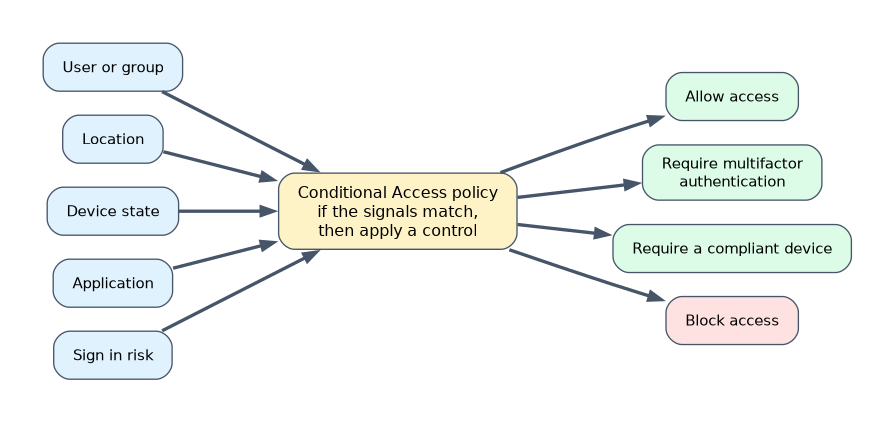 Conditional Access is the policy engine of Zero Trust in Entra ID. Each policy is an if then statement: if a user does this under these conditions, then apply this control.
Signals are the facts gathered at sign in.
- Who the user is, including their group and role.
- Where they are signing in from, such as an IP address range or a country.
- What device they use, and whether it is compliant or joined to the organisation.
- Which application they are trying to open.
- How risky the sign in or the user looks, from Identity Protection.
Decisions are the outcomes.
| Decision | Meaning |
|---|---|
| Block access | Refuse sign in |
| Grant access | Allow, usually with requirements |
| Require multifactor authentication | Ask for a second factor |
| Require a compliant device | Allow only managed, healthy devices |
| Require a password change | Force a new password |
| Require terms of use | Ask the user to accept terms |
Conditional Access needs Microsoft Entra ID P1. The free alternative is security defaults, which turns on a fixed set of basic protections. A new policy can be run in report only mode, which shows who would have been affected without enforcing it, so you can test safely.
A common example: "if a user signs in from outside the country, then require MFA", and a second one: "if the device is not compliant, then block access to finance apps". The device compliance state is reported by Microsoft Intune.
Microsoft Entra roles
Roles are bundles of permissions. Microsoft Entra roles control what an administrator can do in the directory and in Microsoft 365 services, for example resetting passwords or managing users. Common roles include:
- Global Administrator, who can manage almost everything and should be given to very few people.
- User Administrator, who manages users and groups.
- Security Administrator, who manages security features and reads security reports.
Role based access control follows least privilege: give each person only the role they need, and use narrow roles instead of Global Administrator whenever possible.
Azure role based access control
Azure role based access control (Azure RBAC) is a separate system that controls access to Azure resources, such as virtual machines and storage accounts. A role assignment has three parts: who gets the access, which role, and at what scope, such as a management group, subscription, resource group or single resource. Permissions are inherited down the scope.
| Microsoft Entra roles | Azure RBAC | |
|---|---|---|
| Controls | The directory and Microsoft 365 services | Azure resources |
| Example roles | Global Administrator, User Administrator | Owner, Contributor, Reader |
| Scope | The tenant or an administrative unit | Management group, subscription, resource group or resource |
A worked scenario
A company wants only managed laptops to open its finance application. It writes a Conditional Access policy: for the finance app, for all users, require a compliant device, and require MFA when the user is outside the office network. It first runs the policy in report only mode and checks the effects. Separately, it gives the help desk the User Administrator role so they can reset passwords, and gives a developer the Reader role on one resource group in Azure, which keeps each person to the minimum they need.
Example policies
| Policy | Signals | Decision |
|---|---|---|
| Protect administrators | Users in admin roles, any app | Require MFA |
| Block risky countries | Sign in from a named location of blocked countries | Block access |
| Protect finance | Finance app, any device | Require a compliant device |
| Secure remote work | Any app, outside the office network | Require MFA |
| Respond to risk | Sign in judged high risk | Require MFA or a password change |
Choosing between the ways to require MFA
| Option | Licence | Control |
|---|---|---|
| Security defaults | Free | A fixed set of basic protections, no customisation |
| Conditional Access | P1 | Detailed policies on users, apps, devices and risk |
Conditional Access is the recommended approach for organisations that need more than the basics. When writing policies, keep at least one emergency access account out of them, so that a mistake in a policy cannot lock every administrator out.
Named locations and device state
A named location is a trusted range of addresses, such as the head office, or a list of countries. A policy can treat sign ins from there differently. The device state signal tells the policy whether a device is joined to the organisation or marked compliant by Microsoft Intune, which lets you allow access only from healthy, managed devices.
Scopes in Azure RBAC
A role assigned at a management group applies to every subscription beneath it. A role at a subscription covers its resource groups. A role on a single resource applies only to that resource. Assigning at the narrowest scope that works is the least privilege choice.
What to remember for the exam
- Conditional Access policies combine signals with decisions, as if then rules.
- Conditional Access requires Entra ID P1. Security defaults are the free option.
- Report only mode tests a policy without enforcing it.
- Entra roles manage the directory. Azure RBAC manages Azure resources.
- Follow least privilege and avoid handing out Global Administrator.
Do not mix up the two role systems. Owner and Contributor are Azure RBAC roles. Global Administrator is an Entra role.
How the exam asks about this
- "Require MFA only when users sign in from an unknown location." Conditional Access.
- "Which edition is the lowest that includes Conditional Access?" Entra ID P1.
- "Which role system controls access to virtual machines?" Azure RBAC.
- "Test a policy before enforcing it." Report only mode.
Common mistakes
Thinking Conditional Access is free. It needs P1. Security defaults are the free choice.
Using Global Administrator for daily work. It breaks least privilege.
Believing Azure RBAC manages users. It controls access to Azure resources. Entra roles manage the directory.
Forgetting inheritance. A role at a subscription also applies to every resource group inside it.
Check yourself
What two parts make up a Conditional Access policy?
Signals that describe the sign in, and decisions about whether and how to allow access.
Which edition first includes Conditional Access?
Microsoft Entra ID P1.
What does Azure RBAC control?
Access to Azure resources, using role assignments at a scope.
Topic 3 of 4 in Capabilities of Microsoft Entra
Test yourself on Capabilities of Microsoft Entra
The full Microsoft SC-900 question bank has 503 questions, with timed practice exams and an explanation for every answer.
This study guide is independent and is not affiliated with, endorsed by, or sponsored by Microsoft. Vendor names, certification names and exam codes are trademarks of their respective owners and are used for identification only.