Manage Identity, Access, and Governance · Topic 3 of 3
Governance, Roles and Regulatory Compliance
SC-500 governance: Azure Policy effects, Defender for Cloud compliance and standards, resource locks, built-in and custom roles, backup security and IaC.
- 4 min
- Includes a diagram
- Policy effects: Deny, Audit, Modify, DeployIfNotExists, AuditIfNotExists, Disabled, plus Append, DenyAction and Manual.
- Initiatives group policies; remediation tasks fix existing resources using a managed identity.
- Regulatory compliance dashboard, security standards, custom standards and recommendations; regulatory standards beyond the benchmark need Defender CSPM.
What it is
Governance keeps resources secure by design and shows that they meet internal and regulatory requirements. SC-500 covers Azure Policy, regulatory compliance and security standards in Defender for Cloud, resource locks, role assignments and custom roles, removing overprivileged access, protecting backups, and applying controls through infrastructure as code.
How it works
Azure Policy
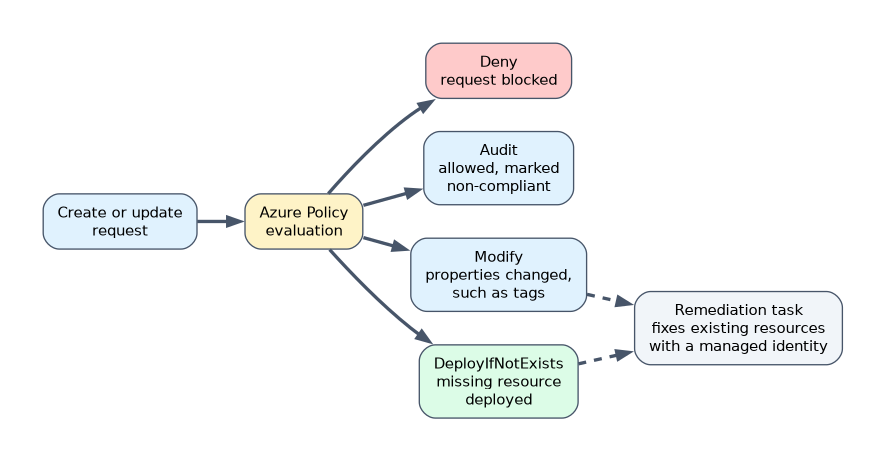
| Effect | What it does |
|---|---|
| Deny | Blocks a create or update that breaks the rule |
| Audit | Allows it but marks the resource non-compliant |
| Modify | Adds or changes properties such as tags during create or update, and through remediation |
| DeployIfNotExists | Deploys a related resource, such as a diagnostic setting, if it is missing |
| AuditIfNotExists | Flags resources missing a related resource |
| Disabled | Turns the policy off |
Other effects include Append, DenyAction (blocks actions such as delete), Manual and Mutate.
Group policies into initiatives (policy set definitions) and assign them at a management group, subscription or resource group. Remediation tasks fix existing resources for Modify and DeployIfNotExists policies, using a managed identity. Create custom policy definitions when built-in ones do not fit.
Defender for Cloud compliance
- The regulatory compliance dashboard shows how resources meet standards such as the Microsoft cloud security benchmark, ISO 27001 or PCI DSS.
- Security standards are assigned to subscriptions, AWS accounts and GCP projects. The Microsoft cloud security benchmark is on by default; adding regulatory standards and creating custom recommendations (written in KQL, inside a custom standard) need the Defender CSPM plan.
- Recommendations describe what to fix; many offer a quick fix or a remediation script, and exemptions record accepted risks.
Resource locks
| Lock | Effect |
|---|---|
| CanNotDelete (Delete) | Resources can be read and modified but not deleted |
| ReadOnly | Resources can be read but not modified or deleted |
Locks apply to everyone, including owners, and are inherited by child resources.
Roles
- Built-in Azure roles: assign at the narrowest scope that works, such as a resource group instead of a subscription.
- Custom Azure roles define
Actions,NotActions,DataActions,NotDataActionsandAssignableScopes. - Custom Microsoft Entra roles grant fine-grained directory permissions, such as managing only app registrations.
- Overprivileged access: review role assignments, remove unused Owner or Contributor assignments, replace them with narrower roles, and use PIM and access reviews. Defender CSPM and recommendations can highlight overpermissioned identities.
Securing backups
Azure Backup security features protect backups from ransomware and malicious deletion:
- Soft delete keeps deleted backup data for a period.
- Immutable vaults stop backup data being changed or deleted early.
- Multi-user authorization protects critical operations, such as disabling soft delete or reducing retention, with a Resource Guard owned by a different user, ideally in another subscription or tenant. The backup admin needs a temporary Backup MUA Operator role on it, for example through PIM.
- Encryption with customer-managed keys where required.
Infrastructure as code
Define secure configurations in Bicep, ARM templates or Terraform: private endpoints, diagnostic settings, TLS versions, role assignments. Combine IaC with Azure Policy so drift and manual changes are still caught.
A worked example: a regulation requires that storage accounts never allow public blob access. A Deny policy blocks new accounts that allow it, an Audit view finds old ones, a remediation script fixes them, and the regulatory compliance dashboard shows progress.
To block bad configurations, choose Deny. To fix them automatically, choose Modify or DeployIfNotExists with a remediation task. To only report, choose Audit.
How the exam asks about this
- "Prevent anyone, including owners, from deleting a production resource group." A CanNotDelete lock.
- "Automatically add diagnostic settings to new resources." A DeployIfNotExists policy.
- "Let a team restart VMs but nothing else." A custom Azure role with the restart action.
What to remember for the exam
- Policy effects: Deny, Audit, Modify, DeployIfNotExists, AuditIfNotExists, Disabled, plus Append, DenyAction and Manual.
- Initiatives group policies; remediation tasks fix existing resources using a managed identity.
- Regulatory compliance dashboard, security standards, custom standards and recommendations; regulatory standards beyond the benchmark need Defender CSPM.
- CanNotDelete versus ReadOnly locks; locks apply to owners too.
- Custom roles use Actions, NotActions, DataActions, NotDataActions and AssignableScopes.
- Backups: soft delete, immutable vaults, multi-user authorization.
A ReadOnly lock can break operations that need write access, such as listing storage account keys. Test before locking.
Common mistakes
Using Audit when the requirement is to prevent. Use Deny.
Assigning Owner at subscription scope for a narrow task. Use a narrower or custom role.
Forgetting existing resources. New policy assignments need remediation for resources already deployed.
Check yourself
Which Azure Policy effect blocks a non-compliant deployment?
Deny.
What is the difference between a CanNotDelete and a ReadOnly lock?
CanNotDelete allows changes but not deletion; ReadOnly blocks both changes and deletion.
Which backup feature requires a second person to approve critical operations?
Multi-user authorization.
Topic 3 of 3 in Manage Identity, Access, and Governance
Test yourself on Manage Identity, Access, and Governance
The full Microsoft SC-500 question bank has 650 questions, with timed practice exams and an explanation for every answer.
This study guide is independent and is not affiliated with, endorsed by, or sponsored by Microsoft. Vendor names, certification names and exam codes are trademarks of their respective owners and are used for identification only.