Plan and Implement Workload Identities · Topic 1 of 4
Managed Identities and Service Principals
SC-300 workload identities: managed identities, service principals, system and user assigned identities, federation for AKS and GitHub, and troubleshooting.
- 6 min
- Includes a diagram
- Managed identities remove stored credentials. System assigned follows the resource. User assigned is reusable.
- Use a service principal when a managed identity does not fit, and prefer a certificate over a secret.
- Federation needs an issuer and a subject. The limit is 20 federated credentials per app or user assigned identity.
What it is
A workload identity is an identity for software, not for a person. Code running in Azure, in a pipeline or in another cloud needs to sign in to reach resources such as Key Vault or a database. Storing a password in the code is risky, so Microsoft Entra offers better options: managed identities, service principals and workload identity federation.
Choosing the right one is the core skill for this topic.
How it works
Choosing the identity type
| Identity | What it is | Best for |
|---|---|---|
| Managed identity | An identity that Azure creates and manages for a resource, with no credential to handle | Code running in Azure |
| Service principal | The identity of an application in a tenant, with a secret, certificate or federated credential | Apps outside Azure, automation, multi tenant apps |
| Workload identity federation | A trust between Entra and an external identity provider, so the workload signs in with its own token and has no secret | GitHub Actions, Kubernetes, other clouds |
| User account | A normal user used by a script | Avoid. It needs a password and MFA exceptions |
| Managed service account | An Active Directory account for services on premises, such as a group managed service account | On premises services |
The decision is simple. If the code runs on an Azure resource that supports managed identities, use a managed identity. If it runs elsewhere and an external token exists, use federation. Use a service principal with a certificate when neither fits.
System assigned and user assigned managed identities
| System assigned | User assigned | |
|---|---|---|
| Created | With the Azure resource, by turning it on | As its own Azure resource |
| Lifecycle | Deleted when the resource is deleted | Independent of any resource |
| Sharing | One resource only, and one identity per resource | Can be assigned to many resources |
| Best for | A single workload with its own identity | Several resources that need the same access, or access that must survive recreation |
Using a managed identity
- Enable a system assigned identity on the resource, or create a user assigned identity and assign it.
- Grant access. Assign an Azure role to the identity on the target, for example Key Vault Secrets User on a vault, or Storage Blob Data Reader on a storage account.
- Use it in code. The app requests a token from the local identity endpoint, usually through
DefaultAzureCredential, which finds the identity automatically.
from azure.identity import DefaultAzureCredential
from azure.keyvault.secrets import SecretClient

client = SecretClient(vault_url="https://contoso-vault.vault.azure.net", credential=DefaultAzureCredential())
secret = client.get_secret("db-password")
On a developer laptop signed in with the Azure CLI, the same code works because DefaultAzureCredential falls back to that sign in.
Azure SQL Database needs one extra step. The identity must exist as a contained database user created FROM EXTERNAL PROVIDER, and then database roles are granted to that user. Falling back to a SQL login with a password defeats the purpose.
Workload identity federation
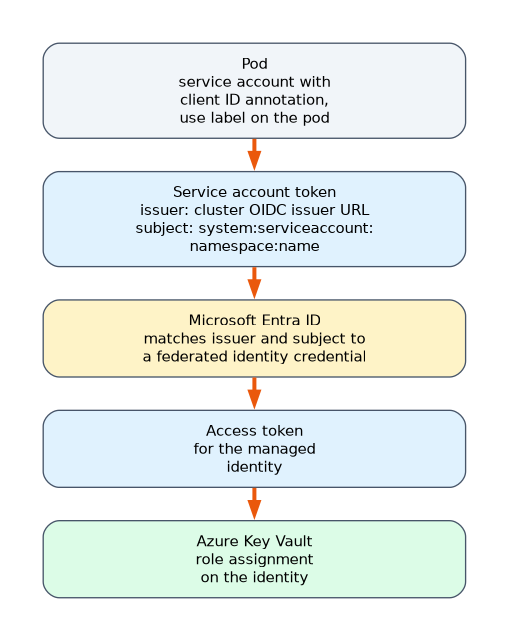 With federated identity credentials, an external workload is trusted without a secret. You add a federated credential to an app registration or a user assigned managed identity. It records the issuer, which is the external identity provider, and the subject, which identifies the workload. When the workload presents a token from that issuer with that subject, Entra exchanges it for an access token.
- GitHub Actions: issuer is GitHub, subject names the repository and environment or branch.
- Azure Kubernetes Service (AKS): the cluster's OIDC issuer URL is the issuer, and the subject is
system:serviceaccount:<namespace>:<service account name>.
A maximum of 20 federated identity credentials can be added to an application or a user assigned managed identity. The combination of issuer and subject must be unique.
For AKS, Microsoft Entra Workload ID uses a service account annotated with the identity's client ID (azure.workload.identity/client-id) and a pod label (azure.workload.identity/use) that opts the pod in to receive a projected token. Each cluster has its own OIDC issuer URL. To move a workload to a new cluster while the old one keeps running, add a second federated credential with the new cluster's issuer URL and the same subject, and leave the first one alone.
Troubleshooting
| Symptom | Likely cause and fix |
|---|---|
| Authorization failure after a subscription moved to another tenant | Managed identities are not updated by the transfer. Disable and re-enable the identity, then assign its roles again in the new tenant |
| Login error for a managed identity on Azure SQL | No contained database user. Create one FROM EXTERNAL PROVIDER and grant roles |
| AADSTS700211 for a pod in a new cluster | No federated credential matches the issuer. Add one for the new cluster |
| 403 from Key Vault | The identity has no role on the vault |
To review activity, use the Managed identity sign-ins and Service principal sign-ins tabs of the sign in logs. Background token activity of users is on the non interactive tab, which is a different tab.
A worked scenario
A web app on Azure App Service reads secrets from Key Vault. The team turns on a system assigned managed identity and gives it the Key Vault Secrets User role, so the code needs no password. Three other apps share the same storage access, so a user assigned managed identity is created and attached to all three. A GitHub Actions pipeline deploys the app. Instead of a stored secret, a federated credential on an app registration trusts the repository, and the workflow exchanges its token for an access token.
What to remember for the exam
- Managed identities remove stored credentials. System assigned follows the resource. User assigned is reusable.
- Use a service principal when a managed identity does not fit, and prefer a certificate over a secret.
- Federation needs an issuer and a subject. The limit is 20 federated credentials per app or user assigned identity.
- Azure SQL needs a contained database user created FROM EXTERNAL PROVIDER.
- After a tenant transfer, disable and re-enable the managed identity and reassign roles.
When an AKS workload moves to a new cluster, add a second federated credential for the new issuer. Do not edit the first one while the old cluster still runs.
How the exam asks about this
- "Which identity type has no credential for you to manage?" A managed identity.
- "A web app's managed identity fails to log in to Azure SQL." Create a contained database user FROM EXTERNAL PROVIDER and grant it roles.
- "A pipeline must call Azure with no stored secret." Workload identity federation.
- "Several VMs need the same identity." A user assigned managed identity.
Common mistakes
Using a user account for a script. Use a managed identity or service principal.
Forgetting the role assignment. An identity has no access until a role is granted.
Editing a federated credential that still serves production. Add a second one.
Expecting a system assigned identity to be shared. It belongs to one resource.
Check yourself
What is the difference between system and user assigned managed identities?
System assigned is tied to one resource and deleted with it. User assigned is a standalone resource that can be attached to many.
What two values define a federated identity credential?
The issuer and the subject.
What is the maximum number of federated identity credentials on an app or user assigned managed identity?
20.
Topic 1 of 4 in Plan and Implement Workload Identities
Test yourself on Plan and Implement Workload Identities
The full Microsoft SC-300 question bank has 650 questions, with timed practice exams and an explanation for every answer.
This study guide is independent and is not affiliated with, endorsed by, or sponsored by Microsoft. Vendor names, certification names and exam codes are trademarks of their respective owners and are used for identification only.