Plan and Automate Identity Governance · Topic 1 of 4
Entitlement Management
SC-300 entitlement management: catalogs, access packages and policies, connected organizations, external user lifecycle, catalog roles and lifecycle workflows.
- 6 min
- Includes a diagram
- A catalog holds resources and packages. An access package bundles resources with policies.
- Policies set who can request, approvers, expiry and reviews. Connected organizations limit who can request.
- When a guest's last assignment ends, you can block sign in and remove the account, by default after 30 days.
What it is
Entitlement management makes access to resources something people request and receive in a controlled, time limited way. Instead of an administrator adding each person to groups and apps by hand, you bundle what a role needs into an access package. People request the package, approvers decide, access is granted automatically, and it expires or is reviewed.
It is especially useful for external users, because the access can be limited in time and removed automatically when the work ends. It needs Microsoft Entra ID Governance, or Entra ID P2.
How it works
Catalogs and resources
A catalog is a container for the resources and access packages of one team or project. It lets that team manage its own packages without being a global administrator. Resources in a catalog can be:
- Groups and Teams, which give access to the resources the group controls.
- Applications, including SaaS and your own apps, with a role.
- SharePoint Online sites.
Access packages and policies
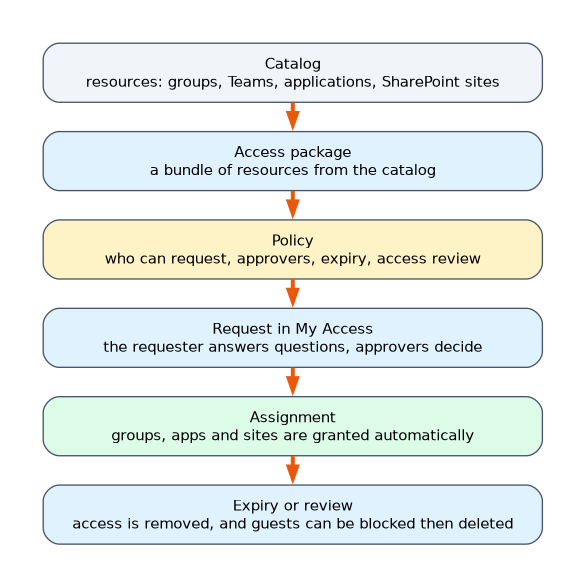 An access package bundles resources from a catalog. Each package has one or more policies that say how access is obtained.
| Policy setting | Meaning |
|---|---|
| Who can request | Users in your directory, guests from selected connected organizations, all connected organizations, or anyone including users not yet in the directory |
| Approval | One or more approval stages, approvers such as the manager or specific people, and fallback approvers if the first does not respond |
| Requestor information | Questions the requester must answer, and whether a justification is needed |
| Lifecycle | When access expires, such as after 180 days, and whether an access review runs during the period |
| Custom extensions | Run a Logic App at a stage, for example to create a ticket |
Users request packages in the My Access portal. After approval, entitlement management adds the person to the groups, apps and sites, and removes them when the assignment ends.
Connected organizations
A connected organization describes an outside organisation whose users you may let request access. It can be identified by its Microsoft Entra tenant, by a domain, or by an identity provider. You can limit a policy to those organisations, so only users from them can request. Connected organizations are also where you can configure the external user lifecycle.
The external user lifecycle
When an external user is given access through a package, entitlement management also manages their account. If the last access package assignment for that guest ends, you can choose to block the guest from signing in, and then remove the guest account after a number of days, which is 30 by default. This stops a growing number of stale guest accounts.
Terms of use
Terms of use make users accept a document, such as a confidentiality agreement or a privacy statement, before they can access a resource. You can require acceptance in an access package, or through Conditional Access. Acceptance is recorded and can be set to repeat.
Catalog roles
| Role | What it can do |
|---|---|
| Catalog owner | Manage the catalog, its resources and its access packages |
| Catalog reader | View the catalog, read only |
| Access package manager | Create and manage access packages in a catalog |
| Access package assignment manager | Manage assignments and requests only |
| Identity Governance Administrator | Manage entitlement management across the tenant |
Groups Administrator is a directory role and does not grant package management.
Lifecycle workflows
Lifecycle workflows automate the tasks that happen when people join, move or leave the organisation. They are part of Entra ID Governance and use attributes such as the hire date or department.
| Workflow | Examples of tasks |
|---|---|
| Joiner | Create or enable the account, add the user to groups and Teams, generate a Temporary Access Pass and email it, send a welcome message |
| Mover | Remove old group and access assignments, add the new department's groups and Teams, notify the manager |
| Leaver | Disable the user account, remove the user from groups, remove licences, delete the account later |
Custom task extensions run a Logic App for anything else, such as opening a ticket in an IT service management tool. A mover workflow triggers when the department attribute changes. Dynamic groups and shorter package expiry do not do the same job, because they do not notify the manager or remove specific old assignments.
Choosing the tool
| The need | Tool |
|---|---|
| Give contractors a bundle of access for 90 days, with approval | An access package with an expiry |
| Let a project team manage its own packages | A catalog with a catalog owner |
| Stop old guest accounts piling up | The external user lifecycle setting |
| New hires get accounts and a first day Temporary Access Pass | A joiner lifecycle workflow |
| Remove old assignments and add new ones when a person moves | A mover lifecycle workflow |
A worked scenario
A software company works with contractors who need several tools for three months. The security team creates a catalog for the project, makes the project lead its owner, and builds an access package with a Teams group, an application role and a SharePoint site. The policy lets users from the contractor's connected organization request the package, requires the manager's approval and expires access after 90 days, with terms of use. When a contractor's last package ends, the guest is blocked from signing in and removed after 30 days. A leaver workflow disables staff accounts on the last working day.
What to remember for the exam
- A catalog holds resources and packages. An access package bundles resources with policies.
- Policies set who can request, approvers, expiry and reviews. Connected organizations limit who can request.
- When a guest's last assignment ends, you can block sign in and remove the account, by default after 30 days.
- Catalog owner and Access package manager can create packages. Assignment manager only manages assignments.
- Joiner, mover and leaver lifecycle workflows automate account and access tasks.
To remove an old department's access and add a new one on the transfer date, the answer is a mover lifecycle workflow.
How the exam asks about this
- "Which two roles can create and manage access packages in a catalog?" Catalog owner and Access package manager.
- "Contractors get bundled access for 90 days with approval." An access package.
- "Guest accounts should disappear after the last package ends." The external user lifecycle setting.
- "Block sign in for an employee on their last day." The Disable user account leaver task.
Common mistakes
Choosing Groups Administrator to manage packages. It is a directory role and not a catalog role.
Giving packages no expiry. Access then never ends.
Using a dynamic group for mover tasks. It does not remove specific old assignments or notify the manager.
Forgetting connected organizations. Without one, outside users cannot request.
Check yourself
What is an access package?
A bundle of resources from a catalog together with policies that control who can request it, approval and expiry.
What happens by default to a guest when their last access package ends?
They can be blocked from signing in, and the account removed after 30 days.
Which lifecycle workflow changes access when someone changes department?
A mover workflow.
Topic 1 of 4 in Plan and Automate Identity Governance
Test yourself on Plan and Automate Identity Governance
The full Microsoft SC-300 question bank has 650 questions, with timed practice exams and an explanation for every answer.
This study guide is independent and is not affiliated with, endorsed by, or sponsored by Microsoft. Vendor names, certification names and exam codes are trademarks of their respective owners and are used for identification only.