Implement and Manage User Identities · Topic 4 of 4
Hybrid Identity with Connect Sync and Cloud Sync
SC-300 hybrid identity: Connect Sync and Cloud Sync, password hash sync, pass through authentication, seamless SSO, Connect Health and leaving AD FS.
- 6 min
- Includes a diagram
- Connect Sync is a full server application. Cloud Sync is a lightweight cloud managed agent that supports multiple and disconnected forests.
- PHS checks a hash in the cloud. PTA checks against Active Directory. Federation uses a trusted on premises service.
- A staging mode server is the fast recovery option for Connect Sync.
What it is
Most organisations still run an on premises Active Directory. Hybrid identity gives users one identity that works for both cloud and on premises resources. Accounts are synchronised from Active Directory to Microsoft Entra ID, and you choose how users prove their password when they sign in to the cloud.
The exam covers the two synchronisation tools, the three sign in methods, single sign on, monitoring, and moving away from AD FS.
How it works
Two synchronisation tools
| Microsoft Entra Connect Sync | Microsoft Entra Cloud Sync | |
|---|---|---|
| How it runs | A full server application installed on premises | A lightweight provisioning agent, managed from the cloud |
| Several forests | All forests must be reachable from one server | Supports multiple forests, even disconnected ones |
| Features | The broadest, including device writeback and custom sync rules | Fewer features, but simpler and more resilient with several agents |
| Management | The server and its wizard | The Microsoft Entra admin center |
Microsoft describes Cloud Sync as its strategic direction for hybrid identity, and Connect Sync is still used when you need its extra features.
Staging mode lets you install a second Connect Sync server that receives data but does not export. If the active server fails, you switch the staging server to active, which is faster than rebuilding. Two active servers for the same environment would conflict.
Choosing how users sign in
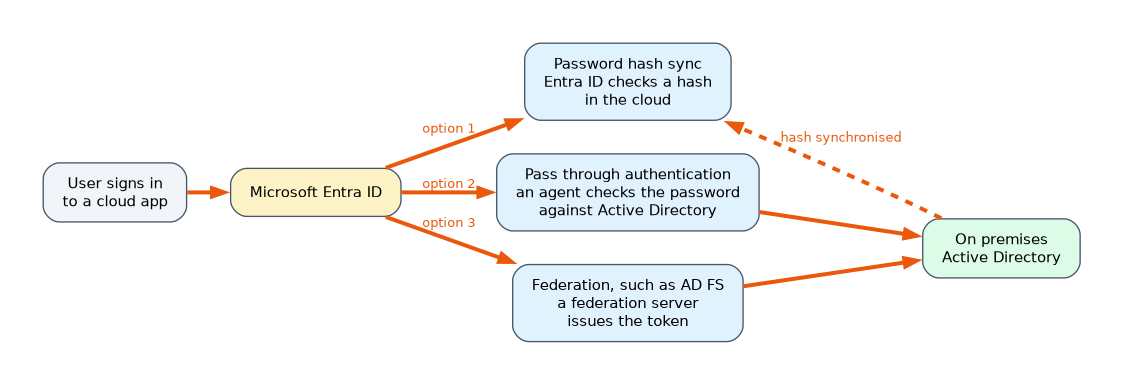
| Method | How the password is checked | Notes |
|---|---|---|
| Password hash synchronization (PHS) | A hash of the password hash is synchronised to Entra ID, which checks it in the cloud | Simplest, works if on premises is down, and enables leaked credential detection |
| Pass through authentication (PTA) | An on premises agent checks the password against Active Directory at sign in | No password hash in the cloud, but sign in depends on the agents |
| Federation, such as AD FS | A trusted on premises service issues the token | The most complex, and needs federation servers to be highly available |
PHS can run alongside PTA or federation as a backup. A hybrid setup also needs password writeback, with self service password reset, if users reset passwords in the cloud and the new password must reach Active Directory.
When the on premises account has the "user must change password at next logon" flag, the synchronised cloud account does not force a change by default. To force a change at first cloud sign in, enable synchronisation of temporary passwords with Set-ADSyncAADCompanyFeature, which also needs password writeback and self service password reset.
Seamless single sign on
Seamless SSO signs users in automatically on domain joined devices that are on the corporate network, without asking for a password again. It works with PHS or PTA, and creates a computer account named AZUREADSSOACC in each forest. The Kerberos decryption key of that account should be rolled over regularly, using the Update-AzureADSSOForest cmdlet.
Microsoft Entra Connect Health
Connect Health monitors your hybrid identity infrastructure: Connect Sync servers, AD FS servers and AD DS domain controllers. It shows alerts, performance data and usage, and sends notifications when something fails, for example when a sync cycle has not run. It needs Microsoft Entra ID P1 and an agent on each monitored server.
Moving from AD FS to cloud authentication
Many organisations retire AD FS to reduce servers and risk. A typical plan is:
- Review the AD FS application activity report to see which relying parties are still in use.
- Move each application to Microsoft Entra for authentication.
- Choose PHS or PTA as the cloud sign in method, and enable seamless SSO.
- Use a staged rollout to move groups of users from federation to cloud authentication gradually, which lets you test with a small group first.
- Finally change the domain from federated to managed, and decommission AD FS.
Hybrid and Conditional Access
Hybrid joined devices and the claims from them can be used in Conditional Access, for example to require a hybrid joined or compliant device. Entra Connect also lets you scope what is synchronised, by domain, organizational unit or attribute, so test accounts and service accounts need not be sent to the cloud.
Choosing the right option
| The need | Choice |
|---|---|
| Simplest hybrid sign in, with cloud fallback | Password hash synchronization |
| Passwords must never be stored in the cloud | Pass through authentication |
| Several disconnected AD forests | Cloud Sync |
| Fast recovery if the sync server fails | A second Connect Sync server in staging mode |
| Monitor sync and AD FS health | Microsoft Entra Connect Health |
| Roll over the Seamless SSO key | Update-AzureADSSOForest |
A worked scenario
A company with one forest runs Connect Sync with password hash synchronization. Security wants fast recovery, so a second Connect Sync server is installed in staging mode with the same rules. The company still uses AD FS for several applications, so it reviews the AD FS activity report, moves the apps to Entra, and uses staged rollout to switch pilot users to cloud authentication. Seamless SSO is enabled, and a scheduled job rolls over the AZUREADSSOACC key. Connect Health alerts the team when a sync cycle fails. After a merger, a second forest that is not network connected is added with Cloud Sync agents.
What to remember for the exam
- Connect Sync is a full server application. Cloud Sync is a lightweight cloud managed agent that supports multiple and disconnected forests.
- PHS checks a hash in the cloud. PTA checks against Active Directory. Federation uses a trusted on premises service.
- A staging mode server is the fast recovery option for Connect Sync.
- Seamless SSO uses the AZUREADSSOACC account. Roll its key with
Update-AzureADSSOForest. - Connect Health monitors sync, AD FS and AD DS, and needs P1.
"A ready replacement that can take over quickly" is a second Connect server in staging mode, not two active servers.
How the exam asks about this
- "A ready replacement for the only Connect Sync server." A second server in staging mode.
- "Roll over the Kerberos key of the AZUREADSSOACC account." Update-AzureADSSOForest.
- "Move users gradually from federation to cloud authentication." Staged rollout.
- "Force a password change at first cloud sign in for synced accounts." Enable temporary password synchronization and password writeback with self service password reset.
Common mistakes
Running two active Connect servers. They conflict. Use staging mode.
Choosing PTA to keep the cloud independent of on premises. PTA needs the agents to be reachable. PHS keeps working.
Forgetting password writeback. Cloud password resets do not reach Active Directory without it.
Decommissioning AD FS first. Move the applications and users before you remove it.
Check yourself
What is the difference between Connect Sync and Cloud Sync?
Connect Sync is a full on premises server application. Cloud Sync is a lightweight agent managed from the cloud, which also handles disconnected forests.
Which sign in method keeps working if on premises Active Directory is unavailable?
Password hash synchronization.
What does Connect Health monitor?
Connect Sync servers, AD FS servers and AD DS domain controllers.
Topic 4 of 4 in Implement and Manage User Identities
Test yourself on Implement and Manage User Identities
The full Microsoft SC-300 question bank has 650 questions, with timed practice exams and an explanation for every answer.
This study guide is independent and is not affiliated with, endorsed by, or sponsored by Microsoft. Vendor names, certification names and exam codes are trademarks of their respective owners and are used for identification only.