Implement and Manage User Identities · Topic 3 of 4
External Identities and Cross Tenant Access
SC-300 external identities: B2B guests, collaboration settings, cross tenant access and trust, cross tenant synchronization and identity providers.
- 6 min
- Includes a diagram
- A guest redeems an invitation with their home identity. The default guest access level is limited.
- External collaboration settings are tenant wide. Cross tenant access settings are per organisation, with inbound, outbound and trust.
- Trust settings can accept MFA, compliant device and hybrid joined claims from a partner.
What it is
Organisations work with partners, suppliers and customers who have their own identities. Microsoft Entra External ID lets you give those people access without creating a full account and password for each. In B2B collaboration, an outside person is invited as a guest and signs in with their own credentials.
Several settings decide who can be invited, what guests can see and what you trust from other organisations. The exam tests which setting does which.
How it works
Inviting guests
A guest can be invited one at a time, in bulk from a CSV file, through an application, or through an entitlement management access package. The guest gets an email invitation and redeems it by signing in with their home identity, for example a work account from another Entra tenant, a Microsoft account, or an email one time passcode. After redemption, the guest account appears in your directory with the user type Guest and a Source that shows where it came from.
External collaboration settings
These tenant wide settings control the guest experience.
| Setting | Options |
|---|---|
| Guest user access | Same access as members, limited access to directory properties (the default), or the most restricted access, where guests see only their own profile |
| Guest invite settings | Anyone, including guests, member users and users in specific admin roles such as Guest Inviter, only specific admin roles, or no one |
| Collaboration restrictions | Allow invitations to specific domains only, or block specific domains |
| Email one time passcode | Lets guests without another identity sign in with a code |
Use the Guest Inviter role to let a person invite guests without being an administrator.
Cross tenant access settings
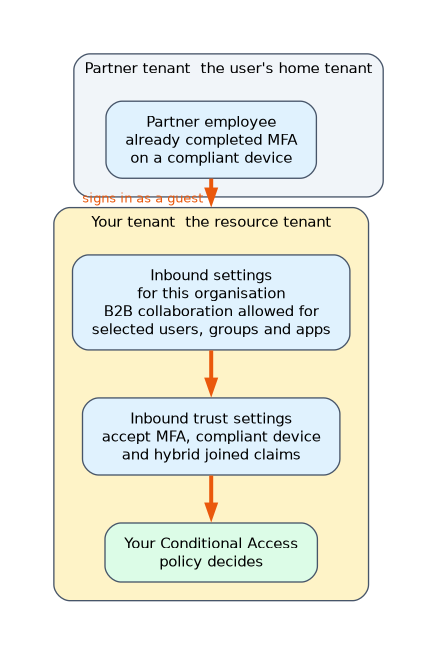 Cross tenant access settings give you finer control over each organisation that you work with. They have two directions.
- Inbound access controls how users from another organisation access your resources, for example B2B collaboration for selected users, groups and applications only.
- Outbound access controls how your users reach resources in other organisations.
There are default settings that apply to everyone, and organizational settings that override them for a named tenant.
Trust settings (inbound) decide whether your Conditional Access policies accept claims from the other organisation, namely that the user already did multifactor authentication, or uses a compliant device, or a Microsoft Entra hybrid joined device. When you trust MFA, your policies still apply, but users who already completed MFA in their home tenant do not have to do it again.
For example, to let a partner's employees reach only the partner portal application and nothing else in your tenant, create an organizational inbound B2B collaboration setting for that partner that allows only that application.
Cross tenant synchronisation
Cross tenant synchronization automatically creates, updates and removes users from one tenant in another that you trust, typically between tenants of the same company after a merger. A source tenant pushes users to a target tenant, and the configuration is managed in the target through cross tenant access settings. It needs Entra ID P1 and it is for users within a multi tenant organisation, not for inviting outside parties one by one.
External identity providers
Besides Microsoft accounts and email codes, you can set up federation with an external identity provider so partners sign in with their own system. You can federate with a SAML or WS-Fed identity provider, or use social providers such as Google. Users then sign in at their own provider, and Entra trusts the result.
Tenant restrictions
Tenant restrictions v2 control which external tenants your own users and devices may sign in to from your network. That is different from cross tenant access inbound settings, which control what other people may access in your tenant.
Choosing the setting
| The need | Setting |
|---|---|
| Allow invitations only to two partner domains | Collaboration restrictions with an allow list |
| Guests must not enumerate users and groups | Guest user access, most restricted |
| A partner's guests may reach only one app | Cross tenant access inbound setting for that organisation |
| Do not repeat MFA for guests who already did it | Inbound trust settings, accept MFA |
| Mirror users between two of your own tenants | Cross tenant synchronization |
| Let a supplier sign in with their own SAML provider | Federation with an external identity provider |
A worked scenario
A company works with a logistics partner and a design agency. It restricts invitations to those two domains with a collaboration allow list, and uses the Guest Inviter role for project managers. For the logistics partner it creates an organizational cross tenant access setting that allows inbound B2B collaboration to the shipping portal only, and trusts the partner's MFA claims, so their staff are not asked twice. After acquiring another company with its own tenant, it uses cross tenant synchronization to provision the new colleagues into the main tenant automatically.
What to remember for the exam
- A guest redeems an invitation with their home identity. The default guest access level is limited.
- External collaboration settings are tenant wide. Cross tenant access settings are per organisation, with inbound, outbound and trust.
- Trust settings can accept MFA, compliant device and hybrid joined claims from a partner.
- Cross tenant synchronization provisions users between tenants and needs P1.
- Federation can use SAML or WS-Fed identity providers.
To restrict which apps a partner's guests can reach, use cross tenant access inbound settings. To restrict which domains you can invite, use collaboration restrictions.
How the exam asks about this
- "Partner guests may reach only one application." An inbound B2B collaboration cross tenant access setting for that partner.
- "Which role lets someone invite guests without being an admin?" Guest Inviter.
- "Avoid a second MFA prompt for guests." Trust the partner's MFA claims in inbound trust settings.
- "Automatically create users from another of our tenants." Cross tenant synchronization.
Common mistakes
Using tenant restrictions to limit guests. They limit where your own users sign in.
Setting a collaboration deny list for an app level need. Those lists work on domains, not applications.
Expecting synchronization to invite outsiders. It is for tenants in your own organisation.
Forgetting default and organizational settings. An organizational setting overrides the default for that tenant.
Check yourself
Which setting controls whether guests see other users and groups?
External collaboration settings, in the guest user access level.
What do inbound trust settings do?
They let your Conditional Access accept MFA, compliant device and hybrid joined claims already satisfied in the partner's home tenant.
Which protocols can an external SAML identity provider federation use?
SAML or WS-Fed.
Topic 3 of 4 in Implement and Manage User Identities
Test yourself on Implement and Manage User Identities
The full Microsoft SC-300 question bank has 650 questions, with timed practice exams and an explanation for every answer.
This study guide is independent and is not affiliated with, endorsed by, or sponsored by Microsoft. Vendor names, certification names and exam codes are trademarks of their respective owners and are used for identification only.