Manage a Security Operations Environment · Topic 4 of 8
Sentinel Roles, Retention and Workbooks
SC-200 Sentinel platform: roles, Analytics, Data lake and XDR tiers with retention up to 12 years, customer managed keys, workbooks and SOC optimization.
- 6 min
- Includes a diagram
- Reader views, Responder manages incidents, Contributor edits rules and workbooks. Playbook Operator runs playbooks manually.
- Analytics tier is hot with 30 days by default and up to two years. The data lake keeps up to 12 years. XDR tables keep 30 days, extendable to 90.
- The data lake tier is for low cost retention and is queried with KQL jobs, notebooks and summary rules.
What it is
Configuring the Microsoft Sentinel platform means deciding who can do what, how long data is kept and at what cost, how analysts see the data, and how to improve the setup over time. Sentinel is now managed in the Microsoft Defender portal, together with Defender XDR, and the older Azure portal experience is being retired.
How it works
Microsoft Sentinel roles
Sentinel uses Azure role based access control. The built in roles are assigned on the workspace or the resource group.
| Role | What it can do |
|---|---|
| Microsoft Sentinel Reader | View data, incidents, workbooks and rules, with no changes |
| Microsoft Sentinel Responder | Everything a Reader can do, and manage incidents: assign, change status and add comments |
| Microsoft Sentinel Contributor | Everything a Responder can do, and create and edit rules, workbooks and connectors |
| Microsoft Sentinel Playbook Operator | Run playbooks manually |
| Microsoft Sentinel Automation Contributor | Lets Sentinel run playbooks from automation rules |
| Workbook Reader and Workbook Contributor | View or edit shared workbooks |
Assign the narrowest role. For example, a tier one analyst who triages incidents needs Responder, an engineer who writes detection rules needs Contributor, and a manager who reads dashboards needs Reader. Roles can be limited to a resource group, so the team that owns a set of playbooks has its own permissions. A Security Reader or Reader role is also needed to use some features such as the Sentinel MCP tools.
Tables, tiers and retention
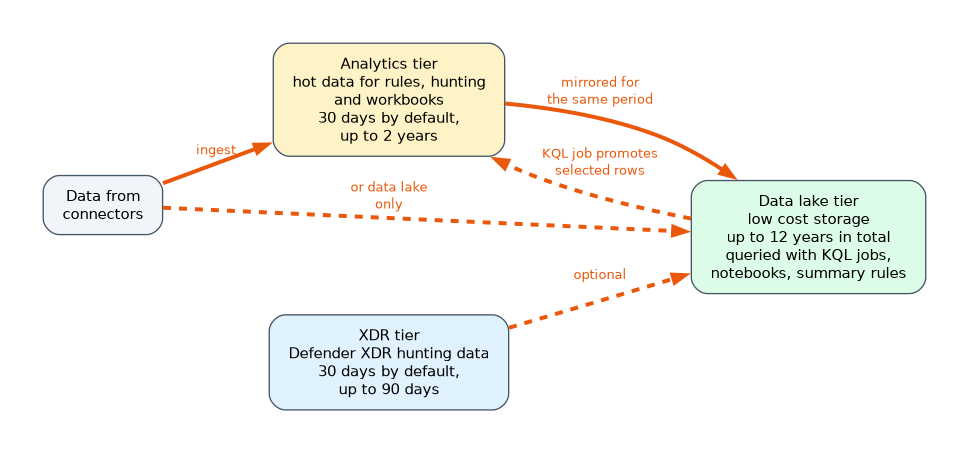 Data in Sentinel and Defender XDR is stored in tables, and the table's tier decides cost and what you can do with the data. There are three places data can live.
| Tier | What it is for | Retention |
|---|---|---|
| Analytics tier | Hot data, fully available for alerting, analytics rules, hunting and workbooks | 30 days by default, extendable up to two years |
| Data lake tier | Low cost cold storage, available through KQL jobs, notebooks and summary rules, and not for real time analytics | Up to 12 years of total retention |
| XDR tier | Defender XDR advanced hunting data | 30 days by default, extendable to 90 days with no extra storage cost |
Key points:
- By default, data in the Analytics tier is also mirrored to the data lake for the same period. You can extend the total retention in the lake for up to 12 years.
- A table can be set to the Data lake tier only. This is ideal for high volume, low fidelity logs such as firewall or DNS data that you do not need for real time detection but want to keep and search.
- Defender XDR tables stay in the XDR tier for 30 days. If you extend their retention in the Analytics tier beyond 30 days, the tables are created in the Sentinel workspace.
- Retention is managed in the Defender portal, per table. You can also keep data longer through search jobs and restore.
Choosing the tier:
| The data | Tier |
|---|---|
| Sign in logs used by analytics rules | Analytics |
| Verbose firewall logs kept for a year for investigations | Data lake |
| Process events needed for hunting for 90 days | XDR tier extended to 90 days |
To retrieve very old data, you use a KQL job in the data lake to promote the rows you need into the Analytics tier, and then query them. Promoting costs more than leaving data in the lake, so promote only what you must analyse.
Customer managed keys
A regulated organisation may need to encrypt workspace data with its own key from Azure Key Vault. This requires linking the workspace to a dedicated cluster first, because the cluster holds the key configuration. A managed identity is configured on the cluster and not on the workspace.
Workbooks
Workbooks are interactive dashboards that visualise Sentinel data, built on Azure Monitor workbooks and KQL. Sentinel provides templates, for example for sign in activity, incident overview, or data collection health. You can use a template, edit it, or build your own, and the Content hub delivers workbooks together with connectors and rules. Useful built in examples include:
- Security Operations Efficiency, which shows how long analysts take, on average, to triage and to close incidents.
- Data collection health monitoring, which shows whether connectors are receiving data.
- Workspace usage, which shows how much data is ingested and what it costs.
SOC optimization
SOC optimization gives recommendations to improve your security operations. It looks at the data you ingest and the detections you have, and suggests actions such as:
- Enable analytics rules or connectors that would cover threats you are exposed to, based on the MITRE ATT&CK techniques and the data you already collect.
- Remove or move to a cheaper tier a data source that costs money but has no detections or hunting using it.
- Add data sources that detections need.
Recommendations appear in the Defender portal, and they help balance coverage against cost.
A worked scenario
A company has three roles. Tier one analysts are Responders, the detection engineers are Contributors and the SOC manager is a Reader. The firewall logs are huge, so the table is set to the data lake tier with a one year retention, and an analyst promotes the relevant days with a KQL job when an incident needs them. Process events are kept for 90 days in the XDR tier. The security team builds a workbook for mean time to triage and uses SOC optimization to find a connector that has no detections and moves it to a cheaper tier. For encryption with its own key, it links the workspace to a dedicated cluster first.
What to remember for the exam
- Reader views, Responder manages incidents, Contributor edits rules and workbooks. Playbook Operator runs playbooks manually.
- Analytics tier is hot with 30 days by default and up to two years. The data lake keeps up to 12 years. XDR tables keep 30 days, extendable to 90.
- The data lake tier is for low cost retention and is queried with KQL jobs, notebooks and summary rules.
- Customer managed keys need a dedicated cluster.
- Workbooks visualise data. SOC optimization recommends coverage and cost improvements.
High volume logs you rarely search belong in the data lake tier. Logs that analytics rules use belong in the Analytics tier.
How the exam asks about this
- "Which role manages incidents but cannot edit rules?" Microsoft Sentinel Responder.
- "How long can data be retained in the Sentinel data lake?" Up to 12 years.
- "Encrypt workspace data with your own key." Link the workspace to a dedicated cluster first.
- "Which workbook shows mean time to triage and close?" Security Operations Efficiency.
Common mistakes
Putting rule data in the data lake tier only. Analytics rules need the Analytics tier.
Giving Contributor to analysts who only triage. Responder is enough.
Expecting XDR tables to be managed like Sentinel tables. They have their own 30 day tier.
Forgetting promotion cost. Promoting data to Analytics costs more than leaving it in the lake.
Check yourself
Which Sentinel role can assign and close incidents but not create analytics rules?
Microsoft Sentinel Responder.
What is the maximum total retention in the Sentinel data lake?
12 years.
What must you do before enabling customer managed keys?
Link the workspace to a dedicated cluster.
Topic 4 of 8 in Manage a Security Operations Environment
Test yourself on Manage a Security Operations Environment
The full Microsoft SC-200 question bank has 650 questions, with timed practice exams and an explanation for every answer.
This study guide is independent and is not affiliated with, endorsed by, or sponsored by Microsoft. Vendor names, certification names and exam codes are trademarks of their respective owners and are used for identification only.