Manage a Security Operations Environment · Topic 5 of 8
Data Connectors and Windows, Syslog and CEF Collection
SC-200 Sentinel ingestion: choosing connectors, Windows Security Events via AMA, Windows Event Forwarding, Syslog and CEF collection and their tables.
- 6 min
- Includes a diagram
- AMA and a DCR collect data. The DCR defines sources, transformations and destination.
- Windows Security Events via AMA writes to SecurityEvent. Other Windows channels written through a DCR go to Event. WEF writes to WindowsEvent.
- Syslog via AMA writes to Syslog, filtered by facility and level in the DCR. CEF via AMA writes to CommonSecurityLog through a Linux forwarder.
What it is
Sentinel can only detect what it can see, so getting the right data in is the foundation of a SOC. A data connector brings a source into Sentinel. For servers and appliances the usual method is the Azure Monitor Agent (AMA) controlled by a data collection rule (DCR), which says what to collect and where to send it.
How it works
Choosing a connector
Pick the connector based on the data source.
| Data source | Connector approach |
|---|---|
| Microsoft first party services such as Entra ID, Microsoft 365, Defender XDR | Service to service connectors, which pull data through APIs |
| Windows servers and workstations | Windows Security Events via AMA, or Windows Forwarded Events |
| Linux servers | Syslog via AMA |
| Firewalls and appliances that send CEF | Common Event Format (CEF) via AMA, through a Linux forwarder |
| Azure resources and subscriptions | Diagnostic settings, often deployed with Azure Policy |
| Other clouds such as AWS | Connectors such as the Amazon Web Services S3 connector |
| Your own application | The Logs Ingestion API |
The Content hub provides solutions that bundle connectors with analytics rules, workbooks and hunting queries for a product. Check the data collection health workbook after you connect a source to confirm data is arriving.
The Azure Monitor Agent and data collection rules
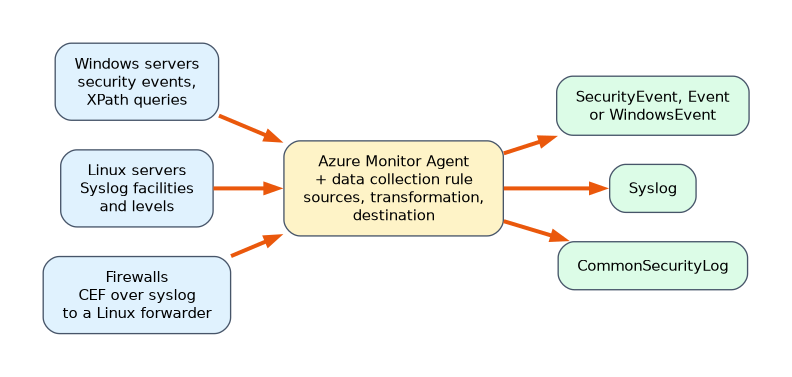 The Azure Monitor Agent is installed on a machine, and a data collection rule is associated with it. The DCR defines:
- The data sources, for example Windows events from chosen channels, or Syslog facilities and levels.
- Optional transformations that filter or reshape events before they are stored, which saves cost.
- The destination, such as a Log Analytics workspace.
One DCR can be associated with many machines, which makes large deployments manageable. Machines outside Azure first need Azure Arc so they can use the agent and DCRs.
Windows Security Events via AMA
This connector collects Windows security events. When you create the data collection rule you choose what to collect.
| Option | What is collected |
|---|---|
| All security events | Every security event |
| Common | A recommended set of events for detection |
| Minimal | A small set, mainly sign in and key audit events |
| Custom | Events chosen with an XPath query, for example event ID 4688 for process creation |
The events are stored in the SecurityEvent table. Using a custom XPath query lets you collect only the event IDs you need, which controls cost.
For events from other Windows channels, such as Microsoft-Windows-Sysmon/Operational, a separate DCR with the Windows event logs data source sends them to the Event table.
Windows Event Forwarding
In large Windows environments, Windows Event Forwarding (WEF) collects events from many machines onto a few Windows Event Collector servers, using subscriptions. Install the AMA on the collector, and use the Windows Forwarded Events connector to send the forwarded events to Sentinel. The events arrive in the WindowsEvent table. WEF reduces the number of agents and lets you control events centrally, and it suits environments where machines cannot connect to the internet directly.
Syslog via AMA
Linux machines send logs through the Syslog daemon. With the Syslog via AMA connector, the DCR chooses the facilities (such as auth and authpriv) and the minimum log level (for example Warning and above) to collect. The events go to the Syslog table. The filtering happens in the data source of the DCR, not in an analytics rule and not by editing rsyslog on each server, so only the chosen events leave the machine.
Common Event Format (CEF) via AMA
Many firewalls and security appliances send logs in Common Event Format. A Linux log forwarder with the AMA receives the CEF messages from the appliances, over syslog on port 514, and forwards them. The events are stored in the CommonSecurityLog table. The forwarder uses a syslog daemon (rsyslog or syslog-ng) to receive and hand the messages to the agent. Use this for products such as Palo Alto, Fortinet and Check Point.
| Connector | Table |
|---|---|
| Windows Security Events via AMA | SecurityEvent |
| Windows event logs via a DCR | Event |
| Windows Forwarded Events | WindowsEvent |
| Syslog via AMA | Syslog |
| CEF via AMA | CommonSecurityLog |
Controlling cost and quality
- Collect only the events that detections or investigations need.
- Use DCR transformations to drop noisy fields or events before ingestion.
- Choose the table plan that suits the use. Rarely queried, high volume data can go to a lower cost plan or the data lake.
- Watch ingestion in the workspace usage workbook.
Choosing the approach
| The need | Approach |
|---|---|
| Process creation events (4688) from Windows servers only | Windows Security Events via AMA with a custom XPath query |
| Sysmon events from Windows servers | A DCR with the Windows event logs data source, into the Event table |
| Thousands of workstations that cannot reach the internet | Windows Event Forwarding with a collector running the AMA |
| Only Warning and above from Linux auth logs | The Syslog data source in the DCR |
| Firewall logs in CEF | CEF via AMA on a Linux forwarder, into CommonSecurityLog |
A worked scenario
A company wants better detection on its Windows servers and firewalls. For the servers, it creates a DCR with a custom XPath query that collects only process creation and logon events, and a second DCR for the Sysmon channel. For branch workstations that cannot reach the internet, it deploys Windows Event Forwarding and sends the forwarded events through a collector. Linux servers send auth and authpriv logs at Warning and above, filtered in the Syslog data source. The firewalls send CEF to a Linux forwarder. The data collection health workbook confirms all five sources are reporting.
What to remember for the exam
- AMA and a DCR collect data. The DCR defines sources, transformations and destination.
- Windows Security Events via AMA writes to SecurityEvent. Other Windows channels written through a DCR go to Event. WEF writes to WindowsEvent.
- Syslog via AMA writes to Syslog, filtered by facility and level in the DCR. CEF via AMA writes to CommonSecurityLog through a Linux forwarder.
- Custom XPath queries collect only chosen event IDs.
- Machines outside Azure need Azure Arc.
Log level and facility filtering belongs in the Syslog data source of the DCR, because that stops unwanted data leaving the machine.
How the exam asks about this
- "Where do you configure that only Warning and above Syslog entries are collected?" In the Syslog data source of the data collection rule.
- "Which table receives Windows Security Events via AMA?" SecurityEvent.
- "Which table holds CEF logs from firewalls?" CommonSecurityLog.
- "Collect only event ID 4688." A custom XPath query.
Common mistakes
Filtering in an analytics rule. The data is still ingested and paid for.
Using the wrong table in queries. SecurityEvent, Event and WindowsEvent are different tables.
Forgetting Azure Arc for non Azure servers. Without it they cannot use the AMA.
Collecting everything. It raises cost and noise.
Check yourself
What does a data collection rule define?
The data sources to collect, optional transformations, and the destination.
Which connector and table handle firewall logs in CEF format?
CEF via AMA on a Linux forwarder, into the CommonSecurityLog table.
Why use Windows Event Forwarding?
To collect events from many machines onto a few collectors, reducing agents and centralising control.
Topic 5 of 8 in Manage a Security Operations Environment
Test yourself on Manage a Security Operations Environment
The full Microsoft SC-200 question bank has 650 questions, with timed practice exams and an explanation for every answer.
This study guide is independent and is not affiliated with, endorsed by, or sponsored by Microsoft. Vendor names, certification names and exam codes are trademarks of their respective owners and are used for identification only.