Prepare the data · Topic 7 of 8
Reference, Duplicate, Merge and Append Queries
PL-300 combining queries: reference versus duplicate, six merge join kinds, append queries, and the effect each choice has on refresh and query folding.
- 5 min
- Includes a diagram
- Reference stays linked to the original. Duplicate copies the steps and is independent.
- Left anti returns rows in the first table that have no match. Inner returns only matches.
- Merge adds columns. Append adds rows, matching columns by name.
What it is
Real models are built from several queries. You reference or duplicate a query to start a new one from it, merge queries to add columns from another table (like a SQL join), and append queries to stack rows (like a SQL union). Each choice changes how the queries depend on each other and how much work happens at refresh.
How it works
Reference or duplicate
| Reference | Duplicate | |
|---|---|---|
| What it creates | A new query whose first step is the result of the original | A full copy of all the original's steps |
| Link to the original | Stays linked. Changes to the original flow into it | Independent |
| Typical use | Build several outputs from one cleaned staging query | Try a different approach or keep a copy |
| Effect | One shared set of cleaning steps, easier to maintain | Repeated steps, which can drift apart |
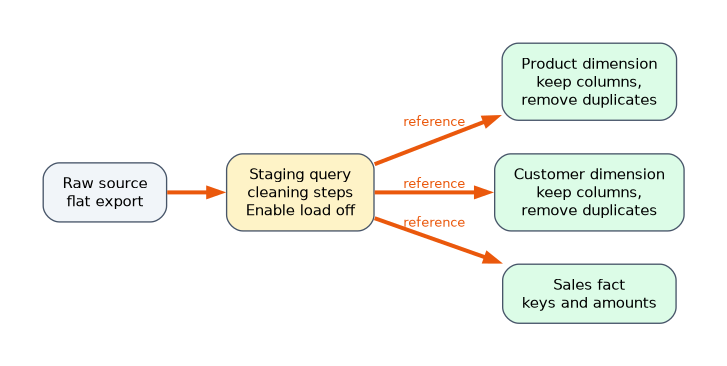
A common pattern is a staging query that cleans a raw table, set to not load. Two reference queries then build the fact table and a dimension from it. Fix a cleaning problem once in the staging query and both outputs are fixed. Be aware that each query still evaluates at refresh, so a slow source may be read more than once. Duplicating a query copies the logic, so a later fix has to be repeated in each copy.
Merge queries
Merge Queries (on the Home tab) joins two tables on matching columns. Select a column in each table, hold Ctrl to match on several columns, and choose a join kind. The result is a new column holding a table, which you expand to pick the columns you need.
| Join kind | Rows returned |
|---|---|
| Left outer | All rows from the first table, matching rows from the second |
| Right outer | All rows from the second, matching from the first |
| Full outer | All rows from both |
| Inner | Only rows that match in both |
| Left anti | Rows from the first table with no match in the second |
| Right anti | Rows from the second table with no match in the first |
Left outer is the default. Use left anti to find problems, for example orders whose customer is missing from the customer table. Merge Queries as New creates a new query and leaves the originals unchanged. A fuzzy match option allows approximate text matching, with a similarity threshold, for names that are spelled differently.
Merging adds columns. If you only need the two tables related for reporting, a relationship in the model is usually better, because it does not duplicate data. Merge when you must flatten data into one table, or when a lookup is needed to clean or filter rows.
Append queries
Append Queries stacks tables vertically. Choose two tables or three or more tables, and Power Query matches the columns by name. A column present in only one table is filled with null for the others. Append Queries as New creates a separate query.
Use append for the same table split by period or region, such as one sheet per month. Check that column names match first. A column called "Customer ID" in one table and "CustomerID" in the other produces two columns with nulls.
Effect on refresh and folding
- Query folding means Power Query sends the work back to the source database as one SQL query. A merge of two tables from the same database can fold. A merge of two different sources cannot, so the data moves into the mashup engine.
- Combining sources with different privacy levels can block folding or raise a privacy error.
- Every query that is loaded is evaluated at refresh. Disabling load on a staging query avoids a duplicate table in the model.
A worked scenario
A company has twelve monthly Excel sheets with the same columns. The analyst appends them into one Sales query, then uses a left anti merge against the Customers table to find orders with no customer record. She keeps a cleaned Customers staging query with load disabled, and uses two reference queries from it to build a Customer dimension and a Region dimension. When the cleaning rule changes, she edits only the staging query.
What to remember for the exam
- Reference stays linked to the original. Duplicate copies the steps and is independent.
- Left anti returns rows in the first table that have no match. Inner returns only matches.
- Merge adds columns. Append adds rows, matching columns by name.
- Merge Queries as New and Append Queries as New leave the original queries unchanged.
- Merging across sources breaks query folding. A relationship is often better than a merge.
When a question asks to find unmatched rows, think left anti or right anti.
How the exam asks about this
- "Several queries must share one set of cleaning steps." Reference a staging query.
- "List customers who have no orders." Merge with left anti.
- "Combine monthly tables with identical columns." Append.
- "Only matching rows from both tables." Inner join.
Common mistakes
Duplicating when you meant to reference. Fixes must then be repeated.
Choosing inner when you need all rows. Rows without a match disappear.
Appending tables with different column names. You get extra columns of nulls.
Merging for reporting when a relationship would do.
Check yourself
Which join returns rows with no match in the second table?
Left anti.
Which command keeps cleaning steps in one place for several outputs?
Reference a staging query.
How does append match columns?
By column name.
Topic 7 of 8 in Prepare the data
Test yourself on Prepare the data
The full Microsoft PL-300 question bank has 657 questions, with timed practice exams and an explanation for every answer.
This study guide is independent and is not affiliated with, endorsed by, or sponsored by Microsoft. Vendor names, certification names and exam codes are trademarks of their respective owners and are used for identification only.