Prepare the data · Topic 8 of 8
Fact and Dimension Tables, Keys and Load Settings
PL-300 star schema preparation: create fact and dimension tables, choose keys for relationships, and control loading with enable load and report refresh.
- 5 min
- Includes a diagram
- A fact table holds events and foreign keys. A dimension holds unique entities and attributes.
- The one side of a relationship needs unique, non null keys, with matching data types on both sides.
- A surrogate key is created with Index Column. A composite key is combined into one column.
What it is
The best shape for a Power BI model is a star schema: one central fact table surrounded by dimension tables. A fact table records events, such as sales, with numbers and keys. A dimension table describes things, such as products or customers, with one row each. In Power Query you create these tables from flat data, choose keys so that relationships work, and set load options so only the right tables reach the model.
How it works
Fact and dimension tables
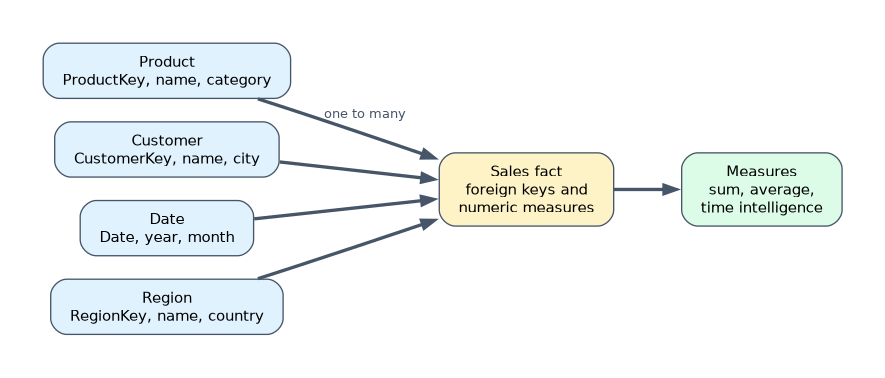
| Fact table | Dimension table | |
|---|---|---|
| Describes | Events or transactions | Business entities such as product, customer, date |
| Rows | Many, grows over time | Fewer, one per entity |
| Columns | Numeric measures and foreign keys | A key and descriptive attributes |
| Role in filtering | Is filtered | Filters the fact table |
Star schemas give faster queries, simpler DAX and clear filters. Avoid putting all columns in one wide table, because it repeats text on every row and inflates the model. A snowflake schema normalises dimensions further into linked tables. It is allowed, but a star is usually simpler.
Building a dimension from a flat table
A standard sequence in Power Query:
- Reference the source query, so the original stays intact.
- Keep only the columns that describe the entity, with Remove Other Columns.
- Remove Duplicates on the key column, so each entity appears once.
- Rename the query to something like Product.
- In the fact table, remove the descriptive columns, keeping only the key.
If the source has no natural key, add a surrogate key with Index Column in the dimension, then merge it back into the fact table to bring the key across, and remove the old text columns.
Choosing keys for relationships
- The one side (dimension) must have unique values with no nulls.
- The related columns must have the same data type. A text key will not match a number key.
- Power BI relationships use one column on each side. For a composite key, make one combined column, for example
Region & "-" & Product. - Prefer integer keys. They compress better and compare faster than long text.
- A date column in the fact table can relate to the key of a date table, which needs the Date data type on both sides.
If duplicates exist on the one side, Power BI will make the relationship many to many or refuse a one to many relationship. Check with the column distribution that distinct equals the number of rows.
Configure data loading
Right click a query for the options below. The query name shows in italics when load is off.
| Setting | Effect |
|---|---|
| Enable load (ticked) | The query is loaded into the model as a table |
| Enable load (unticked) | The query is only used as a step in other queries, such as a staging query |
| Include in report refresh (ticked) | The query is refreshed when the model refreshes |
| Include in report refresh (unticked) | The query keeps its old data until you refresh it manually |
Turn off Enable load for staging and helper queries, so they do not add unused tables to the model. Turn off Include in report refresh for tables that rarely change, such as a static lookup, to reduce refresh time. Remove columns you do not need before loading, because every column costs memory.
Close and Apply loads the queries and applies the changes. Apply changes later keeps the editor changes until you choose to apply them.
A worked scenario
An export has one row per order line with OrderID, Date, ProductName, Category, CustomerName, City and Amount. The analyst references it three times. In the Product query she keeps ProductName and Category, removes duplicates and adds an index as ProductKey. She does the same for Customer. In the fact query she merges the dimensions back on name, keeps only the keys, Date and Amount, and removes the text columns. The original query has Enable load switched off. The result is a three table star.
What to remember for the exam
- A fact table holds events and foreign keys. A dimension holds unique entities and attributes.
- The one side of a relationship needs unique, non null keys, with matching data types on both sides.
- A surrogate key is created with Index Column. A composite key is combined into one column.
- Turn off Enable load for staging queries. Turn off Include in report refresh to skip refreshing a table.
- Remove unneeded columns before loading to cut model size.
If a relationship will not create as one to many, check for duplicates on the intended one side.
How the exam asks about this
- "Split a flat table into dimensions." Reference, Remove Other Columns, Remove Duplicates.
- "A staging query should not appear in the model." Disable Enable load.
- "A relationship needs two columns to identify a row." Create one combined key column.
- "A static lookup slows the refresh." Exclude it from report refresh.
Common mistakes
Duplicate keys on the one side.
Mismatched key types. Text on one side and whole number on the other.
Loading staging queries. The model fills with unused tables.
Keeping descriptive text in the fact table. The model grows.
Check yourself
Which table holds numeric measures and foreign keys?
The fact table.
How do you add a surrogate key to a dimension?
With an Index Column.
What does unticking Enable load do?
The query is not loaded into the model, and can still be used by other queries.
Topic 8 of 8 in Prepare the data
Test yourself on Prepare the data
The full Microsoft PL-300 question bank has 657 questions, with timed practice exams and an explanation for every answer.
This study guide is independent and is not affiliated with, endorsed by, or sponsored by Microsoft. Vendor names, certification names and exam codes are trademarks of their respective owners and are used for identification only.