Prepare infrastructure for devices · Topic 6 of 7
Compliance Policies and Conditional Access
MD-102 compliance: Intune compliance policies per platform, actions for noncompliance, tenant compliance settings and Conditional Access requiring compliance.
- 5 min
- Includes a diagram
- The default for devices with no policy is Compliant. Change it to Not compliant when you use Conditional Access.
- The compliance status validity period is 30 days by default, range 1 to 120.
- Actions for noncompliance include mark noncompliant (with a grace period), email, lock and retire list.
What it is
A compliance policy is a set of rules a device must meet to be considered healthy, such as a minimum OS version or encryption turned on. Intune evaluates each device and reports compliant or noncompliant. Conditional Access in Microsoft Entra ID can then require a compliant device before it grants access to email, files or apps. Compliance policies and Conditional Access are separate pieces that work together.
How it works
Tenant wide compliance policy settings
Under Endpoint security, Device compliance, Compliance policy settings, two settings apply to every device.
| Setting | Detail |
|---|---|
| Mark devices with no compliance policy assigned as | Compliant (default) or Not compliant. Set it to Not compliant when you use Conditional Access, so unassigned devices cannot get in |
| Compliance status validity period (days) | A device must report its compliance within this period, 30 days by default, from 1 to 120. If not, it is treated as noncompliant |
Device compliance policies
Each policy is platform specific: Android device administrator, Android Enterprise, AOSP, iOS/iPadOS, Linux, macOS, Windows and Windows Holographic. Typical rules:
- A minimum or maximum OS version.
- Encryption on (BitLocker on Windows).
- A password or PIN with a set strength.
- Jailbroken or rooted devices are noncompliant.
- Microsoft Defender for Endpoint machine risk score at or under a level.
- Windows health attestation: Secure Boot, code integrity, BitLocker.
- Defender settings such as real time protection and antivirus status.
You assign a compliance policy to users or devices. Assigning to a user checks all of their devices. Assigning to device groups gives clearer reports.
Custom compliance extends the built in settings: a discovery script collects values from the device, and a JSON file defines the rules and the messages. It supports Windows, macOS and Linux (Ubuntu and Red Hat).
Some compliance results are remediated by the operating system, such as forcing a PIN on iOS, while others are only quarantined: the device is marked noncompliant and Conditional Access blocks it.
Actions for noncompliance
Every policy includes Mark device noncompliant, which can be immediate or after a grace period in days. A device inside the grace period shows as In grace period. You can add more actions.
| Action | Effect |
|---|---|
| Send email to end user | Message with details, and optional extra recipients |
| Remotely lock the noncompliant device | Locks it after a delay |
| Add device to retire list | Marks it ready to retire, and an admin must take the explicit action |
| Send push notification (mobile) | Notifies the user |
Use schedules, such as email on day 0, lock after 3 days and add to retire list after 30.
Conditional Access with compliance
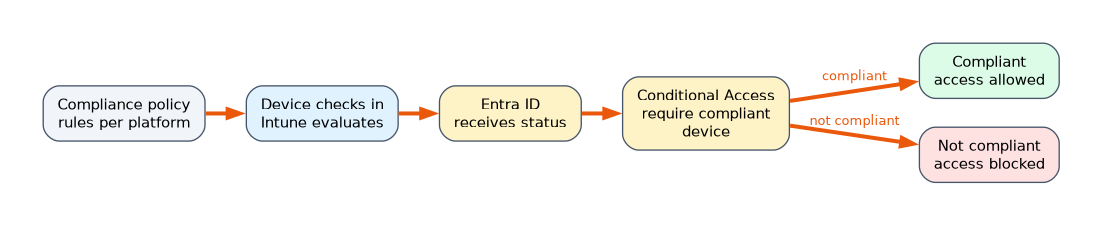 In Microsoft Entra ID, create a Conditional Access policy that targets users and apps, and in Grant choose Require device to be marked as compliant. Entra ID P1 is needed. When a device enrolls in Intune it is registered in Entra ID and reports its compliance status there. Good practice:
- Set Mark devices with no compliance policy assigned as to Not compliant.
- Use report only mode first and check sign in logs.
- Exclude emergency access accounts.
- Combine with MFA, and consider a Require device to be marked as compliant or Require Microsoft Entra hybrid joined device grant if hybrid devices exist.
- A compliance policy conflicts with a configuration policy for the same setting, and the compliance policy value wins.
Compliance evaluation happens when a device checks in, so a change can take hours to be reflected. Windows also supports client driven evaluation (preview), where the device asks for re evaluation when local state changes.
Monitoring compliance
Use Devices, Monitor, Device compliance and Setting compliance, or the compliance dashboard under Devices, Compliance. The Is active setting shows the validity period status. Company Portal also shows each user the reason and how to fix it.
A worked scenario
A company requires encrypted, up to date Windows 11 laptops to open Exchange Online. The admin creates a Windows compliance policy that requires BitLocker, a minimum OS version and a Defender risk score of Low or lower, with mark noncompliant after 1 day and an email to the user. She sets Mark devices with no compliance policy assigned as to Not compliant, and creates a Conditional Access policy for Exchange Online that requires a compliant device. A new laptop without a policy is blocked until a policy applies.
What to remember for the exam
- The default for devices with no policy is Compliant. Change it to Not compliant when you use Conditional Access.
- The compliance status validity period is 30 days by default, range 1 to 120.
- Actions for noncompliance include mark noncompliant (with a grace period), email, lock and retire list.
- Conditional Access uses the grant Require device to be marked as compliant.
- Custom compliance uses a discovery script and a JSON rules file, for Windows, macOS and Linux.
If a noncompliant device still gets access, check the tenant setting for devices with no policy and whether a Conditional Access policy applies.
How the exam asks about this
- "Devices with no compliance policy must be blocked." Set the no policy default to Not compliant.
- "Give users 5 days to fix a problem before blocking." A grace period on the noncompliance action.
- "Compliance must check a registry value that Intune lacks." Custom compliance.
- "Only compliant devices may reach Exchange Online." Conditional Access requiring a compliant device.
Common mistakes
Leaving the default at Compliant. New devices pass without any policy.
Skipping report only mode. Users can be locked out.
Assuming Intune blocks access itself. Conditional Access does the blocking.
Targeting a user group and reading device reports. Device groups report more clearly.
Check yourself
What is the default validity period for compliance status?
30 days.
Which Conditional Access grant uses Intune compliance?
Require device to be marked as compliant.
What does a custom compliance policy need?
A discovery script and a JSON rules file.
Topic 6 of 7 in Prepare infrastructure for devices
Test yourself on Prepare infrastructure for devices
The full Microsoft MD-102 question bank has 658 questions, with timed practice exams and an explanation for every answer.
This study guide is independent and is not affiliated with, endorsed by, or sponsored by Microsoft. Vendor names, certification names and exam codes are trademarks of their respective owners and are used for identification only.