Optimize endpoint operations · Topic 4 of 4
Remediations, Tenant Health and Alerts
MD-102 health monitoring: Intune Remediations scripts, tenant status, service health and message center, and alert rules for compliance and enrollment.
- 6 min
- Includes a diagram
- Remediation scripts run only when detection exits with 1. Packages are limited to 200 per tenant and 2,048 characters of output, with no reboots.
- Remediations need Windows Enterprise E3 or E5 style licensing and Entra joined or hybrid joined Intune devices.
- Tenant status has Tenant details, Connector status and Service health and message center. Plan for change items give about 30 days notice.
What it is
Keeping endpoints healthy means fixing recurring issues automatically and noticing problems early. Remediations pair a detection script with a remediation script that run on a schedule to find and fix common device problems. Tenant health pages show whether the Intune service and your connectors are working, and alerts notify the right people when something changes, such as compliance drift or enrollment failures.
How it works
Intune Remediations
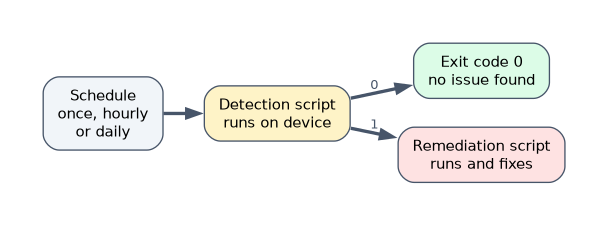 Remediations (formerly proactive remediations) are packages of two PowerShell scripts, found under Devices, Scripts and remediations, Remediations.
- The detection script checks for the problem and exits with code 0 (healthy) or 1 (issue found).
- The remediation script runs only when detection exits with 1, and fixes the problem. A package can also contain a detection script only, to report.
- Settings: run as system or user (the logged on credentials), enforce script signature check, and run in 64 bit PowerShell.
- Schedule: once, hourly or daily, with a time.
- Assign to user or device groups, optionally with an assignment filter.
- Built in packages exist, and you can write your own. Results show a detection status and a remediation status for each device.
Details to remember:
- Up to 200 script packages per tenant. The output is limited to 2,048 characters. Use UTF-8 encoding, and no reboot commands in either script.
- Do not store secrets or personal data in scripts.
- Licensing: devices need Windows Enterprise E3 or E5 (also in Microsoft 365 F3, E3 and E5), Education A3 or A5 or Windows VDA per user. An Intune administrator must confirm the licensing the first time.
- Devices must be Entra joined or hybrid joined and Intune managed (or co-managed).
- On demand runs (Run remediation) need the Run remediation remote task permission, and the device must be online.
- The Intune management extension runs the scripts.
Typical remediations: clear a full temp folder, restart a stopped service, reset a registry value, renew a certificate, repair the Windows Update client, or fix a broken Office configuration.
Monitoring tenant health
Open Tenant administration, Tenant status. It has tabs:
| Tab | Shows |
|---|---|
| Tenant details | Tenant name, location, version and licensing |
| Connector status | Health of connectors such as Apple tokens, managed Google Play, Defender for Endpoint and the NDES or certificate connectors. Unhealthy ones appear first, then warnings, then healthy, then Not enabled |
| Service health and message center | Incidents and advisories that affect your tenant, and planned change messages |
- Service health shows incidents for your tenant only. You need a role such as Service support administrator to see it. Check it first when many users suddenly cannot enroll.
- Message center posts planned changes. Items marked Plan for change usually have about 30 days of notice. Communication preferences are set in the Microsoft 365 admin center.
- Also review expiring items: the APNs certificate, the Apple VPP token, the Android enrollment tokens and the Defender connector.
- The Enrollment failures report shows the reason, OS and method of failed enrollments.
- Audit logs record admin actions.
Alerts and notifications
Several levels exist.
| Source | What you can alert on |
|---|---|
| Compliance policies | Actions for noncompliance: email the user, notify extra recipients, lock, add to retire list |
| Service health | Notifications through the Microsoft 365 admin center communication preferences |
| Connector and token expiry | Warnings appear in Tenant status and on the connector page |
| Azure Monitor log search alert rules | Custom alerts built on Intune logs sent to Log Analytics: compliance drift, enrollment failures, configuration conflicts |
| Intune Advanced Analytics anomalies | Newly detected device issues |
To alert the security team on compliance drift, send DeviceComplianceOrg logs to Log Analytics with diagnostic settings, create a log search alert rule (a KQL query that returns noncompliant Windows devices, with a frequency and a threshold) and attach an action group that emails or messages the team. For enrollment failures, alert on the OperationalLogs table. Remember the compliance export is daily, so an alert based on it is not instant, while audit and operational logs arrive immediately. For configuration conflicts, check policy per setting status and alert on failed device configuration status data.
Set operational baselines by recording normal values: enrollment success rate, compliance percentage, update compliance and startup score. Alerts and reviews compare against them.
A worked scenario
Laptops regularly fill their disks with temporary files. The admin creates a remediation: the detection script exits 1 when free space is under 10 percent, and the remediation script clears temp folders. It runs daily, as SYSTEM, for the laptop group. She also sends OperationalLogs to Log Analytics and creates a log search alert for more than 20 failed enrollments in an hour, with an action group to the on call channel. Every Monday she reviews Tenant status for unhealthy connectors and expiring tokens.
What to remember for the exam
- Remediation scripts run only when detection exits with 1. Packages are limited to 200 per tenant and 2,048 characters of output, with no reboots.
- Remediations need Windows Enterprise E3 or E5 style licensing and Entra joined or hybrid joined Intune devices.
- Tenant status has Tenant details, Connector status and Service health and message center. Plan for change items give about 30 days notice.
- Alerts for compliance drift and enrollment failures use diagnostic settings, Log Analytics log search alert rules and action groups.
- Compliance export is daily, so those alerts lag. Operational and audit logs are immediate.
A recurring, self healing fix is a remediation. A message to the security team is an alert rule with an action group.
How the exam asks about this
- "Detect a stopped service on every laptop daily and restart it." A remediation with a daily schedule.
- "Check whether Microsoft has an active incident affecting enrollment." Service health in Tenant status.
- "Alert the security team when devices become noncompliant." Diagnostic settings to Log Analytics and a log search alert rule with an action group.
- "A connector shows an error." Connector status in Tenant status.
Common mistakes
Putting the fix in the detection script. It should only detect.
Using reboot commands in a remediation.
Using Message center emails as alerts for incidents. It announces changes.
Forgetting action groups. The alert fires but nobody is told.
Check yourself
When does the remediation script run?
Only when the detection script exits with code 1.
Where do you check for a Microsoft reported incident affecting your tenant?
Tenant status, Service health.
What delivers an alert to the security team?
A log search alert rule with an action group.
Topic 4 of 4 in Optimize endpoint operations
Test yourself on Optimize endpoint operations
The full Microsoft MD-102 question bank has 658 questions, with timed practice exams and an explanation for every answer.
This study guide is independent and is not affiliated with, endorsed by, or sponsored by Microsoft. Vendor names, certification names and exam codes are trademarks of their respective owners and are used for identification only.