Maintain a Data Analytics Solution · Topic 2 of 5
Row, Column, Object and File Security
Fabric granular security: T-SQL GRANT and DENY, warehouse security policies, semantic model RLS and OLS, and OneLake security roles for folders and files.
- 6 min
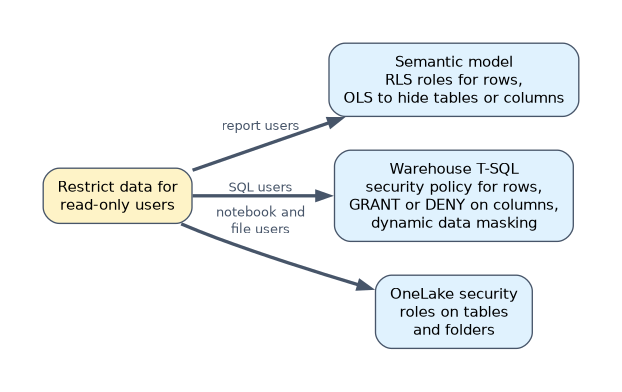
- Includes a diagram
- Warehouse RLS = predicate function +
CREATE SECURITY POLICY ... ADD FILTER PREDICATE. - CLS in the warehouse is
GRANT SELECTon a column list orDENYon a column. - Dynamic RLS in a semantic model uses
USERPRINCIPALNAME()in a role's DAX filter.
What it is
Granular security limits what a user sees inside an item. Row-level security (RLS) filters rows, column-level security (CLS) hides columns, object-level security (OLS) hides whole tables or columns, and file-level control limits folders and files in OneLake.
Fabric enforces these in three places: the warehouse or SQL analytics endpoint (T-SQL), the semantic model (DAX roles) and OneLake itself (OneLake security roles). The exam tests which place fits a requirement.
How it works
Where each rule lives
| Requirement | Where to implement it |
|---|---|
| Report users see only their region | Semantic model RLS role |
| SQL users see only their own rows | Warehouse security policy with a filter predicate |
| SQL analysts must not read a salary column | T-SQL GRANT on a column list, or DENY on the column |
| A table must be invisible to report users, metadata included | Semantic model OLS |
| Notebook users may read only one folder of files | OneLake security role on that folder |
| Hide part of a value but still show the column | Dynamic data masking in the warehouse |
All of these restrict Viewers and users with item-level read access. Workspace Admins, Members and Contributors can edit the item, so the rules do not limit them.
Object-level and column-level security with T-SQL
In a warehouse or a SQL analytics endpoint, standard T-SQL permissions control tables, views and columns.
-- object level: whole table
GRANT SELECT ON dbo.Sales TO [SalesAnalysts];
DENY SELECT ON dbo.Payroll TO [SalesAnalysts];

-- column level: only the listed columns
GRANT SELECT ON dbo.Employee (EmployeeID, Name, Department) TO [HRAnalysts];
DENY SELECT ON dbo.Employee (Salary) TO [HRAnalysts];
A query that names a denied column fails, and SELECT * fails too. Users must list only the columns they may read.
Row-level security with a security policy
Warehouse RLS uses an inline table-valued function as the predicate and a security policy that binds it to a table.
CREATE SCHEMA Security;
GO
CREATE FUNCTION Security.fn_SalesRep(@SalesRep AS varchar(100))
    RETURNS TABLE
WITH SCHEMABINDING
AS
    RETURN SELECT 1 AS fn_result
    WHERE @SalesRep = USER_NAME();
GO
CREATE SECURITY POLICY Security.SalesFilter
    ADD FILTER PREDICATE Security.fn_SalesRep(SalesRepEmail) ON dbo.Sales
    WITH (STATE = ON);
Each user now sees only rows where SalesRepEmail equals their user name. Rows are filtered silently; no error is raised.
Semantic model RLS and OLS
In Power BI Desktop, Modeling > Manage roles creates roles with DAX filter expressions. A static role uses a fixed value; a dynamic role compares a column with the signed-in user.
'Sales Rep'[Email] = USERPRINCIPALNAME()After publishing, you add users or groups to each role in the semantic model's Security page in the service. View as (in Desktop) and Test as role (in the service) let you check the result.
OLS hides tables or columns from a role. It is usually configured with an external tool such as Tabular Editor. A visual that uses a hidden object shows an error for that role, as if the object did not exist.
OneLake security and file-level control
OneLake security roles are defined on a lakehouse. A role grants read on chosen tables or folders, and on tables it can add row and column constraints. Folder access in the Files area is how you control access at file level.
These roles apply when users read through OneLake, for example from Spark notebooks or through shortcuts. As with the other rules, they restrict readers, not workspace editors.
A worked example
An HR warehouse holds an Employee table. HR analysts may query everything except Salary, and department managers may see only their own department in a Power BI report.
- Grant
SELECTon the allowed columns to the analysts' group, and denySELECTonSalary. - In the semantic model, create a role
Managerswith a filter on the department table that matchesUSERPRINCIPALNAME()to a manager email column. - Add the managers' security group to the role in the service and give them the Viewer role or an app.
Put the rule as close to the users' tool as possible. Report users are governed by the semantic model; SQL users by the warehouse; notebook users by OneLake security.
How the exam asks about this
- "Users must not see the Salary column when they query the warehouse." Column-level security with
GRANTorDENYon the column. - "Each sales rep sees only their own orders in a report." A dynamic RLS role using
USERPRINCIPALNAME(). - "A table must not appear at all for one group of report users." Object-level security on the semantic model.
What to remember for the exam
- Warehouse RLS = predicate function +
CREATE SECURITY POLICY ... ADD FILTER PREDICATE. - CLS in the warehouse is
GRANT SELECTon a column list orDENYon a column. - Dynamic RLS in a semantic model uses
USERPRINCIPALNAME()in a role's DAX filter. - OLS hides tables and columns, including their metadata, from a role.
- Folder access in OneLake security is the file-level control for lakehouse files.
Defining an RLS role in Power BI Desktop is not enough. Until you add members to the role in the service, Viewers who belong to no role see no data at all.
Common mistakes
Using RLS to hide a column. RLS filters rows only. Hiding a column needs column-level security in the warehouse or OLS in the semantic model.
Testing security as a workspace Member. Members and Contributors bypass the rules. Test with View as, Test as role, or an account that holds only Viewer access.
Choosing dynamic data masking as a security boundary. Masking changes how values are shown, but it is not the same as denying the column. When the requirement says users must not read the data, use permissions.
Check yourself
Which T-SQL object binds a predicate function to a table for row-level security?
A security policy, created with
CREATE SECURITY POLICY ... ADD FILTER PREDICATE.How do you stop report users from even seeing that a Payroll table exists?
Use object-level security on the semantic model to hide the table from their role.
Where do you control which lakehouse folders a notebook user can read?
In OneLake security roles on the lakehouse, by granting read on the chosen folders.
Topic 2 of 5 in Maintain a Data Analytics Solution
Test yourself on Maintain a Data Analytics Solution
The full Microsoft DP-600 question bank has 648 questions, with timed practice exams and an explanation for every answer.
This study guide is independent and is not affiliated with, endorsed by, or sponsored by Microsoft. Vendor names, certification names and exam codes are trademarks of their respective owners and are used for identification only.