Design identity, governance, and monitoring solutions · Topic 2 of 6
Authentication and Identity Management Solutions
AZ-305 identity design: choose Microsoft Entra ID, hybrid sign in options, Entra External ID for partners and customers, managed identities and workload identities.
- 5 min
- Includes a diagram
- Employees use Entra ID with MFA and Conditional Access. Partners use B2B guests. Customers use External ID external tenants. Apps use managed identities.
- Password hash sync is the default hybrid choice. Pass through needs agents. Federation is the most complex.
- User assigned managed identities can be shared and survive resource deletion. System assigned ones are one to one.
What it is
Authentication proves who or what is signing in. Identity management covers how identities are created, synchronised and governed. In Azure the foundation is Microsoft Entra ID. The architect decides which kind of identity each actor needs: an employee, a partner, a customer or a workload such as an app or VM. Each has a different best fit.
How it works
Choosing an authentication solution
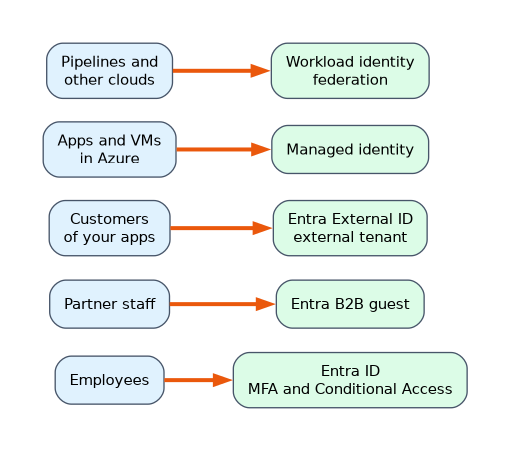
| Actor | Recommendation |
|---|---|
| Employees | Microsoft Entra ID with MFA, Conditional Access and passwordless methods (Windows Hello for Business, FIDO2 keys, Authenticator) |
| Partners and vendors | Entra B2B collaboration: invite them as guests so they sign in with their own organization's identity |
| Customers of your apps | Microsoft Entra External ID with an external tenant, with social and local accounts |
| Applications and VMs | Managed identities or workload identities instead of stored secrets |
| On premises users to reach Azure | Hybrid identity with Entra Connect or Cloud Sync |
| Legacy domain dependent apps | Microsoft Entra Domain Services, a managed domain |
Conditional Access decides access from signals such as user, device compliance, location and risk, and can require MFA, a compliant device or a block. Entra ID Protection adds user and sign in risk detection and needs Entra ID P2. Good designs use passwordless and phishing resistant methods for admins.
Hybrid identity
For organisations with on premises Active Directory:
| Option | Detail |
|---|---|
| Password hash synchronization | Syncs a hash of the password hash to Entra ID. Simple, resilient, supports leaked credential detection. The usual recommendation |
| Pass through authentication | An agent validates the password against Active Directory at sign in. Passwords stay on premises, but sign in depends on the agents |
| Federation (AD FS) | Sign in is handled by on premises federation servers. Most complex, used for specific needs such as smart cards |
| Microsoft Entra Connect | The full sync engine for complex topologies |
| Microsoft Entra Cloud Sync | A lightweight agent, good for multiple disconnected forests |
Choose password hash sync, with seamless single sign on, unless a requirement forces another option. Add Entra Connect Health to monitor sync.
Microsoft Entra External ID
External ID covers external identities.
- A workforce tenant holds employees and can invite B2B guests to collaborate on internal resources.
- An external tenant is a separate directory for apps you publish to consumers and business customers, with sign up and sign in flows, branding and social identity providers.
- Azure AD B2C continues to be supported for existing tenants until May 2030, but new deployments should use External ID.
- Pricing is based on monthly active users.
- Single sign on to Microsoft 365 and Entra ID Protection are not available in external tenants.
Managed identities and workload identities
A managed identity gives an Azure resource an identity in Entra ID that the platform manages, so code gets tokens with no secrets or password rotation.
| Type | Lifecycle | Use |
|---|---|---|
| System assigned | Tied to one resource. Deleted with it | A single resource that needs its own identity |
| User assigned | A standalone resource shared by many resources | Several resources that need the same access, or when the identity must survive resource recreation. Microsoft recommends it for most scenarios |
For workloads outside Azure (GitHub Actions, Kubernetes, another cloud), use workload identity federation, which exchanges an external token for an Entra token with no secret. Use an app registration with a certificate rather than a client secret when federation is not possible.
Choosing quickly
| Requirement | Answer |
|---|---|
| App in Azure must read Key Vault with no secrets | A managed identity |
| Customers sign up with email or social accounts | External ID external tenant |
| A partner's staff need access to a SharePoint site | B2B guest |
| GitHub pipeline deploys to Azure with no stored secret | Workload identity federation |
| Remove passwords for admins | FIDO2 keys or Windows Hello with Conditional Access |
A worked scenario
A bank runs an internal HR app, a partner portal and a customer banking app. Staff use Entra ID with MFA and Conditional Access, synced with password hash sync. Partner agencies are invited as B2B guests, limited by access packages. Retail customers sign in through an External ID external tenant with social login. The apps in Azure read their secrets from Key Vault with user assigned managed identities, and the GitHub deployment pipeline uses workload identity federation.
What to remember for the exam
- Employees use Entra ID with MFA and Conditional Access. Partners use B2B guests. Customers use External ID external tenants. Apps use managed identities.
- Password hash sync is the default hybrid choice. Pass through needs agents. Federation is the most complex.
- User assigned managed identities can be shared and survive resource deletion. System assigned ones are one to one.
- Azure AD B2C is supported until May 2030, but new customer identity work should use External ID.
- Workload identity federation removes secrets for pipelines and external workloads.
"No secrets in code or config" is almost always a managed identity or workload identity federation.
How the exam asks about this
- "A web app must call Azure SQL without storing credentials." A managed identity.
- "Thousands of retail customers must register with social accounts." An External ID external tenant.
- "On premises passwords must be validated against Active Directory, with no hash in the cloud." Pass through authentication.
- "A GitHub Actions workflow must deploy to Azure without a client secret." Workload identity federation.
Common mistakes
Inviting customers as B2B guests. Use an external tenant for consumers.
Choosing federation when password hash sync would meet the need.
Using a client secret in a pipeline when federation exists.
Assuming a system assigned identity can be shared.
Check yourself
Which identity type fits many resources sharing one identity?
A user assigned managed identity.
What replaces Azure AD B2C for new customer identity projects?
Microsoft Entra External ID.
Which hybrid method is the usual recommendation?
Password hash synchronization.
Topic 2 of 6 in Design identity, governance, and monitoring solutions
Test yourself on Design identity, governance, and monitoring solutions
The full Microsoft AZ-305 question bank has 755 questions, with timed practice exams and an explanation for every answer.
This study guide is independent and is not affiliated with, endorsed by, or sponsored by Microsoft. Vendor names, certification names and exam codes are trademarks of their respective owners and are used for identification only.