Implement Machine Learning Model Lifecycle and Operations · Topic 5 of 5
Drift Detection, Production Monitoring and Retraining Triggers
AI-300 lifecycle: detect data drift with Azure Machine Learning model monitoring, track endpoint performance metrics and trigger retraining or alerts.
- 5 min
- Includes a diagram
- Enable data collection on the deployment first.
- Data drift and prediction drift need no labels; performance needs ground truth.
- Each signal has per metric thresholds; breach triggers a notification.
What it is
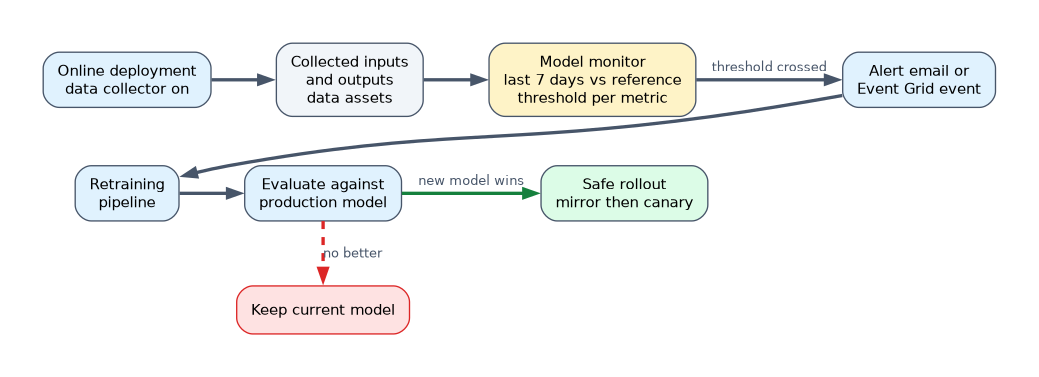
A model that was good at deployment slowly becomes wrong because the world changes. Model monitoring in Azure Machine Learning compares production data to a reference and raises alerts. Separately, endpoint metrics show whether the service itself is healthy. When a threshold is crossed, an alert or an automated retraining pipeline closes the loop.
How it works
Collect production data
Turn on the data collector on the deployment so model inputs and outputs are stored (as data assets) for the monitor to read. Without collection there is nothing to analyse. Sampling rate and the logged collections (model inputs, model outputs) are configurable.
Monitoring signals
| Signal | Detects | Needs ground truth? |
|---|---|---|
| Data drift | Production input distribution moved away from the reference (training or earlier data) | No |
| Prediction drift | Distribution of model outputs changed | No |
| Data quality | Nulls, type mismatches, out of range values | No |
| Feature attribution drift | Feature importance ranking changed | No |
| Model performance | Accuracy, precision, recall and so on | Yes, labels must be joined later |
| Custom signal | Your own metric from your own component | Depends |
Drift uses a statistical distance per feature. For numerical features options include Jensen-Shannon distance, population stability index, normalized Wasserstein distance and two-sample Kolmogorov-Smirnov test; for categorical features, Jensen-Shannon distance, population stability index and Pearson's chi-squared test. You set a threshold per metric; crossing it fires the alert. Choose the reference (training data for long term comparison, or a past production window to catch sudden shifts) and the production data window, for example the last 7 days.
A monitor definition
$schema: https://azuremlschemas.azureedge.net/latest/monitorSchedule.schema.json
name: churn_monitor
trigger:
  type: recurrence
  frequency: day
  interval: 1
create_monitor:
  compute:
    instance_type: standard_e4s_v3
    runtime_version: "3.4"
  monitoring_target:
    ml_task: classification
    endpoint_deployment_id: azureml:churn-endpoint:blue
  monitoring_signals:
    drift_signal:
      type: data_drift
      production_data:
        input_data:
          type: mltable
          path: azureml:churn-endpoint-blue-model_inputs:1
        data_context: model_inputs
        data_window:
          lookback_window_size: P7D
          lookback_window_offset: P0D
      reference_data:
        input_data:
          type: mltable
          path: azureml:churn-train:1
        data_context: training
      features:
        top_n_feature_importance: 10
      metric_thresholds:
        numerical:
          jensen_shannon_distance: 0.1
        categorical:
          pearsons_chi_squared_test: 0.05
  alert_notification:
    emails:
      - mlops-team@contoso.com
az ml schedule create --file monitor.ymlMonitoring runs as a scheduled serverless Spark job, so it needs the compute settings above. When a signal breaches, you open the monitor results in the studio to see which features drifted and by how much. Drift on an important feature matters more than drift on a minor one, hence the top N feature option.
Service performance metrics
Separate from model drift, track endpoint health in Azure Monitor and Application Insights: requests per minute, request latency, error counts by status code, CPU and memory use, and instance count. Enable resource logs for the console log to debug. Add Azure Monitor alert rules with action groups for latency or error thresholds, and use autoscale for load.
Retraining and alert triggers
| Trigger | How |
|---|---|
| Schedule | A pipeline schedule retrains weekly or monthly |
| Monitor alert | Email from the monitor; people decide |
| Event | Azure Machine Learning publishes events to Event Grid (for example run status changes), and a Logic App, Azure Function or GitHub workflow starts the retraining pipeline |
| New data | Pipeline starts when new data lands |
Automatic retraining should not automatically deploy. Retrain, evaluate against the current production model, and deploy only if the new model wins, using the safe rollout from the previous page.
A worked example
The churn endpoint logs inputs. A daily monitor compares the last 7 days to the training data, and emails the team when Jensen-Shannon distance on monthly_charge exceeds 0.1. An Event Grid rule triggers a GitHub workflow that runs the training pipeline; the new model is registered and goes through mirror and canary before replacing the old one.
How the exam asks about this
- "Inputs seen in production no longer look like training data." Data drift signal against the training reference.
- "Accuracy must be tracked, but labels arrive weeks later." Model performance signal after joining ground truth.
- "Start retraining when drift crosses a threshold." Alert to Event Grid or a workflow that runs the pipeline.
What to remember for the exam
- Enable data collection on the deployment first.
- Data drift and prediction drift need no labels; performance needs ground truth.
- Each signal has per metric thresholds; breach triggers a notification.
- Monitors run on a schedule with Spark compute.
- Retrain automatically if you like, but gate deployment on evaluation.
Data drift does not prove the model is worse. It is a warning to investigate; only the performance signal measures accuracy.
Common mistakes
Comparing against the wrong reference. A very old reference raises constant false alarms.
Alerting only on the service. A healthy endpoint can return bad predictions.
Auto-deploying every retrained model. Always evaluate first.
Check yourself
Which monitoring signal needs ground truth labels?
Model performance.
What must be enabled so a monitor can analyse production inputs?
The data collector on the deployment.
How can a drift alert start a retraining pipeline?
Send the event through Event Grid (or an alert action) to a workflow, Function or Logic App that submits the pipeline job.
Topic 5 of 5 in Implement Machine Learning Model Lifecycle and Operations
Test yourself on Implement Machine Learning Model Lifecycle and Operations
The full Microsoft AI-300 question bank has 650 questions, with timed practice exams and an explanation for every answer.
This study guide is independent and is not affiliated with, endorsed by, or sponsored by Microsoft. Vendor names, certification names and exam codes are trademarks of their respective owners and are used for identification only.