Develop Containerized Solutions on Azure · Topic 2 of 2
Azure Container Apps, KEDA Scaling and AKS
AI-200 orchestration: Container Apps environments, revisions and KEDA scaling, deploying to AKS with manifests, and troubleshooting logs and events.
- 4 min
- Includes a diagram
- Container Apps: environments, apps, immutable revisions, single or multiple revision mode.
- KEDA scale rules: HTTP, TCP and custom event sources; min replicas 0 allows scale to zero.
- AKS: Deployments, Services, ConfigMaps and Secrets defined in manifests and applied with kubectl.
What it is
Azure Container Apps runs containers on a serverless platform built on Kubernetes, without you managing the cluster. It scales with KEDA (Kubernetes Event-driven Autoscaling), including down to zero. Azure Kubernetes Service (AKS) gives you a managed Kubernetes cluster that you control with manifest files.
How it works
Container Apps basics
| Concept | Meaning |
|---|---|
| Environment | A secure boundary for a group of container apps that share a virtual network and logging |
| Container app | One app, with its containers, ingress and scale rules |
| Revision | An immutable snapshot of a version of the app, created by revision-scope changes to the template (such as the image or scale rules). Application-scope changes such as secrets, ingress and traffic rules apply to all revisions without creating a new one |
| Revision mode | Single (default): a new revision takes all traffic once it is ready and old ones are deprovisioned. Multiple: several revisions stay active, with traffic split between them. A deployment labels mode is in preview |
| Ingress | External or internal HTTP access to the app |
| Secrets | Values stored with the app, referenced by environment variables, or referenced from Key Vault |
Multiple revision mode supports blue-green and canary releases by assigning traffic percentages to revisions and switching once the new one is healthy.
Scaling with KEDA
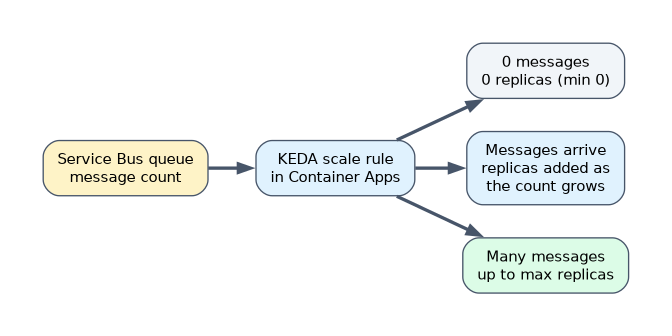 Container Apps scale rules decide how many replicas run:
| Rule type | Scales on |
|---|---|
| HTTP | Concurrent HTTP requests |
| TCP | Concurrent TCP connections |
| Custom (KEDA scaler) | CPU, memory, or event sources such as Azure Service Bus queue length, Event Hubs or Storage queues |
By default a revision scales between 0 and 10 replicas, and an app with no scale rule gets an HTTP rule. Setting minimum replicas to 0 lets an app scale to zero when idle, which saves cost but adds cold-start delay. Event-driven scalers authenticate to the event source with secrets or a managed identity.
A worked example: a worker processes embedding jobs from a Service Bus queue. A KEDA Service Bus scaler with min replicas 0 runs no replicas when the queue is empty and adds replicas as the message count grows.
Deploying to AKS with manifests
| Kubernetes object | Purpose |
|---|---|
| Deployment | Runs and updates a set of identical pods |
| Service | Gives pods a stable network endpoint (ClusterIP inside the cluster, LoadBalancer for external access) |
| ConfigMap and Secret | Supply configuration and sensitive values to pods |
| Ingress | Routes HTTP traffic to services |
Typical steps: get cluster credentials (az aks get-credentials), apply the manifests (kubectl apply -f), and check the rollout. AKS pulls from ACR once the registry is attached to the cluster (az aks update --attach-acr), which assigns the AcrPull role to the cluster's kubelet managed identity.
Monitoring and troubleshooting
| Problem | Where to look |
|---|---|
| Container crashes on start | Container logs (kubectl logs, Container Apps console or log stream) |
| Pod stuck pending or image pull errors | Events (kubectl describe pod, kubectl get events) |
| Revision not healthy | Revision status and system logs in Container Apps |
| App unreachable | Ingress settings, service type, ports and network connectivity |
Container Apps and AKS can send logs to a Log Analytics workspace for querying with KQL.
If a Container Apps question mentions queue length, scale to zero or event-driven scaling, the answer involves a KEDA scale rule.
How the exam asks about this
- "Send 10% of traffic to the new version first." Multiple revision mode with traffic splitting.
- "A worker should run no replicas when its queue is empty." A KEDA queue scaler with minimum replicas 0.
- "Pods fail with ImagePullBackOff." Check events, and make sure the cluster can pull from ACR.
What to remember for the exam
- Container Apps: environments, apps, immutable revisions, single or multiple revision mode.
- KEDA scale rules: HTTP, TCP and custom event sources; min replicas 0 allows scale to zero.
- AKS: Deployments, Services, ConfigMaps and Secrets defined in manifests and applied with kubectl.
- Attach ACR to AKS so the cluster can pull images.
- Troubleshoot with logs for crashes and events for scheduling and image pull problems.
Scale to zero means the first request after idle waits for a replica to start. Keep a minimum of one replica if latency must stay low.
Common mistakes
Using single revision mode for a canary release. Use multiple revision mode.
Reading only logs for an image pull failure. Events explain scheduling and pull errors.
Choosing AKS when no Kubernetes control is needed. Container Apps is simpler.
Check yourself
What is a revision in Azure Container Apps?
An immutable snapshot of a version of the container app, created when its template changes.
How do you make a Container App scale to zero?
Set minimum replicas to 0 with an appropriate scale rule.
Which kubectl commands help diagnose a pod that will not start?
kubectl describe pod and kubectl get events for events, and kubectl logs for container output.
Topic 2 of 2 in Develop Containerized Solutions on Azure
Test yourself on Develop Containerized Solutions on Azure
The full Microsoft AI-200 question bank has 650 questions, with timed practice exams and an explanation for every answer.
This study guide is independent and is not affiliated with, endorsed by, or sponsored by Microsoft. Vendor names, certification names and exam codes are trademarks of their respective owners and are used for identification only.