Develop AI Solutions with Azure Data Management Services · Topic 1 of 3
Azure Cosmos DB for NoSQL for AI Solutions
AI-200 Cosmos DB: SDK queries, partition keys and Request Units, indexing policies, consistency levels, vector search and the change feed processor.
- 5 min
- Includes a diagram
- Point reads are cheapest; cross-partition queries cost more; 429 means over the RU limit.
- Pick a high-cardinality partition key with even access.
- Tune indexing with excluded paths and composite indexes.
What it is
Azure Cosmos DB for NoSQL is a globally distributed database for JSON documents. You work with it through SDKs, pay for throughput in Request Units (RUs), and can store vector embeddings next to your data for semantic search. The change feed lets you react to new or updated items.
How it works
Connecting and querying
- Create a CosmosClient with the account endpoint and a credential (Microsoft Entra ID through
DefaultAzureCredential, or a key). - Get the database and container, then read, create, upsert and query items.
- A point read (by id and partition key) is the cheapest operation. Queries cost more RUs, especially if they cross partitions.
- Queries use a SQL-like syntax, for example
SELECT c.id, c.title FROM c WHERE c.category = @cat, with parameters.
Partition keys and Request Units
- Each container has a partition key. Choose one with many distinct values and even access, such as a tenant or user ID.
- Queries that include the partition key go to one partition; others fan out and cost more.
- Throughput is provisioned in RU/s (manual or autoscale) or billed per request in serverless mode. Exceeding it returns HTTP 429, which the SDK retries.
Indexing policies
By default every property is indexed. You can tune the indexing policy:
| Setting | Effect |
|---|---|
| Included and excluded paths | Exclude properties you never filter on to lower write RU cost |
| Composite indexes | Support ORDER BY on several properties and some multi-filter queries |
| Indexing mode | consistent (default) or none |
| Vector indexes | Index embedding paths for vector search |
Consistency levels
| Level | Guarantee |
|---|---|
| Strong | Reads always see the latest committed write |
| Bounded staleness | Reads lag by at most a set number of versions or time |
| Session (default) | A client reads its own writes; the most common choice |
| Consistent prefix | Reads never see writes out of order |
| Eventual | No ordering guarantee; the weakest level, with the highest availability |
Strong and bounded staleness reads use two replicas, so a read costs about twice the RUs of a session, consistent prefix or eventual read. Write RU cost is the same at every level.
Vector search
- Define a vector embedding policy on the container: the path (such as
/embedding), data type (float32, float16, int8 or uint8), number of dimensions and distance function (cosine, the default, dot product or Euclidean). - Add a vector index for that path:
| Vector index | Notes |
|---|---|
| flat | Exact (brute force) search; up to 505 dimensions |
| quantizedFlat | Brute force over compressed vectors; up to 4,096 dimensions; recommended for 50,000 vectors or fewer in the search scope |
| diskANN | Approximate search with very low latency and RU cost at scale; up to 4,096 dimensions |
The quantizedFlat and diskANN indexes are used only once at least 1,000 vectors are indexed; below that a full scan runs. Vector policy and index settings can't be edited in place.
- Query with the VectorDistance function, for example
SELECT TOP 5 c.title, VectorDistance(c.embedding, @q) AS score FROM c ORDER BY VectorDistance(c.embedding, @q).
Combine a vector query with filters, such as category or tenant, to narrow the search.
Change feed processor
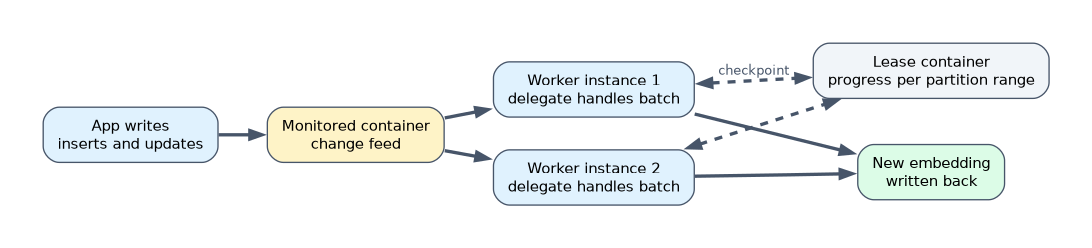 The change feed is a persistent record of inserts and updates in a container, in order within each partition key value. The change feed processor, part of the .NET and Java SDKs, reads it reliably with at-least-once delivery:
| Part | Role |
|---|---|
| Monitored container | The container whose changes you process |
| Lease container | Stores progress so work is shared across instances and resumes after restarts |
| Delegate (handler) | Your code that processes each batch of changes |
| Instance name | Identifies each worker so leases are balanced |
The Python SDK has no change feed processor: Python apps use the change feed pull model (saving continuation tokens themselves) or an Azure Functions Cosmos DB trigger, which also keeps its state in a lease container.
A worked example: when a product document changes, the change feed processor generates a new embedding and writes it back, keeping vector search up to date.
The default change feed mode shows the latest version of each item; deletes do not appear in it. Use a soft-delete flag or the all versions and deletes mode if you must react to deletes.
How the exam asks about this
- "Cut write cost for a container with many unused properties." Exclude those paths from the indexing policy.
- "A user must always see their own updates, at low cost." Session consistency.
- "Keep embeddings in sync when documents change." The change feed processor with a lease container.
What to remember for the exam
- Point reads are cheapest; cross-partition queries cost more; 429 means over the RU limit.
- Pick a high-cardinality partition key with even access.
- Tune indexing with excluded paths and composite indexes.
- Session consistency is the default and most common.
- Vector search needs a vector embedding policy, a vector index and VectorDistance.
- The change feed processor needs a lease container.
Changing the partition key later means moving data to a new container. Choose it carefully up front.
Common mistakes
Choosing a low-cardinality partition key. It creates hot partitions.
Forgetting the lease container. The change feed processor needs it.
Using flat indexes for high-dimension embeddings. Flat is limited to 505 dimensions.
Check yourself
What does the lease container do for the change feed processor?
It stores processing progress so work is shared across instances and resumes after a restart.
Which consistency level is the default?
Session.
Which function ranks items by vector similarity in a Cosmos DB query?
VectorDistance.
Topic 1 of 3 in Develop AI Solutions with Azure Data Management Services
Test yourself on Develop AI Solutions with Azure Data Management Services
The full Microsoft AI-200 question bank has 650 questions, with timed practice exams and an explanation for every answer.
This study guide is independent and is not affiliated with, endorsed by, or sponsored by Microsoft. Vendor names, certification names and exam codes are trademarks of their respective owners and are used for identification only.