Connect to and Consume Azure Services · Topic 1 of 2
Azure Service Bus and Azure Event Grid
AI-200 messaging and events: Service Bus queues, topics, subscriptions and dead-letter queues, and Event Grid custom events, filters and retries.
- 5 min
- Includes a diagram
- Service Bus queue: one receiver. Topic plus subscriptions: many receivers, with filters.
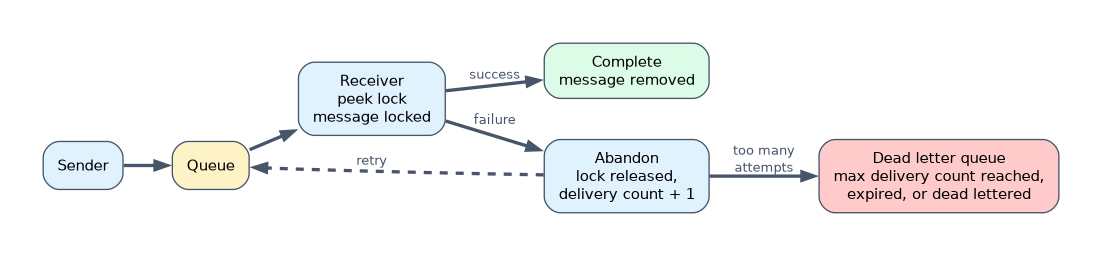
- Peek-lock: complete, abandon or dead-letter. Receive-and-delete: removed at once.
- DLQ causes: max delivery count, expiry, filter errors, explicit dead-lettering.
What it is
Azure Service Bus is an enterprise message broker: senders put messages on queues or topics, and receivers process them reliably. Azure Event Grid routes events, notifications that something happened, from sources to subscribers with filtering and retries.
How it works
Service Bus queues, topics and subscriptions
| Entity | Pattern |
|---|---|
| Queue | One-to-one: each message is processed by one receiver |
| Topic | One-to-many: a message is copied to each subscription |
| Subscription | A topic's virtual queue, with filters (SQL or correlation) that select which messages it receives |
Receiving messages
| Mode | Behavior |
|---|---|
| Peek-lock (default) | The message is locked; the receiver completes it when done, abandons it to retry, or dead-letters it |
| Receive-and-delete | The message is removed as soon as it is received; faster but lost if processing fails |
Other useful features: sessions for ordered processing of related messages, duplicate detection, scheduled messages and message time to live.
Dead-letter queue
Every queue and subscription has a dead-letter queue (DLQ). Messages move there when:
- they exceed the maximum delivery count (10 by default),
- they expire and dead-lettering on expiration is enabled,
- a subscription filter rule throws an error and dead-lettering on filter evaluation exceptions is enabled, or
- the receiver explicitly dead-letters them.
You read the DLQ like a normal queue (its path is the queue or subscription path followed by /$deadletterqueue), inspect the reason, fix the problem and resubmit if needed. Messages stay in the DLQ until you receive and complete them; time to live doesn't apply there.
Tiers
Service Bus has Basic, Standard and Premium tiers. Basic supports queues only. Standard adds topics and subscriptions, sessions, transactions and duplicate detection. Premium adds dedicated messaging units for predictable performance, messages up to 100 MB, private endpoints and geo-replication.
Event Grid
| Concept | Meaning |
|---|---|
| Event source | Where the event comes from, such as Blob Storage or your own app |
| Topic | The endpoint events are sent to: system topics for Azure services, custom topics for your own events |
| Event subscription | Routes events to a handler, such as a function, webhook, queue or Event Hubs |
| Filters | Select events by event type, subject begins with or ends with, or advanced filters on data fields |
| Schema | Event Grid schema or CloudEvents |
Delivery, retries and dead-lettering
- Event Grid retries delivery when the handler fails or does not respond, with exponential backoff. The retry policy defaults to 30 attempts and an event time to live of 1,440 minutes (24 hours). Errors such as 400 and 413 are not retried.
- Events that still cannot be delivered can be dead-lettered to a blob container in a storage account. Dead-lettering is off by default; without it, undeliverable events are dropped.
- Handlers should be idempotent, because an event may be delivered more than once.
Event Grid namespaces add namespace topics, which accept CloudEvents and support pull delivery, where consumers fetch events, as well as push delivery (currently to Event Hubs).
A worked example: when a PDF lands in Blob Storage, a system topic raises a BlobCreated event. A subscription filtered on subject ending with .pdf sends it to a function, which queues an embedding job on Service Bus. A worker processes the job; failures beyond the max delivery count go to the dead-letter queue for review.
If a question needs each message processed by exactly one worker with retries and a dead-letter queue, choose a Service Bus queue. If several independent services must react to the same change, choose Event Grid or a Service Bus topic.
How the exam asks about this
- "Several services each need a copy of an order message, but only for their region." A Service Bus topic with filtered subscriptions.
- "Messages that keep failing should be set aside for investigation." The dead-letter queue, with a max delivery count.
- "Only react to blobs with the .pdf extension." An Event Grid subscription with a subject ends with filter.
What to remember for the exam
- Service Bus queue: one receiver. Topic plus subscriptions: many receivers, with filters.
- Peek-lock: complete, abandon or dead-letter. Receive-and-delete: removed at once.
- DLQ causes: max delivery count, expiry, filter errors, explicit dead-lettering.
- Basic tier has no topics.
- Event Grid: system and custom topics, subscriptions, filters, retries, dead-lettering to storage.
Receive-and-delete loses the message if the receiver crashes before finishing. Use peek-lock for work that must not be lost.
Common mistakes
Using Event Grid for commands that must be processed once, in order. Use Service Bus.
Choosing Basic tier for a topic. Topics need Standard or Premium.
Writing non-idempotent handlers. Events and messages can arrive more than once.
Check yourself
What is the difference between a Service Bus queue and a topic?
A queue delivers each message to one receiver; a topic copies each message to every matching subscription.
When does Service Bus move a message to the dead-letter queue automatically?
When it exceeds the maximum delivery count, or when it expires with dead-lettering on expiration enabled.
How can an Event Grid subscription receive only some events?
By using filters on event type, subject prefix or suffix, or advanced filters on data fields.
Topic 1 of 2 in Connect to and Consume Azure Services
Test yourself on Connect to and Consume Azure Services
The full Microsoft AI-200 question bank has 650 questions, with timed practice exams and an explanation for every answer.
This study guide is independent and is not affiliated with, endorsed by, or sponsored by Microsoft. Vendor names, certification names and exam codes are trademarks of their respective owners and are used for identification only.