Layer 2 Bridging or VLANs · Topic 3 of 4
Virtual Switches and IRB
Learn MX virtual switch routing instances and integrated routing and bridging for the JNCIS-SP JN0-364: configuration, routing-interface irb and checks.
- 6 min
- Includes a diagram
- Virtual switch:
instance-type virtual-switch, its own bridge domains, MAC tables and spanning tree. - VLAN IDs must be unique within one instance and may repeat across instances.
- Enterprise-style interfaces join a virtual switch with
set routing-instances NAME interface ge-x/y/z.0.
What it is
A virtual switch is a routing instance of type virtual-switch. It is a separate Layer 2 switch inside the MX, with its own bridge domains, MAC tables and spanning tree. A provider uses virtual switches to keep customers apart, so two customers can both use VLAN 100 without sharing a broadcast domain.
Integrated routing and bridging (IRB) gives a bridge domain a Layer 3 interface. Hosts in the bridge domain use the IRB address as their default gateway, and the MX routes between bridge domains, or out to the rest of the network, through it.
How it works
The default switch and virtual switches
Bridge domains configured at [edit bridge-domains] live in the built-in default-switch instance. Every virtual switch is an additional, independent copy.
| default-switch | Virtual switch | |
|---|---|---|
| Created by | Built in | set routing-instances NAME instance-type virtual-switch |
| Bridge domains | [edit bridge-domains] | [edit routing-instances NAME bridge-domains] |
| VLAN IDs | Unique within the instance | Unique within the instance; may repeat in other instances |
| MAC table | One per bridge domain | Separate per bridge domain in the instance |
| Spanning tree | [edit protocols rstp] and so on | [edit routing-instances NAME protocols rstp] and so on |
Configuring a virtual switch
Enterprise-style interfaces are added to the instance with the interface statement, and then join the bridge domain whose vlan-id matches.
user@mx# set interfaces ge-1/0/4 unit 0 family bridge interface-mode trunk
user@mx# set interfaces ge-1/0/4 unit 0 family bridge vlan-id-list 100
user@mx# set routing-instances CUST-A instance-type virtual-switch
user@mx# set routing-instances CUST-A interface ge-1/0/4.0
user@mx# set routing-instances CUST-A bridge-domains A-100 vlan-id 100
Service provider style units are listed directly under the bridge domain inside the instance:
routing-instances {
    CUST-B {
        instance-type virtual-switch;
        bridge-domains {
            B-100 {
                domain-type bridge;
                vlan-id 100;
                interface ge-1/0/5.100;
                interface ge-1/0/6.100;
            }
        }
    }
}
A-100 and B-100 both use VLAN 100 but are different broadcast domains with different MAC tables, because they are in different instances.
IRB
An IRB is a logical unit of the irb interface with a Layer 3 address. It is tied to one bridge domain with routing-interface.
user@mx# set interfaces irb unit 100 family inet address 10.1.100.1/24
user@mx# set interfaces irb unit 200 family inet address 10.1.200.1/24
user@mx# set bridge-domains BD100 vlan-id 100
user@mx# set bridge-domains BD100 routing-interface irb.100
user@mx# set bridge-domains BD200 vlan-id 200
user@mx# set bridge-domains BD200 routing-interface irb.200
Inside a virtual switch, the statement goes under the instance's bridge domain:
user@mx# set routing-instances CUST-A bridge-domains A-100 routing-interface irb.150The unit number does not have to match the VLAN ID, but matching them makes configurations easier to read. Each bridge domain has at most one routing interface. The IRB unit itself can stay in the main routing table or be placed in a Layer 3 instance, such as a VRF, with set routing-instances NAME interface irb.150.
How a routed packet flows
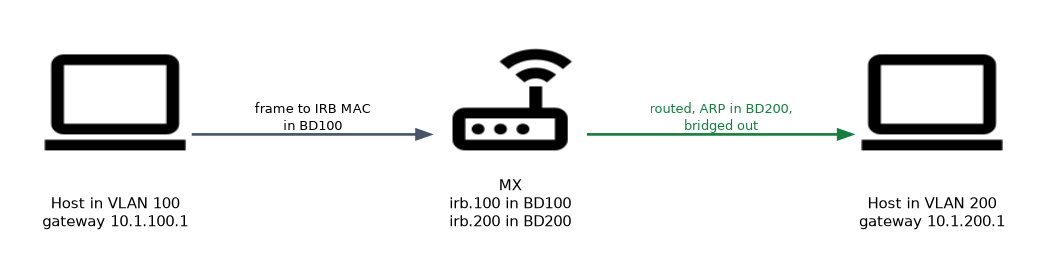 A host in VLAN 100 sends to its gateway MAC, the IRB's MAC. The MX receives the frame in BD100, sees its own IRB MAC as the destination and passes the packet to Layer 3. The route lookup points to irb.200, so the MX resolves the destination host with ARP in BD200 and bridges the frame out of the correct port in that bridge domain.
The IRB address is the hosts' default gateway. If two MX routers share a bridge domain, VRRP on the IRB units gives the hosts one virtual gateway address.
Monitoring and troubleshooting IRB
user@mx> show interfaces irb terse
user@mx> show interfaces irb.100 extensive
user@mx> show arp interface irb.100
user@mx> show route 10.1.100.0/24
user@mx> show bridge mac-table bridge-domain BD100
If hosts cannot reach the gateway, check in this order:
- The
routing-interfaceis set in the right bridge domain and instance. - At least one Layer 2 interface in the bridge domain is up, because the IRB unit's state follows the bridge domain.
- The IRB subnet matches the hosts' addresses and gateway.
- ARP entries appear on the IRB unit, and the host MAC appears in the bridge domain's MAC table.
Common mistakes
Forgetting routing-interface. An irb unit with an address does nothing for hosts until a bridge domain names it.
Assuming the IRB unit must equal the VLAN ID. It is a common convention, not a rule.
Expecting VLAN 100 in two virtual switches to be one network. Each instance is a separate switch; the same VLAN ID in two instances means two broadcast domains.
EX ELS switches use l3-interface irb.100 under vlans. On the MX the bridge domain statement is routing-interface irb.100, and exam options often swap the two.
What to remember for the exam
- Virtual switch:
instance-type virtual-switch, its own bridge domains, MAC tables and spanning tree. - VLAN IDs must be unique within one instance and may repeat across instances.
- Enterprise-style interfaces join a virtual switch with
set routing-instances NAME interface ge-x/y/z.0. - IRB:
set interfaces irb unit N family inet address, thenrouting-interface irb.Nin the bridge domain. - One routing interface per bridge domain; unit number need not match the VLAN.
- Troubleshoot with
show interfaces irb terse,show arp interface irb.Nandshow bridge mac-table.
Check yourself
Two customers both need VLAN 100 on the same MX without sharing traffic. What do you configure?
A separate virtual switch routing instance for each customer, each with its own bridge domain using VLAN 100.
Which statement ties irb.100 to bridge domain BD100 on an MX?
set bridge-domains BD100 routing-interface irb.100.An IRB unit is configured and named in its bridge domain, but it is down. What should you check?
That at least one Layer 2 interface in that bridge domain is up, because the IRB state follows the bridge domain.
Topic 3 of 4 in Layer 2 Bridging or VLANs
Test yourself on Layer 2 Bridging or VLANs
The full Juniper JNCIS-SP JN0-364 question bank has 860 questions, with timed practice exams and an explanation for every answer.
This study guide is independent and is not affiliated with, endorsed by, or sponsored by Juniper. Vendor names, certification names and exam codes are trademarks of their respective owners and are used for identification only.