IS-IS · Topic 2 of 4
IS-IS Levels, Areas and Adjacencies
Learn the IS-IS NET, Level 1 and Level 2 routing, areas, the attached bit, adjacency rules and hello timers in Junos for the JNCIS-SP JN0-364 exam.
- 6 min
- Includes a diagram
- The NET on lo0 has area ID, 6-byte system ID and NSEL 00; interfaces need
family iso. - Junos enables both levels on every IS-IS interface by default.
- Level 1 adjacency needs the same area; Level 2 does not.
What it is
IS-IS divides a domain into two levels. Level 1 routes inside one area. Level 2 is the backbone that connects areas. A router can be Level 1 only, Level 2 only, or both (L1/L2), and Junos runs both levels on every IS-IS interface by default.
An adjacency forms when two routers exchange hellos and agree on the level, the area (for Level 1) and the other hello parameters. Unlike OSPF, an IS-IS area boundary sits on a link, not inside a router: each router belongs entirely to one area.
How it works
The NET
Every IS-IS router needs a network entity title (NET), an ISO address configured on lo0. It has three parts:
| Part | Example | Meaning |
|---|---|---|
| Area ID | 49.0001 | 49 is the private AFI; the rest names the area |
| System ID | 1921.6800.0001 | 6 bytes, unique in the domain; often built from the loopback address |
| NSEL | 00 | Always 00 for a router |
user@router# set interfaces lo0 unit 0 family inet address 192.168.0.1/32
user@router# set interfaces lo0 unit 0 family iso address 49.0001.1921.6800.0001.00
Here 192.168.0.1 is written as 192.168.000.001 and regrouped as 1921.6800.0001. Each IS-IS interface also needs family iso, with no address:
user@router# set interfaces ge-0/0/0 unit 0 family isoLevel 1 and Level 2
| Level 1 | Level 2 | |
|---|---|---|
| Scope | Inside one area | Between areas, the backbone |
| Adjacency needs same area | Yes | No |
| Junos internal route preference | 15 | 18 |
| Junos external route preference | 160 | 165 |
| Database | Level 1 LSDB | Level 2 LSDB |
The Level 2 backbone must be contiguous: every Level 2 capable router must connect to the rest through other Level 2 routers.
Routes between levels
- Level 1 into Level 2: an L1/L2 router advertises its Level 1 routes into Level 2 automatically.
- Level 2 into Level 1: not done by default. Level 1 routers instead use a default route toward the nearest L1/L2 router. Specific Level 2 routes can be leaked into Level 1 with an export policy.
The attached bit
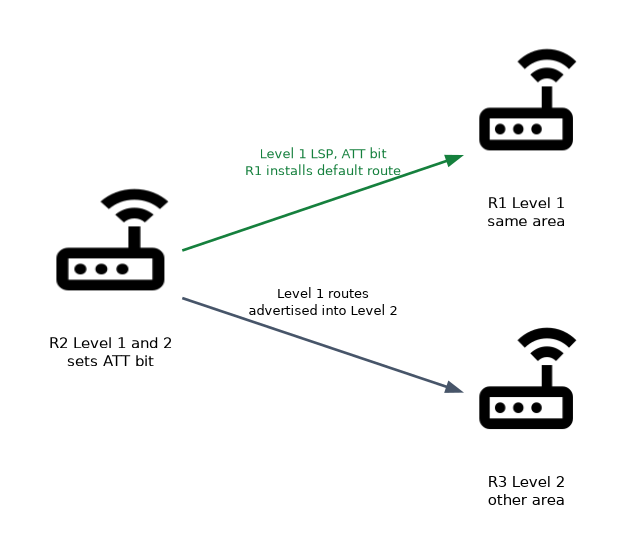 An L1/L2 router that has Level 2 connectivity to another area sets the attached (ATT) bit in its Level 1 LSP. Level 1 routers in the area see it and install a default route toward the nearest L1/L2 router with the bit set.
To stop a router from installing that default route, use set protocols isis ignore-attached-bit.
Limiting levels in Junos
user@router# set protocols isis level 1 disable
user@router# set protocols isis interface ge-0/0/1.0 level 2 disable
The first line makes the whole router Level 2 only. The second disables Level 2 on one interface, so that interface forms only Level 1 adjacencies.
What must match for an adjacency
| Item | Rule |
|---|---|
family iso | Required on both interfaces |
| Level | At least one level in common |
| Area | Must match for a Level 1 adjacency; may differ for Level 2 |
| System ID | Must be unique |
| Authentication | Must match for that level |
| Interface type | Both ends must be point-to-point or both LAN |
| MTU | Hellos are padded to the MTU by default, so a smaller MTU on one side can drop the other's hellos |
Hello timers
| Default in Junos | |
|---|---|
| Hello interval | 9 seconds |
| Hold time | 27 seconds |
| Hello interval of the DIS on a LAN | 3 seconds |
| Hold time advertised by the DIS | 9 seconds |
Timers do not need to match between neighbors, because each router advertises its own hold time in its hellos. This is another difference from OSPF.
Adjacency states and the three-way handshake
On a LAN, a router lists the MAC addresses of neighbors it hears in TLV 6 of its hellos. When a router sees itself in a neighbor's hello, the adjacency moves from Initializing to Up. On point-to-point links, a three-way handshake does the same job.
user@router> show isis adjacency
Interface             System         L State        Hold (secs) SNPA
ge-0/0/0.0            R2             2  Up                   23
ge-0/0/1.0            R3             1  Up                    7  0:5:86:71:1a:c0
ge-0/0/2.0            R4             3  Up                   25  0:5:86:71:2b:d1
The L column shows the level: 1, 2, or 3 for both levels. The SNPA column shows the neighbor's MAC address on a LAN and is empty on point-to-point links.
A missing Level 1 adjacency between two routers that do have a Level 2 adjacency almost always means different area IDs. Level 2 ignores the area, Level 1 does not.
Common mistakes
Forgetting family iso on the interface. The interface is listed under protocols isis but sends no hellos, so no adjacency appears.
Expecting Level 2 routes in Level 1 by default. Level 1 routers rely on the attached bit and a default route until you leak routes with a policy.
Thinking a router can sit in two areas like an OSPF ABR. An IS-IS router is in one area; the area boundary is the link between two routers.
Two routers with the same system ID break the database for the whole level. Check every NET when building or cloning router configurations.
What to remember for the exam
- The NET on lo0 has area ID, 6-byte system ID and NSEL 00; interfaces need
family iso. - Junos enables both levels on every IS-IS interface by default.
- Level 1 adjacency needs the same area; Level 2 does not.
- Preferences: L1 internal 15, L2 internal 18, L1 external 160, L2 external 165.
- Level 1 routes go into Level 2 automatically; Level 2 into Level 1 needs a policy.
- The ATT bit from an L1/L2 router gives Level 1 routers a default route.
- Junos hello 9 s, hold 27 s; DIS hello 3 s; timers need not match.
show isis adjacencyL column: 1, 2 or 3 for both.
Check yourself
Two routers with different area IDs share a link. Which adjacency can they form?
Only a Level 2 adjacency, because Level 1 requires the same area.
How does a Level 1 router reach destinations in other areas by default?
It installs a default route toward the nearest L1/L2 router that sets the attached bit.
What does
3in the L column ofshow isis adjacencymean?The adjacency is up at both Level 1 and Level 2.
Topic 2 of 4 in IS-IS
Test yourself on IS-IS
The full Juniper JNCIS-SP JN0-364 question bank has 860 questions, with timed practice exams and an explanation for every answer.
This study guide is independent and is not affiliated with, endorsed by, or sponsored by Juniper. Vendor names, certification names and exam codes are trademarks of their respective owners and are used for identification only.