Protocol Independent Routing · Topic 4 of 4
Filter-Based Forwarding
Learn Junos filter-based forwarding: input filter with routing-instance, forwarding instance, RIB group interface routes and verification for JN0-352.
- 6 min
- Includes a diagram
- FBF = input firewall filter with
then routing-instance <name>. - The instance has
instance-type forwardingand its own static routes. - A RIB group (
import-rib [ inet.0 NAME.inet.0 ]) copies interface routes into the instance.
What it is
Normal forwarding looks only at the destination address. Filter-based forwarding (FBF) lets you choose the path by other fields, such as the source address or the protocol. It is a form of policy-based routing.
A firewall filter matches the traffic and sends it to a different routing table with the action routing-instance. That table is held in a forwarding instance, which has its own routes, usually just a default route toward the chosen next hop.
How it works
An FBF design always has three parts, and the exam asks which one is missing.
- A firewall filter whose term uses
then routing-instance <name>. - A routing instance of type
forwarding, holding the routes to use for matched traffic. - A RIB group that copies interface routes into that instance, so its next hops can resolve.
The filter is applied as an input filter on the interface where the traffic arrives.
Example: send one subnet out through a second ISP
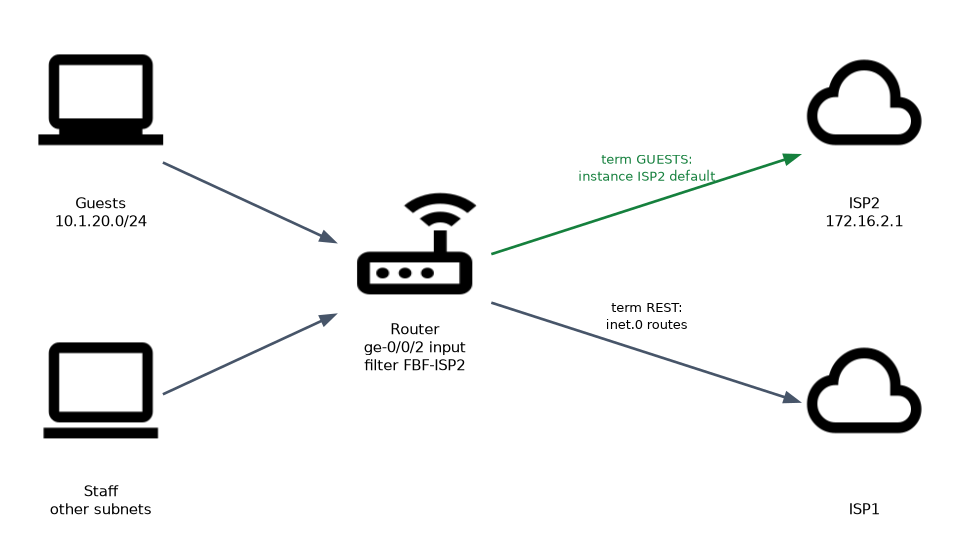
user@router# set firewall family inet filter FBF-ISP2 term GUESTS from source-address 10.1.20.0/24
user@router# set firewall family inet filter FBF-ISP2 term GUESTS then count GUEST-PKTS
user@router# set firewall family inet filter FBF-ISP2 term GUESTS then routing-instance ISP2
user@router# set firewall family inet filter FBF-ISP2 term REST then accept

user@router# set routing-instances ISP2 instance-type forwarding
user@router# set routing-instances ISP2 routing-options static route 0.0.0.0/0 next-hop 172.16.2.1

user@router# set routing-options rib-groups FBF-GROUP import-rib [ inet.0 ISP2.inet.0 ]
user@router# set routing-options interface-routes rib-group inet FBF-GROUP

user@router# set interfaces ge-0/0/2 unit 0 family inet filter input FBF-ISP2
Read it in this order. Traffic from 10.1.20.0/24 arriving on ge-0/0/2.0 matches term GUESTS and is sent to the ISP2 instance, where the default route uses 172.16.2.1. Everything else matches term REST and follows the normal routing table.
Why each part is needed
| Part | If it is missing |
|---|---|
Filter with routing-instance | Nothing selects traffic; all traffic uses inet.0 |
| Forwarding instance with a route | Matched traffic has no route in the instance and is dropped |
| RIB group for interface routes | The next hop 172.16.2.1 cannot resolve, so the instance default route is hidden |
| Filter applied as input on the right interface | The filter never sees the traffic |
Final accept term | Unmatched traffic hits the implicit discard at the end of the filter |
The RIB group copies the direct routes (interface routes) into the instance. The instance default route needs 172.16.2.0/24 to be known there to resolve its next hop.
Terminating action and the implicit discard
routing-instance is a terminating action, like accept or discard. The packet is forwarded using the named instance and no later terms are checked. Because every filter ends with an implicit discard, a filter with only the GUESTS term would drop all other traffic on that interface.
Always end an FBF filter with a term that has no from and the action accept. Without it, traffic that is not selected for the special path is dropped, not routed normally.
Other options
Some platforms also offer the actions next-ip and next-interface, which pick the next hop directly without a forwarding instance. The routing-instance method is the one that works across the EX and MX platforms, and it is the one the outline describes.
Monitoring and troubleshooting
user@router> show firewall filter FBF-ISP2
user@router> show route instance ISP2 detail
user@router> show route table ISP2.inet.0
user@router> show route hidden table ISP2.inet.0
user@router> show route forwarding-table table ISP2
Work from the outside in:
show firewall filterwith acountaction shows whether the term matches. If the counter does not move, check the interface and the direction of the filter.show route table ISP2.inet.0shows whether the instance has an active default route. If it is hidden, copy the interface routes.- A
traceroutefrom a host in the matched subnet shows the actual path. A traceroute started on the router itself does not pass through the input filter, so it does not test FBF.
Add a count action to the FBF term. It costs nothing and it answers the first troubleshooting question: is the traffic reaching the filter?
Common mistakes
Applying the filter as output. FBF uses an input filter on the ingress interface. The decision is made before the destination lookup.
Forgetting the RIB group. The instance default route stays hidden because its next hop does not resolve. This is the classic FBF fault.
Using the wrong instance type. The instance for FBF is type forwarding, not vrf.
Leaving out the final accept term. Unmatched traffic is silently discarded.
Matching traffic that comes from the router itself. An input filter on an interface does not apply to packets the router originates.
What to remember for the exam
- FBF = input firewall filter with
then routing-instance <name>. - The instance has
instance-type forwardingand its own static routes. - A RIB group (
import-rib [ inet.0 NAME.inet.0 ]) copies interface routes into the instance. - The filter is applied with
family inet filter inputon the ingress interface. routing-instanceis terminating; end the filter with anacceptterm.- Check with
show firewall filter,show route table NAME.inet.0andshow route instance.
Check yourself
Where is the FBF filter applied, and in which direction?
On the interface where the traffic arrives, as an input filter under
family inet filter input.The forwarding instance default route is hidden. What is the most likely missing piece?
A RIB group that copies the interface routes into the instance, so the next hop can resolve.
Why should an FBF filter end with a term that accepts all remaining traffic?
Because of the implicit discard at the end of every filter, unmatched traffic would otherwise be dropped instead of using the normal routing table.
Topic 4 of 4 in Protocol Independent Routing
Test yourself on Protocol Independent Routing
The full Juniper JNCIS-ENT JN0-352 question bank has 846 questions, with timed practice exams and an explanation for every answer.
This study guide is independent and is not affiliated with, endorsed by, or sponsored by Juniper. Vendor names, certification names and exam codes are trademarks of their respective owners and are used for identification only.