IS-IS · Topic 2 of 4
IS-IS Adjacencies, Levels, Areas and the DIS
Learn how IS-IS adjacencies form, Level 1 and Level 2 rules, the attached bit and the designated intermediate system election on Junos for JN0-352.
- 6 min
- Includes a diagram
- Level 1 adjacency needs the same area; Level 2 does not.
- Junos routers are Level 1 and 2 by default;
level 1 disableorlevel 2 disablerestricts them. - Level 1 routes leak up by default; Level 2 routes do not leak down.
What it is
An IS IS adjacency is the relationship between two neighboring routers that have exchanged hellos and agreed to route together. IS IS has two levels. Level 1 routes inside an area, and Level 2 routes between areas.
On a broadcast link, one router is elected designated intermediate system (DIS). It acts for the LAN: it creates a pseudonode that represents the segment, and it keeps the databases of the routers on the LAN in step.
How it works
Forming an adjacency
Routers send hellos (IIH) on each interface. By default, Junos sends hellos every 9 seconds, with a hold time of 27 seconds (three times the hello interval). On a point to point link Junos uses a three way handshake, so each side confirms it sees the other.
Rules for the adjacency:
| Level | Condition |
|---|---|
| Level 1 | The area ID in the NET must match |
| Level 2 | The area IDs may differ; both routers must be Level 2 capable |
| Both levels | Unique system IDs, matching authentication, same MTU (hellos are padded), family iso |
A router running both levels (the Junos default) forms a Level 1 adjacency with a neighbor in the same area, and a Level 2 adjacency with it too. A neighbor in another area gets a Level 2 adjacency only.
user@R1> show isis adjacency
Interface             System         L State        Hold (secs) SNPA
ge-0/0/1.0            R2             1  Up                   24  2:5:86:71:e1:5
ge-0/0/1.0            R2             2  Up                   25  2:5:86:71:e1:5
The L column is the level of the adjacency. A state other than Up, such as Initializing or One-way, means the hellos go one way only.
Levels and areas
IS IS area borders are on the links, not on the routers. A router belongs to exactly one area, defined by its NET. The Level 2 backbone is not an area numbered 0. It is the set of Level 2 capable routers and the links between them, and it must be contiguous.
| Router | Level 1 | Level 2 | Role |
|---|---|---|---|
| Level 1 router | Yes | No | Knows only its own area; uses a default route to leave |
| Level 2 router | No | Yes | Backbone router in the Level 2 topology |
| Level 1 and 2 router | Yes | Yes | Connects an area to the backbone; the Junos default |
The Junos default is Level 1 and Level 2 on every IS IS router and interface. To change it, disable one level:
user@R1# set protocols isis level 2 disable
user@R1# set protocols isis interface ge-0/0/2.0 level 1 disable
The first line makes the router Level 1 only. The second runs only Level 2 on that interface.
How routes cross levels
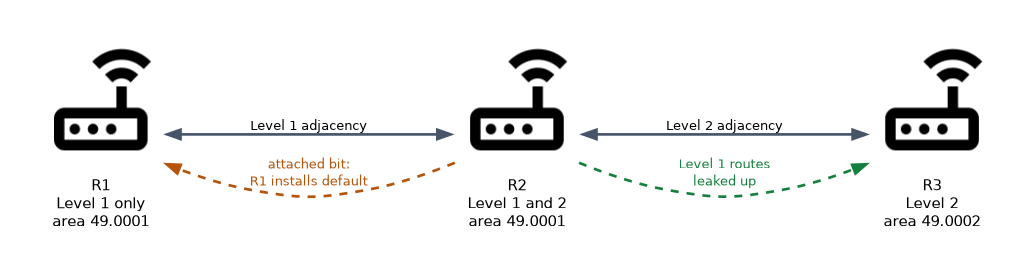 A Level 1 and 2 router leaks Level 1 routes up into Level 2 by default. It does not leak Level 2 routes down into Level 1. Instead, it sets the attached bit in its Level 1 LSP, which tells Level 1 routers in the area that it has a path out. A Level 1 router installs a default route toward the closest router with the attached bit set.
A Level 1 router that uses the default route may take a longer path to another area. To give it specific routes, leak Level 2 routes down with a routing policy (see the policy page). Junos also has ignore-attached-bit for a router that must not install the default route.
The designated intermediate system
On a broadcast link, IS IS elects a DIS for each level. The DIS:
- Creates the pseudonode LSP that lists every router on the LAN, so the LAN looks like one node.
- Sends the CSNP every 10 seconds, so the routers on the LAN keep their databases in step.
- Sends hellos every 3 seconds in Junos, faster than the others.
| IS IS DIS | OSPF DR | |
|---|---|---|
| Backup | None | BDR |
| Election | Highest priority, then highest SNPA (MAC address) | Highest priority, then highest router ID |
| Preemption | Yes, a better router takes over | No |
| Adjacencies | Every router is adjacent to every other router | Only to the DR and BDR |
| Default priority | 64 | 128 |
The election is preemptive: a router with a higher priority that joins later takes over at once. There is no backup DIS, but everyone is adjacent to everyone, so a new DIS is elected quickly.
Set the priority per level on the interface. A higher value is better:
user@R1# set protocols isis interface ge-0/0/1.0 level 1 priority 100
user@R1# set protocols isis interface ge-0/0/1.0 level 2 priority 100
show isis interface shows the DIS for each level, as the name and pseudonode ID, such as R1.02. On a link that has only two routers you can avoid the pseudonode with point-to-point:
user@R1# set protocols isis interface ge-0/0/1.0 point-to-pointBoth ends must be configured the same way. On a point to point interface there is no DIS election and no pseudonode LSP.
A Level 1 only router and a Level 2 only router never form an adjacency, because they share no level.
Common mistakes
Expecting Level 2 routes in a Level 1 area. They are not leaked by default; Level 1 routers use the default route.
What to remember for the exam
- Level 1 adjacency needs the same area; Level 2 does not.
- Junos routers are Level 1 and 2 by default;
level 1 disableorlevel 2 disablerestricts them. - Level 1 routes leak up by default; Level 2 routes do not leak down.
- The attached bit makes Level 1 routers install a default route.
- The DIS has priority 64 by default, is preemptive, and has no backup.
- Hello 9 seconds, hold 27 seconds by default.
point-to-pointavoids the DIS on a two router link.
Check yourself
Two routers in different areas are both Level 1 and 2. Which adjacency forms?
Only a Level 2 adjacency, because Level 1 requires the same area ID.
How does a Level 1 router reach another area?
Through the default route it installs toward the closest Level 1 and 2 router that has the attached bit set.
What is different about DIS election compared with OSPF DR election?
The DIS is preemptive, has no backup, and the tie breaker is the highest MAC address.
Topic 2 of 4 in IS-IS
Test yourself on IS-IS
The full Juniper JNCIS-ENT JN0-352 question bank has 846 questions, with timed practice exams and an explanation for every answer.
This study guide is independent and is not affiliated with, endorsed by, or sponsored by Juniper. Vendor names, certification names and exam codes are trademarks of their respective owners and are used for identification only.