High Availability · Topic 1 of 5
Link Aggregation and Redundant Trunk Groups
Learn Junos link aggregation with LACP, ae interfaces, active and passive modes, and redundant trunk groups, with configuration and show commands.
- 6 min
- Includes a diagram
- A LAG is
aeinterfaces built withchassis aggregated-devices ethernet device-countand members withether-options 802.3ad aeN. - LACP modes are active and passive; at least one side must be active; the default timer is slow, 30 seconds, and fast is 1 second.
- No
lacpstatement means a static LAG.
What it is
A link aggregation group (LAG) bundles several physical Ethernet links into one logical link. It gives more bandwidth and keeps working when one member fails. On Junos the logical link is an aggregated Ethernet interface named ae0, ae1 and so on. The standard is IEEE 802.3ad, and its control protocol is the Link Aggregation Control Protocol (LACP).
A redundant trunk group (RTG) is a Layer 2 feature for access switches with two uplinks. One uplink forwards and the other is blocked as a backup. If the active link fails, the backup takes over in well under a second, without Spanning Tree.
How it works
LAG with LACP
LACP lets the two ends negotiate the bundle and detect a member that is miscabled or failed. Each side runs in one of two modes.
| Mode | Behavior |
|---|---|
active | Sends LACP packets and starts the negotiation |
passive | Replies only when it receives LACP packets from the other end |
At least one side must be active. Two passive ends never negotiate, so the bundle does not form. Without any lacp statement the LAG is static, and the members are bundled with no negotiation at all.
LACP packets are sent every 30 seconds by default (slow), or every 1 second with periodic fast. A member is removed after three missed packets, so fast timers detect a failure sooner.
Member and load balancing rules
Members of one bundle must have the same speed and duplex. The device balances traffic per flow using a hash of packet fields such as addresses, so one flow always uses one member. A single large flow cannot use more than one member link.
When a member fails, the bundle stays up with fewer links. The minimum-links option sets the smallest number of up members for the bundle to stay up.
LAG configuration on an EX switch
First create the aggregated interfaces, then add the members and the LACP mode, then the Layer 2 settings.
user@switch# set chassis aggregated-devices ethernet device-count 2
user@switch# set interfaces ge-0/0/0 ether-options 802.3ad ae0
user@switch# set interfaces ge-0/0/1 ether-options 802.3ad ae0
user@switch# set interfaces ae0 aggregated-ether-options lacp active
user@switch# set interfaces ae0 aggregated-ether-options lacp periodic fast
user@switch# set interfaces ae0 aggregated-ether-options minimum-links 1
user@switch# set interfaces ae0 unit 0 family ethernet-switching interface-mode trunk
user@switch# set interfaces ae0 unit 0 family ethernet-switching vlan members [ sales voice ]
The device-count sets how many ae interfaces can exist. Without it, ae0 does not appear. The member statement is ether-options 802.3ad on the switch (on routers the equivalent is under gigether-options). The VLAN settings go on the ae0 unit, never on the members.
Member interfaces that are configured with their own unit 0 family settings cannot join the bundle. Remove them and put the Layer 2 or Layer 3 configuration on the ae interface.
Monitoring LAG
user@switch> show lacp interfaces
Aggregated interface: ae0
    LACP state:       Role   Exp   Def  Dist  Col  Syn  Aggr  Timeout  Activity
      ge-0/0/0       Actor    No    No   Yes  Yes  Yes   Yes     Fast    Active
      ge-0/0/0     Partner    No    No   Yes  Yes  Yes   Yes     Fast    Active
Check these items.
| Output | What it tells you |
|---|---|
Dist and Col both Yes | The member is distributing and collecting traffic, so it is in service |
Def Yes | The member runs on default values because no LACP packet was received from the partner |
| Partner line missing | The far end is not sending LACP, for example it is passive or not configured |
Timeout | Fast or slow, and the two ends should normally match |
Other commands: show interfaces ae0 terse shows the bundle and its members, show interfaces ae0 extensive adds counters per member, and show lacp statistics interfaces counts LACP packets sent and received.
Redundant trunk groups
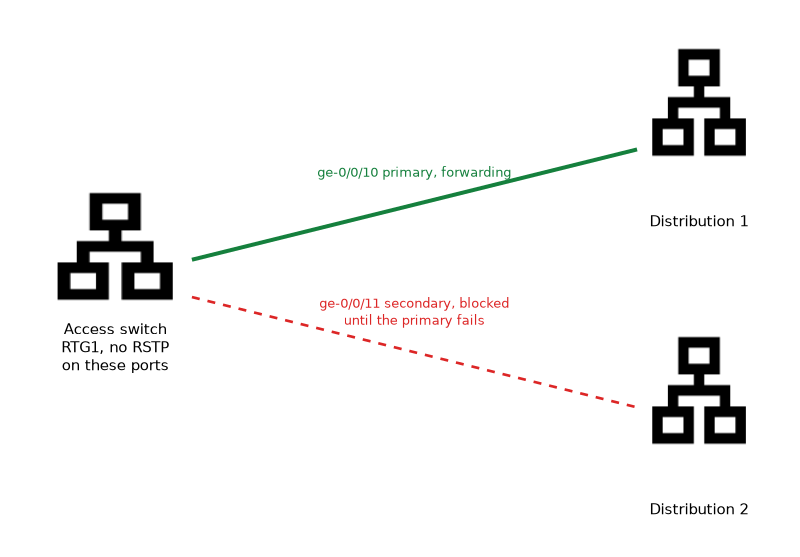 An RTG has two trunk interfaces. One is marked
primary and forwards traffic. The other is the secondary, and it stays blocked until the primary fails. After a switchover, traffic moves to the secondary link and the upstream switches relearn the MAC addresses on the new path.
On switches with the ELS CLI, the statement is under switch-options.
user@switch# set switch-options redundant-trunk-group group RTG1 interface ge-0/0/10 primary
user@switch# set switch-options redundant-trunk-group group RTG1 interface ge-0/0/11
user@switch# set switch-options redundant-trunk-group group RTG1 preempt-cutover-timer 60
On older non-ELS software the same statement sits under ethernet-switching-options. The RTG interfaces must be Layer 2 trunk or access interfaces.
| Detail | Value |
|---|---|
| Interfaces per group | Two, one primary and one secondary |
| Spanning Tree | Must not run on the RTG interfaces; disable RSTP on them or on the switch |
preempt-cutover-timer | Delays moving traffic back to the primary after it recovers |
| Maximum groups | 16 on a standalone switch or virtual chassis |
Without the primary keyword, there is no preferred link. When the primary recovers, it takes traffic back only after the preempt timer, if one is set.
user@switch> show redundant-trunk-group
Group   Interface       State   Time of last flap   Flap
name                            Date  Time          count
RTG1    ge-0/0/10.0     Up/Pri  Never               0
        ge-0/0/11.0     Up      Never               0
Pri marks the primary link, which forwards while it is up. The secondary shows Up but stays blocked until the primary fails.
Common mistakes
Both ends passive. The bundle stays down because nobody starts LACP.
Missing device-count. The ae interface cannot be created without it.
Mismatched member speeds. A member with a different speed or duplex does not join.
Expecting one flow to spread over all members. Balancing is per flow.
Running RSTP on RTG interfaces. The two protocols conflict, so disable one.
What to remember for the exam
- A LAG is
aeinterfaces built withchassis aggregated-devices ethernet device-countand members withether-options 802.3ad aeN. - LACP modes are active and passive; at least one side must be active; the default timer is slow, 30 seconds, and fast is 1 second.
- No
lacpstatement means a static LAG. - Traffic is balanced per flow.
show lacp interfacesandshow interfaces ae0 terseverify a LAG.- An RTG has one primary and one secondary link, uses no Spanning Tree, and fails over quickly.
- ELS uses
switch-options redundant-trunk-group; non-ELS usesethernet-switching-options. show redundant-trunk-groupshows active and standby.
Check yourself
Two switches both configure LACP passive on a LAG. What happens?
The bundle does not come up, because neither side sends LACP packets to start the negotiation.
Where is the VLAN membership of a LAG configured?
On the
aeinterface unit, underfamily ethernet-switching, not on the member interfaces.When do you choose an RTG instead of a LAG?
When an access switch has two uplinks to two different switches, and you want one active link with fast failover and no Spanning Tree.
Topic 1 of 5 in High Availability
Test yourself on High Availability
The full Juniper JNCIS-ENT JN0-352 question bank has 846 questions, with timed practice exams and an explanation for every answer.
This study guide is independent and is not affiliated with, endorsed by, or sponsored by Juniper. Vendor names, certification names and exam codes are trademarks of their respective owners and are used for identification only.