High Availability · Topic 4 of 5
BFD and VRRP
Configure and verify BFD and VRRP on Junos: timers, multiplier, priority, preempt, tracking, virtual MAC and the show commands that prove it.
- 7 min
- Includes a diagram
- BFD detects failure in subsecond time; detection time is the interval times the multiplier, default multiplier 3.
- BFD uses UDP 3784 and is set with
bfd-liveness-detectionunder a protocol or neighbor. show bfd sessionshows the state, detect time and clients.
What it is
Bidirectional Forwarding Detection (BFD) is a lightweight protocol that detects a failed path in well under a second. Routing protocols alone are slow to notice a silent failure: OSPF waits for its dead interval (40 seconds by default on broadcast links) and BGP waits for its hold time (90 seconds by default). BFD runs a fast hello between two neighbors and tells the routing protocol when it stops.
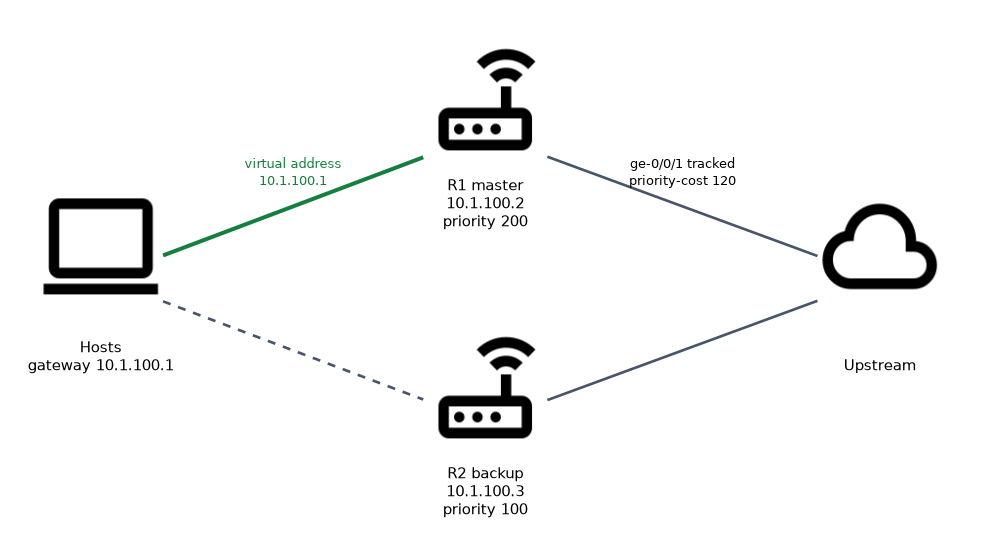
Virtual Router Redundancy Protocol (VRRP) gives hosts a default gateway that survives the failure of one router. Two or more routers share a virtual IP address. One of them is the master and answers for it. If the master fails, a backup takes over the address.
How it works
BFD sessions
A BFD session needs two routers that both have BFD configured. They send control packets at an agreed interval. If the other side stops sending for the detection time, BFD declares the session down and notifies the protocol that uses it.
The detection time is the negotiated interval multiplied by the multiplier. The default multiplier is 3. With a 300 millisecond interval and multiplier 3, a failure is detected in 900 milliseconds.
BFD uses UDP port 3784 for single hop sessions and 4784 for multihop sessions. It does not discover neighbors. A routing protocol or a static route starts the session.
BFD is enabled per protocol and per neighbor with bfd-liveness-detection.
user@router# set protocols ospf area 0.0.0.0 interface ge-0/0/1.0 bfd-liveness-detection minimum-interval 300
user@router# set protocols ospf area 0.0.0.0 interface ge-0/0/1.0 bfd-liveness-detection multiplier 3
user@router# set protocols bgp group ISP neighbor 192.0.2.2 bfd-liveness-detection minimum-interval 300| Option | Meaning |
|---|---|
minimum-interval | Sets both the transmit and receive interval, in milliseconds |
multiplier | Number of missed packets before the session is declared down; default 3 |
user@router> show bfd session
                                                  Detect   Transmit
Address                  State     Interface      Time     Interval  Multiplier
192.0.2.2                Up        ge-0/0/1.0     0.900     0.300        3

1 sessions, 1 clients
State should be Up. A session that stays Down or Init usually means BFD is missing on the far side, the intervals cannot be agreed, or a filter blocks UDP port 3784. show bfd session extensive adds the negotiated timers and the protocol using the session.
VRRP
VRRP is configured under the interface address with a VRRP group. Every router in the group uses the same group number and the same virtual address. On an EX switch with a Layer 3 VLAN, the group goes on the irb unit.
user@R1# set interfaces ge-0/0/0 unit 0 family inet address 10.1.100.2/24 vrrp-group 10 virtual-address 10.1.100.1
user@R1# set interfaces ge-0/0/0 unit 0 family inet address 10.1.100.2/24 vrrp-group 10 priority 200
user@R1# set interfaces ge-0/0/0 unit 0 family inet address 10.1.100.2/24 vrrp-group 10 accept-data
R2 uses its own interface address, the same group and virtual address, and a lower priority (the default is 100).
user@R2# set interfaces ge-0/0/0 unit 0 family inet address 10.1.100.3/24 vrrp-group 10 virtual-address 10.1.100.1How the master is chosen
| Rule | Result |
|---|---|
| Highest priority | Becomes master; the range is 1 to 254 for normal routers |
| Priority 255 | Only the owner of the virtual address, when the virtual address equals its real address |
| Equal priority | The router with the highest IP address on the interface wins |
| Default priority | 100 |
The master sends advertisements to multicast 224.0.0.18, using IP protocol 112, every 1 second by default. The backups listen. If they hear nothing for the master down interval (about three advertisement intervals plus a skew time), the best backup becomes master.
The virtual address uses the virtual MAC address 00:00:5e:00:01:xx, where xx is the group number in hexadecimal. Hosts keep the same ARP entry for the gateway after a failover, because the MAC address moves with the role.
Preempt, accept-data and tracking
 Preempt is on by default in Junos. If a router with a higher priority comes back, it takes the master role back. With
no-preempt, the current master keeps the role until it fails.
By default, the master does not answer ping or other traffic sent to the virtual address if it does not own that address. accept-data makes the master accept it, which helps when testing.
Tracking lowers the priority when something the master depends on fails, so a healthier router takes over.
user@R1# set interfaces ge-0/0/0 unit 0 family inet address 10.1.100.2/24 vrrp-group 10 track interface ge-0/0/1 priority-cost 120If ge-0/0/1, the uplink, goes down, the priority of R1 falls from 200 to 80, and R2 at 100 becomes master. Without tracking, R1 would stay master with a dead uplink and drop the traffic of the hosts.
Verifying VRRP
user@R1> show vrrp brief
Interface     State       Group   VR state VR Mode   Timer    Type   Address
ge-0/0/0.0    up             10   master   Active      A  0.2 lcl    10.1.100.2
                                                              vip    10.1.100.1
VR state shows master or backup. show vrrp detail shows the priority, the advertisement interval, the preempt setting and the number of times the router became master. show vrrp track shows tracked interfaces and the current priority.
Hosts must use the virtual address as the gateway. A host that uses the real address of R1 loses its gateway when R1 fails, even though VRRP works.
Common mistakes
Using different group numbers on the two routers. They do not form one group, and each becomes master of its own.
Pointing hosts at the real address. Failover works but the hosts do not follow.
Configuring BFD on one side. The session stays down.
What to remember for the exam
- BFD detects failure in subsecond time; detection time is the interval times the multiplier, default multiplier 3.
- BFD uses UDP 3784 and is set with
bfd-liveness-detectionunder a protocol or neighbor. show bfd sessionshows the state, detect time and clients.- VRRP default priority is 100; the highest priority wins; 255 means the address owner.
- VRRP preempt is on by default; advertisement interval is 1 second.
- VRRP uses multicast 224.0.0.18, IP protocol 112 and virtual MAC 00:00:5e:00:01:group.
vrrp-groupgoes under the interface address, or theirbunit on a switch.show vrrp briefandshow vrrp detailverify the state;tracklowers the priority bypriority-cost.
Check yourself
A BFD session has an interval of 300 milliseconds and the default multiplier. How long does it take to detect a failure?
900 milliseconds, which is 300 milliseconds times a multiplier of 3.
Two VRRP routers have the same priority. Which becomes master?
The one with the higher IP address on the interface.
Why add
track interfaceto a VRRP group?So the master lowers its priority when its uplink fails, and a backup with a working uplink takes over.
Topic 4 of 5 in High Availability
Test yourself on High Availability
The full Juniper JNCIS-ENT JN0-352 question bank has 846 questions, with timed practice exams and an explanation for every answer.
This study guide is independent and is not affiliated with, endorsed by, or sponsored by Juniper. Vendor names, certification names and exam codes are trademarks of their respective owners and are used for identification only.