Layer 2 Authentication and Access Control · Topic 1 of 3
Layer 2 Authentication, Process Flow and 802.1X
JN0-650 study page on Layer 2 access control and 802.1X on Junos: supplicant, authenticator, RADIUS flow, supplicant modes, VLAN assignment and timers.
- 5 min
- Includes a diagram
- Roles: supplicant, authenticator (switch), authentication server (RADIUS).
- EAPOL between device and switch; RADIUS between switch and server.
- Flow: identity, RADIUS Access-Request, EAP challenge, Access-Accept or Reject.
What it is
Layer 2 authentication makes a switch ask a device to prove who it is before the port passes normal traffic. The switch acts as the enforcement point, and a RADIUS server makes the decision.
IEEE 802.1X is the standard for port based network access control. It uses the Extensible Authentication Protocol over LAN (EAPOL) between the device and the switch.
How it works
The three roles
| Role | Who | Job |
|---|---|---|
| Supplicant | The end device with an 802.1X client | Sends credentials or a certificate |
| Authenticator | The switch | Relays EAP between the device and the server, and opens or closes the port |
| Authentication server | A RADIUS server | Validates the identity and returns the result |
The process flow
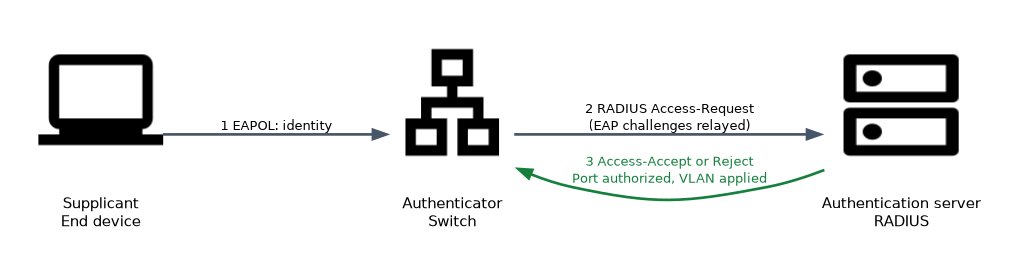
- The link comes up. The port is open only for EAPOL traffic.
- The switch sends an EAP Request for the identity, or the supplicant sends EAPOL-Start.
- The supplicant answers with its identity.
- The switch wraps the EAP data in a RADIUS Access-Request and sends it to the server.
- The server and the supplicant exchange EAP challenges through the switch, using a method such as EAP-TLS or PEAP.
- The server sends Access-Accept or Access-Reject.
- On Accept, the switch authorizes the port, and applies any VLAN or other attributes the server returned. On Reject, the port stays blocked or uses a fallback.
The switch does not interpret the EAP method. It only relays it, which is why new methods need no switch change. EAPOL frames use the Ethertype 0x888E and the group address 01:80:C2:00:00:03.
Supplicant modes
| Mode | Behavior |
|---|---|
single | Only the first supplicant is authenticated; other devices on the port are then allowed without authentication |
single-secure | One supplicant authenticated by MAC; no other MAC is allowed |
multiple | Each MAC address authenticates separately, so a phone and a PC can share a port |
Basic configuration
set access radius-server 10.1.1.100 secret "<secret>"
set access profile DOT1X-PROFILE authentication-order radius
set access profile DOT1X-PROFILE radius authentication-server 10.1.1.100
set protocols dot1x authenticator authentication-profile-name DOT1X-PROFILE
set protocols dot1x authenticator interface ge-0/0/5.0 supplicant multiple
The RADIUS server entry defines the shared secret, the access profile collects the server and the order of methods, and protocols dot1x enables the port. RADIUS uses UDP; the standard authentication port is 1812, and the switch must be known to the server as a client with the same secret.
Dynamic VLAN assignment
The server can tell the switch which VLAN to use with standard RADIUS attributes (RFC 3580): Tunnel-Type set to VLAN (13), Tunnel-Medium-Type set to 802 (6), and Tunnel-Private-Group-ID set to the VLAN name or ID.
The VLAN returned by RADIUS must already exist on the switch. If the name or ID does not match, authentication succeeds but the port is not placed in the VLAN you expect.
Timers
| Option | Role |
|---|---|
reauthentication | How often an authenticated supplicant is checked again (default 3600 seconds) |
quiet-period | Time the switch waits after a failure before trying again (default 60 seconds) |
transmit-period | Time between EAP identity requests (default 30 seconds) |
supplicant-timeout | Wait for a supplicant response (default 30 seconds) |
server-timeout | Wait for a RADIUS response (default 30 seconds) |
maximum-requests | Identity requests before giving up (default 2) |
set protocols dot1x authenticator interface ge-0/0/5.0 reauthentication 7200
set protocols dot1x authenticator interface ge-0/0/5.0 quiet-period 30Hosts that never answer EAPOL (a printer, for instance) wait for roughly transmit-period times maximum-requests before the switch moves to the next method or the guest VLAN. Shorten the timers to speed up their access.
Verification
show dot1x interface
show dot1x interface ge-0/0/5.0 detail
The output shows the port state, the authenticated MAC addresses, the VLAN and the method used. A port can be Authenticated, Connecting, Held after failures, or Authenticating while the exchange runs.
Common mistakes
Missing the RADIUS client entry. The server ignores a switch that is not a known client.
Different shared secrets. The Access-Request is dropped and authentication times out.
Using single and expecting a phone and PC to both authenticate. Use multiple.
Returning a VLAN that does not exist. The port does not move to it.
Expecting 802.1X to protect against a device behind an unmanaged hub in single mode. Use single-secure or multiple.
What to remember for the exam
- Roles: supplicant, authenticator (switch), authentication server (RADIUS).
- EAPOL between device and switch; RADIUS between switch and server.
- Flow: identity, RADIUS Access-Request, EAP challenge, Access-Accept or Reject.
- Modes:
single,single-secure,multiple. - RADIUS VLAN attributes: Tunnel-Type 13, Tunnel-Medium-Type 6, Tunnel-Private-Group-ID.
- Configuration:
access radius-server,access profile,protocols dot1x authenticator. show dot1x interfaceverifies.
Check yourself
Which device relays EAP between the supplicant and RADIUS?
The authenticator, which is the switch.
Which supplicant mode lets every MAC address on a port authenticate separately?
multiple.What does the RADIUS server return to place a user in a VLAN?
The Tunnel-Type, Tunnel-Medium-Type and Tunnel-Private-Group-ID attributes, with the VLAN name or ID.
Topic 1 of 3 in Layer 2 Authentication and Access Control
Test yourself on Layer 2 Authentication and Access Control
The full Juniper JNCIP-ENT JN0-650 question bank has 858 questions, with timed practice exams and an explanation for every answer.
This study guide is independent and is not affiliated with, endorsed by, or sponsored by Juniper. Vendor names, certification names and exam codes are trademarks of their respective owners and are used for identification only.