SRX Series Services Gateways · Topic 3 of 4
Traffic Flow and Security Processing
Learn SRX flow mode and packet mode, sessions, the first packet path through screens, NAT, route, zone and policy lookup, and the fast path for JN0-232.
- 6 min
- Includes a diagram
- IPv4 is flow mode by default; IPv6 is dropped by default until set to flow-based.
- First packet order: screens, static NAT, destination NAT, route, zones, policy, reverse static NAT, source NAT, services, session.
- Destination and static NAT are before the route and policy lookup; source NAT is after the policy.
What it is
An SRX is a stateful firewall. In its default flow mode it does not judge every packet from scratch. It checks the first packet of a connection in full, creates a session, and then forwards every later packet of that session on a much shorter fast path.
The order of the checks on the first packet is the single most tested sequence in JN0-232. It tells you which address a policy sees after NAT, and why a packet can be dropped before any policy is even looked at.
How it works
Flow mode and packet mode
| Flow mode | Packet mode | |
|---|---|---|
| Behavior | Stateful; tracks sessions | Stateless; each packet forwarded on its own like a router |
| Security features | Zones, screens, policies, NAT, ALGs, Content Security | None of the flow features |
| Default for | IPv4 | Not the default for IPv4 |
IPv4 traffic is flow-based by default. IPv6 is dropped by default until you enable flow mode for it:
user@srx# set security forwarding-options family inet6 mode flow-basedshow security flow status in operational mode shows the current mode for each family.
Stateless processing around the flow
Some processing happens per packet, before and after the flow process, whether or not a session exists.
- Ingress: input policers and stateless firewall filters on the ingress interface, and class of service classification.
- Flow process: the session lookup, then the first packet path or the fast path.
- Egress: output firewall filters, class of service shaping and queuing on the egress interface.
A stateless firewall filter that discards a packet stops it before the flow process ever sees it.
The first packet path
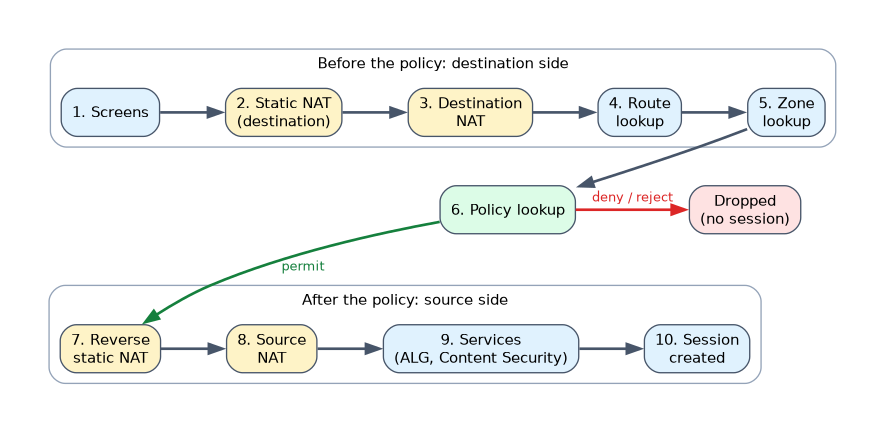 When the session lookup finds no match, the SRX runs the first packet through these steps in this order:
| Step | What happens |
|---|---|
| 1. Screens | Ingress zone screens check for attacks and floods |
| 2. Static NAT | Inbound static NAT translates the destination |
| 3. Destination NAT | Destination NAT rules translate the destination |
| 4. Route lookup | Finds the egress interface for the (translated) destination |
| 5. Zone lookup | The ingress and egress interfaces give the from zone and to zone |
| 6. Policy lookup | Zone-based policies, then global policies, then the default policy |
| 7. Reverse static NAT | Outbound static NAT translates the source |
| 8. Source NAT | Source NAT rules translate the source |
| 9. Services | ALGs and other services, such as Content Security, are set up |
| 10. Session | The session is created and the packet is forwarded |
Three facts fall out of this order.
- Destination and static NAT happen before the route and policy lookup, so the policy must match the translated (real) destination address.
- Source NAT happens after the policy lookup, so the policy matches the original (untranslated) source address.
- No route means no egress zone, so the packet is dropped before the policy lookup.
If the policy action is deny or reject, the packet is dropped there and no session is created.
What a session holds
A session records the 5-tuple of the connection, the zones, the matched policy, any NAT translations and the timeout. It has two wings, one for each direction, so return traffic matches the session and is permitted without a separate policy.
user@srx> show security flow session
Session ID: 4021, Policy name: TRUST-TO-INTERNET/5, Timeout: 1796, Valid
  In: 10.10.10.20/51544 --> 198.51.100.80/443;tcp, Conn Tag: 0x0, If: ge-0/0/1.0, Pkts: 12, Bytes: 2150
  Out: 198.51.100.80/443 --> 203.0.113.2/51544;tcp, Conn Tag: 0x0, If: ge-0/0/0.0, Pkts: 10, Bytes: 6804
Total sessions: 1
The In wing shows the original packet. The Out wing shows the return traffic, and here its destination is the source NAT address 203.0.113.2.
Default timeouts depend on the protocol: an idle TCP session times out after 1800 seconds and a UDP session after 60 seconds. An application definition can set its own inactivity-timeout.
The fast path
Packets that match an existing session skip the route and policy lookup.
Screens and TCP checks still run, and NAT and services are applied from what the session recorded. The route, zone and policy decisions are reused, which makes the fast path much quicker.
TCP checks
By default the SRX requires the first packet of a new TCP session to be a SYN. A non-SYN packet with no matching session, such as a stray ACK, is dropped. The SRX also tracks TCP sequence numbers for established sessions.
To answer "which address does the policy use", find where the NAT type sits in the first packet path. Destination and static NAT are before the policy, so use the real server address. Source NAT is after, so use the original client address.
Common mistakes
Writing the policy for the public destination address. With destination NAT, the policy lookup already sees the translated private address.
Writing the policy for the translated source. Source NAT runs after the policy, so the policy matches the original source.
Expecting a policy for return traffic. The session's reverse wing permits replies automatically.
Thinking a policy change always cuts existing sessions. By default, modifying a policy does not re-evaluate existing sessions; they keep the decision made when they were created unless policy-rematch is enabled. Deleting a policy does clear the sessions that use it.
A missing route drops the first packet before the policy lookup. When troubleshooting, a deny in the flow trace is not the only possible cause; check the route table too.
What to remember for the exam
- IPv4 is flow mode by default; IPv6 is dropped by default until set to flow-based.
- First packet order: screens, static NAT, destination NAT, route, zones, policy, reverse static NAT, source NAT, services, session.
- Destination and static NAT are before the route and policy lookup; source NAT is after the policy.
- The fast path runs screens, TCP checks, NAT and services, but no route or policy lookup.
- A session has two wings, so return traffic needs no extra policy.
- New TCP sessions must start with a SYN by default.
show security flow sessionlists active sessions;show security flow statusshows the forwarding mode.
Check yourself
An SRX translates destination 203.0.113.10 to server 10.20.20.10. Which destination address must the security policy match?
The translated address 10.20.20.10, because destination NAT happens before the policy lookup.
Which first packet steps does the fast path skip?
The route lookup, zone lookup and policy lookup. Screens, TCP checks, NAT and services still apply.
What is the default forwarding mode for IPv6 on an SRX?
Drop. IPv6 must be set to flow-based mode under
security forwarding-options family inet6.
Topic 3 of 4 in SRX Series Services Gateways
Test yourself on SRX Series Services Gateways
The full Juniper JNCIA-SEC JN0-232 question bank has 658 questions, with timed practice exams and an explanation for every answer.
This study guide is independent and is not affiliated with, endorsed by, or sponsored by Juniper. Vendor names, certification names and exam codes are trademarks of their respective owners and are used for identification only.