Security Policies · Topic 1 of 3
Zone-Based Security Policies
Learn SRX zone-based security policies: from-zone and to-zone contexts, match conditions, permit, deny and reject, policy order and default deny.
- 6 min
- Includes a diagram
- Zone-based policies live under
security policies from-zone <a> to-zone <b> policy <name>. source-address,destination-addressandapplicationare all required.- Different match conditions are AND; several values in one condition are OR.
What it is
A security policy is a stateful rule that decides what happens to the first packet of a new session. A zone-based policy belongs to one context, a pair of zones written as from-zone and to-zone, and it only applies to traffic that enters the first zone and leaves through the second.
If the policy permits the first packet, the SRX creates a session and the return traffic is allowed automatically. If no policy permits it, the default policy denies it.
How it works
Policy structure
security {
    policies {
        from-zone trust to-zone untrust {
            policy ALLOW-WEB {
                match {
                    source-address LAN;
                    destination-address any;
                    application [ junos-http junos-https ];
                }
                then {
                    permit;
                    log {
                        session-close;
                    }
                    count;
                }
            }
            policy DENY-REST {
                match {
                    source-address any;
                    destination-address any;
                    application any;
                }
                then {
                    deny;
                    log {
                        session-init;
                    }
                }
            }
        }
    }
}
The first policy in set form:
user@srx# set security policies from-zone trust to-zone untrust policy ALLOW-WEB match source-address LAN
user@srx# set security policies from-zone trust to-zone untrust policy ALLOW-WEB match destination-address any
user@srx# set security policies from-zone trust to-zone untrust policy ALLOW-WEB match application [ junos-http junos-https ]
user@srx# set security policies from-zone trust to-zone untrust policy ALLOW-WEB then permit
user@srx# set security policies from-zone trust to-zone untrust policy ALLOW-WEB then log session-close
user@srx# set security policies from-zone trust to-zone untrust policy ALLOW-WEB then count
Match conditions
| Condition | Takes | Required |
|---|---|---|
source-address | Address book names or sets, or any, any-ipv4, any-ipv6 | Yes |
destination-address | Address book names or sets, or any | Yes |
application | Applications or application sets, or any | Yes |
All three must be present before the policy commits. Different conditions are combined with AND, and several values of one condition are combined with OR. ALLOW-WEB matches traffic from LAN to any destination that uses HTTP or HTTPS.
Because destination NAT runs before the policy lookup and source NAT after it, the policy matches the translated destination and the original source.
Actions
| Action | Effect |
|---|---|
permit | Creates the session and forwards the packet |
deny | Drops the packet silently; no session is created |
reject | Drops the packet and replies: a TCP reset for TCP, an ICMP port unreachable message for UDP; other traffic is dropped without a reply |
log session-init | Logs when the session is created or denied |
log session-close | Logs when the session ends, with byte and packet counts |
count | Keeps traffic statistics for the policy |
A permit can also enable services, such as Content Security with then permit application-services utm-policy <name>.
Policy order
Within a context, policies are checked top to bottom, and the first match wins. Later policies are never checked for that session. A new policy is added at the end of its context, so a new permit placed below a broad deny never matches.
Use insert in configuration mode to move a policy:
user@srx# insert security policies from-zone trust to-zone untrust policy ALLOW-WEB before policy DENY-RESTA policy that can never match because an earlier policy already matches all of its traffic is shadowed. show security shadow-policies from-zone trust to-zone untrust lists such policies.
Only the matching context is checked
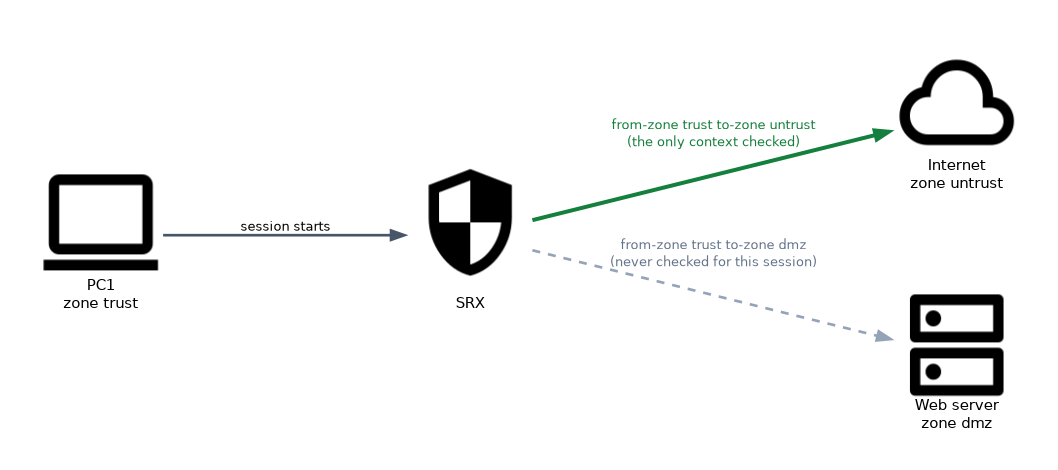 The SRX looks only at the context for the session's zone pair. A policy from trust to dmz is never considered for traffic from trust to untrust, however well its addresses match.
Intrazone traffic uses a context from a zone to the same zone, such as from-zone trust to-zone trust.
The default policy
If nothing matches in the zone context, and no global policy matches, the default policy applies. It is deny-all unless changed.
user@srx# set security policies default-policy deny-allThe other value, permit-all, permits everything that no policy matches, which is rarely wise. Sessions dropped by the default policy are not logged by default, so add an explicit final deny with log session-init if you want to see dropped sessions.
Policy changes and existing sessions
By default, modifying a policy affects new sessions only, and existing sessions continue. Deleting a policy clears the sessions that use it. With policy rematch, the SRX re-evaluates existing sessions when a policy changes, and closes those that are no longer permitted:
user@srx# set security policies policy-rematchMonitoring policies
| Command | Shows |
|---|---|
show security policies | All policies, in evaluation order, with their state |
show security policies from-zone trust to-zone untrust | Policies in one context |
show security policies policy-name ALLOW-WEB detail | One policy in full |
show security policies hit-count | How many times each policy matched |
show security match-policies from-zone trust to-zone untrust source-ip 10.10.10.20 destination-ip 198.51.100.80 source-port 51544 destination-port 443 protocol tcp | Which policy a given flow would match |
show security match-policies answers "which policy wins" without sending any traffic. Use it whenever a question asks why a session hits the wrong policy.
Common mistakes
Adding a permit after a deny-all policy. New policies go to the end of the context. Use insert ... before to place it above the deny.
Writing the policy in the wrong context. Traffic from untrust to dmz is only checked against from-zone untrust to-zone dmz.
Writing a policy for return traffic. The session already allows replies.
Mixing up deny and reject. Deny is silent. Reject sends a TCP reset for TCP or an ICMP port unreachable message for UDP.
Changing the default policy to permit-all permits every zone pair that has no matching policy, including untrust to trust. Exam options sometimes offer it as a quick fix for a missing permit.
What to remember for the exam
- Zone-based policies live under
security policies from-zone <a> to-zone <b> policy <name>. source-address,destination-addressandapplicationare all required.- Different match conditions are AND; several values in one condition are OR.
- Top to bottom, first match wins; new policies go to the end;
insertreorders them. permit,deny(silent) andreject(TCP reset for TCP, ICMP port unreachable for UDP).- The default policy is
deny-alland does not log by default. - Policy changes affect new sessions unless
policy-rematchis enabled. show security match-policiesandshow security policies hit-countare the key checks.
Check yourself
A new permit policy is added to a context that ends with a deny-any policy, but traffic is still dropped. Why?
New policies are added at the end, below the deny. Move it with
insert ... before policy <deny policy>.What does the reject action send for a TCP session?
A TCP reset. For UDP it sends an ICMP port unreachable message; other traffic is dropped without a reply.
No policy exists from untrust to dmz. What happens to a new session from untrust to dmz?
If no global policy matches, the default policy deny-all drops it.
Topic 1 of 3 in Security Policies
Test yourself on Security Policies
The full Juniper JNCIA-SEC JN0-232 question bank has 658 questions, with timed practice exams and an explanation for every answer.
This study guide is independent and is not affiliated with, endorsed by, or sponsored by Juniper. Vendor names, certification names and exam codes are trademarks of their respective owners and are used for identification only.