Content Security · Topic 1 of 3
Content Security Policies and Content Filtering
Learn SRX Content Security policies and content filtering for JNCIA-SEC: utm-policy, attaching it to a security policy, rule-sets, file types and actions.
- 6 min
- Includes a diagram
- Content Security is the new name for UTM; the CLI hierarchy is still
security utm. - Steps: configure the feature, reference it in
security utm utm-policy, attach it withthen permit application-services utm-policy. - Content filtering since Junos OS 21.4R1: rule-sets and rules under
security utm utm-policy <name> content-filtering.
What it is
Content filtering blocks or allows files by their real file type. The SRX looks at the content of the file as it is transferred, not at its name, so renaming setup.exe to report.txt does not get it past the filter.
Content filtering is one of the Content Security features (formerly UTM). Like the others, it is configured inside a Content Security policy under security utm utm-policy, and that policy only takes effect when a security policy that permits the traffic references it.
How it works
The Content Security policy framework
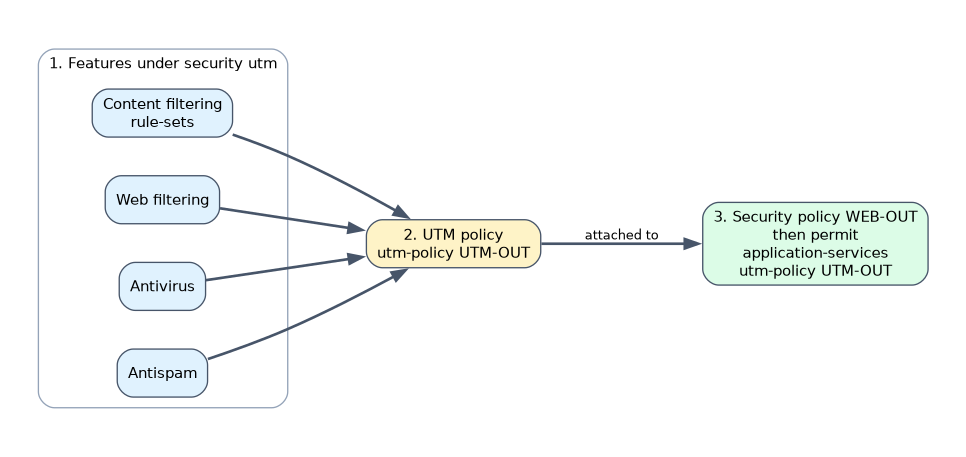 Every Content Security feature follows the same three steps.
- Configure the feature under
security utm. - Reference it in a UTM policy,
security utm utm-policy <name>. - Attach the UTM policy to a security policy with
then permit application-services utm-policy <name>.
user@srx# set security policies from-zone trust to-zone untrust policy WEB-OUT match source-address any
user@srx# set security policies from-zone trust to-zone untrust policy WEB-OUT match destination-address any
user@srx# set security policies from-zone trust to-zone untrust policy WEB-OUT match application junos-http
user@srx# set security policies from-zone trust to-zone untrust policy WEB-OUT then permit application-services utm-policy UTM-OUT
One UTM policy can hold several features at once: content filtering, web filtering, antivirus and antispam. One UTM policy can also be attached to many security policies.
Content filtering rule-sets
Since Junos OS Release 21.4R1, content filtering uses content-based file type detection with rule-sets and rules configured directly under the UTM policy.
security {
    utm {
        utm-policy UTM-OUT {
            content-filtering {
                rule-set CF-RULES {
                    rule BLOCK-EXE {
                        match {
                            applications http;
                            direction download;
                            file-types exe;
                        }
                        then {
                            action block;
                            notification {
                                log;
                            }
                        }
                    }
                }
            }
        }
    }
}
The same rule in set form:
user@srx# set security utm utm-policy UTM-OUT content-filtering rule-set CF-RULES rule BLOCK-EXE match applications http
user@srx# set security utm utm-policy UTM-OUT content-filtering rule-set CF-RULES rule BLOCK-EXE match direction download
user@srx# set security utm utm-policy UTM-OUT content-filtering rule-set CF-RULES rule BLOCK-EXE match file-types exe
user@srx# set security utm utm-policy UTM-OUT content-filtering rule-set CF-RULES rule BLOCK-EXE then action block
user@srx# set security utm utm-policy UTM-OUT content-filtering rule-set CF-RULES rule BLOCK-EXE then notification log
Match conditions
| Condition | Meaning |
|---|---|
applications | The protocol the file is carried in, such as http, or any |
direction | upload, download or any |
file-types | One or more file types, detected from the file content |
All conditions in a rule must match. When a file arrives, the SRX inspects its content, works out the real type, and compares it with the rules.
Actions
| Action | Effect |
|---|---|
block | The file transfer is blocked |
close-client | The connection to the client is closed |
close-server | The connection to the server is closed |
close-client-and-server | Both connections are closed |
no-action | The file is allowed; useful with logging to see what passes |
The notification options control what happens around the action. log writes a log message, and an endpoint notification can send a message to the user.
Older releases
Before Junos OS Release 21.4R1, content filtering was built from separate lists: blocked file extensions, MIME types, content types and protocol commands. Those options are deprecated and hidden in current releases. Configure content filtering with rule-sets under the UTM policy.
The old model trusted file names and MIME headers, which the sender controls. The current model reads the file content, so a renamed or mislabeled file is still detected. If an answer choice relies on a "block extension" list, it describes an older release.
Encrypted traffic
Content filtering can only inspect what it can read. For HTTPS, the SRX must decrypt the traffic with SSL proxy before content filtering sees the file. Without it, files inside TLS pass uninspected.
Licensing
Content filtering does not need a separate license. Antivirus, antispam and enhanced web filtering do.
Checking content filtering
| Command (operational mode) | Shows |
|---|---|
show security utm status | Whether the Content Security service is running |
show security utm session | Content Security session counts |
show security utm content-filtering statistics | Files passed and blocked by content filtering |
show security policies policy-name WEB-OUT detail | Whether the security policy references the UTM policy |
Start new rules with no-action and notification log. The log shows which file types really cross the firewall before you begin blocking them.
Common mistakes
Forgetting to attach the UTM policy. A UTM policy that no security policy references inspects nothing.
Attaching it to a deny policy. Content Security runs only on traffic that a security policy permits.
Expecting the file name to decide. The current model detects the type from content. Renaming a file does not change the result.
Configuring old extension lists. Block-extension and MIME lists belong to older releases; current Junos OS uses rule-sets.
Expecting HTTPS files to be filtered without decryption. Encrypted content needs SSL proxy first.
What to remember for the exam
- Content Security is the new name for UTM; the CLI hierarchy is still
security utm. - Steps: configure the feature, reference it in
security utm utm-policy, attach it withthen permit application-services utm-policy. - Content filtering since Junos OS 21.4R1: rule-sets and rules under
security utm utm-policy <name> content-filtering. - Rules match
applications,directionandfile-types; file type comes from the file content, not its name. - Actions:
block,close-client,close-server,close-client-and-server,no-action;notification logadds logging. - Extension, MIME and protocol-command lists are from older releases.
- HTTPS content needs SSL proxy before it can be filtered.
Check yourself
A user renames tool.exe to tool.txt and downloads it over HTTP. A rule blocks file type exe on download. What happens?
The download is blocked, because content filtering detects the file type from its content, not its name.
A UTM policy with content filtering is configured, but nothing is ever blocked. What is the most likely cause?
The UTM policy is not attached to the security policy that permits the traffic with
application-services utm-policy.Where are content filtering rule-sets configured in current Junos OS?
Under
security utm utm-policy <name> content-filtering, as rule-sets with rules that match applications, direction and file types.
Topic 1 of 3 in Content Security
Test yourself on Content Security
The full Juniper JNCIA-SEC JN0-232 question bank has 658 questions, with timed practice exams and an explanation for every answer.
This study guide is independent and is not affiliated with, endorsed by, or sponsored by Juniper. Vendor names, certification names and exam codes are trademarks of their respective owners and are used for identification only.