Juniper Mist Cloud Operations · Topic 2 of 3
WebSocket API and Webhooks
Learn the Juniper Mist WebSocket API and webhooks: streaming channels, subscribing, org and site webhooks, topics, secrets and when to use each one.
- 6 min
- Includes a diagram
- WebSocket: two way session, subscribe to site channels, real time updates, authentication required.
- Stream endpoint pattern:
wss://api-ws.mist.com/api-ws/v1/streamfor Global 01; regions differ. - Every WebSocket channel needs a site ID.
What it is
The REST API answers when you ask. Two other interfaces deliver data as it happens, without polling.
The WebSocket API keeps a two way session open between your application and the Mist cloud. Your application subscribes to channels, and Mist streams updates over that session in real time. It suits live dashboards, live packet captures and command output from devices.
Webhooks work the other way round. You give Mist a URL and choose topics, and whenever a matching event occurs, Mist sends an HTTP POST to your URL. There is no session to keep open; your receiver simply waits for messages. Webhooks suit integration with monitoring tools, SIEMs, ticketing systems and business applications.
How it works
WebSocket API
The client opens a WebSocket session to the regional stream endpoint. For the Global 01 cloud that is:
wss://api-ws.mist.com/api-ws/v1/stream
The endpoint differs by region, so check the endpoint table for your cloud. Authentication is required, using an API token, an HTTP login with Mist credentials, or an external OAuth2 provider. With a token, the request carries an Authorization header with the word token followed by the key.
Once connected, the client sends a JSON message naming a channel:
{"subscribe": "/sites/:site_id/stats/devices"}
Mist replies with messages of type data that name the channel and carry a data object. Messages keep arriving until you unsubscribe or disconnect.
Every channel needs a site ID, which you can find under Organization > Site Configuration.
| Channel | Streams |
|---|---|
| /sites/:site_id/devices | Device updates |
| /sites/:site_id/stats/devices | Device statistics |
| /sites/:site_id/stats/clients | Wi Fi client statistics |
| /sites/:site_id/stats/maps/:map_id/clients | Wi Fi client location on a map |
| /sites/:site_id/stats/maps/:map_id/unconnected_clients | Unconnected clients on a map |
| /sites/:site_id/stats/maps/:map_id/discovered_assets | BLE assets discovered on a map |
| /sites/:site_id/devices/:device_id/cmd | Command output from a device |
| /sites/:site_id/pcaps | Streaming packet capture |
Juniper's examples include a dashboard showing live AP status and BLE asset location, device statistics fed to an external dashboard such as Grafana, and packet captures displayed as they occur.
If a question says "real time", "without refreshing" or "stream", and the data is per site, think WebSocket. All channels are site level.
Webhooks
Webhooks are configured at two levels:
| Level | Where to configure |
|---|---|
| Organization webhooks | Organization > Settings, Webhooks section |
| Site webhooks | Organization > Site Configuration, select the site, Webhooks section |
Click Add Webhook and fill in:
| Field | Purpose |
|---|---|
| Name | Identifies the webhook |
| Webhook Type | HTTP Post, OAuth2 or Splunk |
| URL | Where Mist sends the messages |
| Topics | The events to send; at least one is required |
| Verify Certificate | On by default; checks the receiver's certificate |
| Secret | Optional, HTTP Post only; lets the receiver verify the message |
| Custom Headers | Extra headers the receiver needs, for example for token authentication |
With the OAuth2 type, Mist acts as an OAuth client: it gets a token from an authorization server and adds it to the webhook's authorization header.
Signing with a secret
When a secret is set, Mist adds two headers to every message:
| Header | Value |
|---|---|
| X-Mist-Signature | HMAC-SHA1 of the body, keyed with the secret |
| X-Mist-Signature-v2 | HMAC-SHA256 of the body, keyed with the secret |
The receiver computes the same HMAC and compares it, which proves the message came from Mist and was not changed.
Turning Verify Certificate off skips validation of the receiver's certificate. Juniper advises against it for security reasons.
Topics
Some topics are available at both organization and site level, while others are site only.
| Available at org and site | Site only |
|---|---|
| alerts (alarms), audits, device-events, device-updowns | location, location-asset, location-client, location-sdk |
| client-join, client-sessions, client-info | zone, vbeacon, occupancy-alerts, asset-raw-rssi |
| nac-accounting, nac-events, mxedge-events | client-latency, guest-authorizations |
| minis-application, minis-network, ping | wifi-conn-raw, wifi-unconn-raw |
The Marvis Minis topics (minis-application, minis-network) and client-latency need an active Marvis subscription. The ping topic is used to test that the receiver can be reached.
Because org level topics are also offered at site level, setting the same topic at both levels to the same URL sends duplicate messages.
Choosing a method
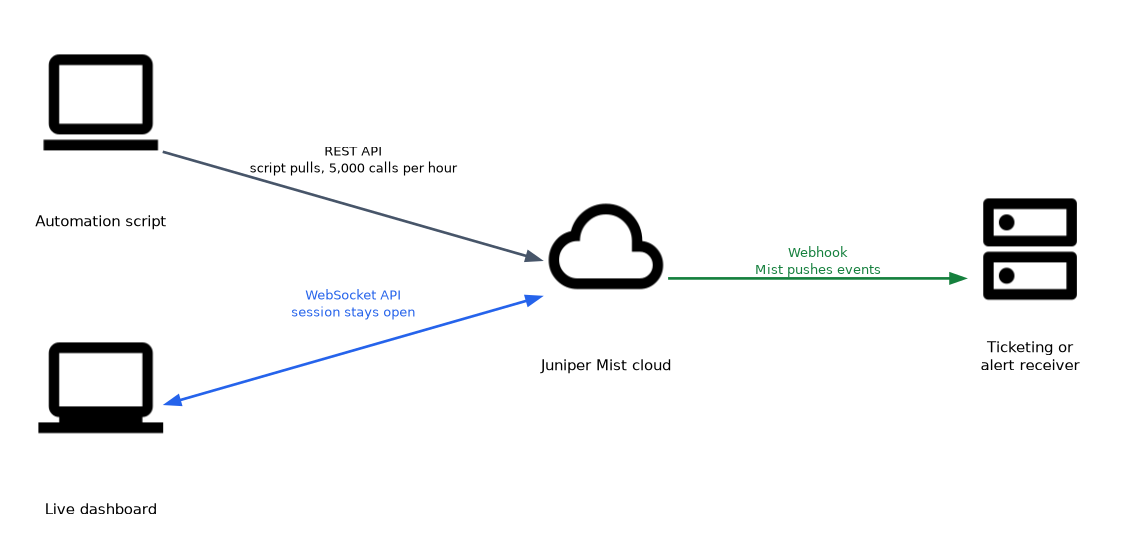
| Need | Best fit | Why |
|---|---|---|
| Change configuration, automate | REST API | Full coverage, pull model, 5,000 calls per hour |
| Live per site stream for a dashboard | WebSocket API | Session stays open; channels push updates |
| Send alerts or events to another system | Webhooks | Push model, no polling, receiver only waits |
Common mistakes
Polling REST for alerts. Webhooks push alerts and key events as they happen, without spending REST API calls.
Expecting an organization wide WebSocket channel. Every streaming channel needs a site ID.
Looking for location topics at organization level. Topics such as location, zone and vbeacon are site only.
Configuring the same topic at org and site to one URL. The receiver gets duplicate messages.
What to remember for the exam
- WebSocket: two way session, subscribe to site channels, real time updates, authentication required.
- Stream endpoint pattern:
wss://api-ws.mist.com/api-ws/v1/streamfor Global 01; regions differ. - Every WebSocket channel needs a site ID.
- Webhooks: push model, HTTP POST to your URL, configured at org (Organization > Settings) or site (Site Configuration).
- Webhook types: HTTP Post, OAuth2, Splunk; at least one topic.
- Secret adds X-Mist-Signature (HMAC-SHA1) and X-Mist-Signature-v2 (HMAC-SHA256).
- Location, zone and vbeacon topics are site only; minis topics need Marvis.
Check yourself
A team wants AP status to update live on a wall display without refreshing the page. Which interface fits best?
The WebSocket API, subscribing to a site channel such as /sites/:site_id/devices for real time updates.
How can a webhook receiver confirm that a message really came from Mist?
Configure a secret, then check the X-Mist-Signature or X-Mist-Signature-v2 HMAC of the body.
Why can't an administrator find the zone topic in the organization webhook settings?
Zone is a site only topic, so it is configured in the site's webhook settings under Site Configuration.
Topic 2 of 3 in Juniper Mist Cloud Operations
Test yourself on Juniper Mist Cloud Operations
The full Juniper JNCIA-MistAI JN0-253 question bank has 668 questions, with timed practice exams and an explanation for every answer.
This study guide is independent and is not affiliated with, endorsed by, or sponsored by Juniper. Vendor names, certification names and exam codes are trademarks of their respective owners and are used for identification only.