Routing Policy and Firewall Filters · Topic 1 of 4
Default Routing Policies, Import, Export and Policy Flow
Learn Junos default routing policies per protocol, import and export policies, policy chain evaluation and how policies change routing tables for JN0-106.
- 6 min
- Includes a diagram
- Import: protocol into routing table. Export: routing table (active routes) out to a protocol.
- Default import for all protocols accepts the routes they learn.
- Default export: BGP advertises active BGP routes; OSPF, IS-IS and RIP reject everything through policy.
What it is
A routing policy controls the flow of routes between routing protocols and the routing table. An import policy acts on routes a protocol has learned, before they are placed in the routing table. An export policy acts on routes in the routing table, before a protocol advertises them to neighbors.
Every protocol has a default policy that applies when you configure nothing, or when none of your policies makes a final decision about a route. Knowing these defaults is one of the most tested facts in this chapter.
How it works
Import and export from the routing table's point of view
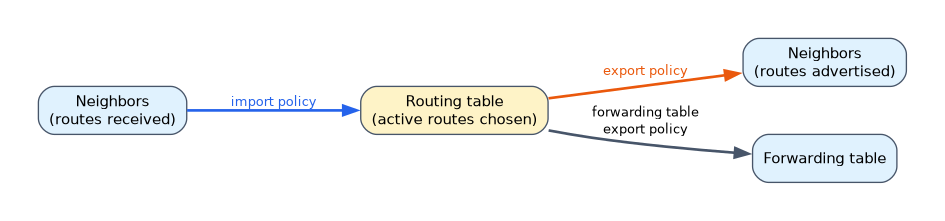 Junos OS describes direction relative to the routing table. Routes coming in from a protocol pass through import policies. Routes going out of the table to a protocol pass through export policies. Export policies evaluate the active routes in the routing table.
| Policy | Acts on | Typical use |
|---|---|---|
| Import | Routes received from neighbors | Reject unwanted prefixes, change local preference |
| Export | Active routes in the routing table | Redistribute static or direct routes into a protocol, limit what is advertised |
You can also apply an export policy to the forwarding table. A common example is load balancing across equal cost paths:
user@router# set policy-options policy-statement LB then load-balance per-packet
user@router# set routing-options forwarding-table export LB
Default routing policies
| Protocol | Default import | Default export |
|---|---|---|
| BGP | Accept all BGP routes learned from neighbors | Accept all active BGP routes (routes learned from an IBGP peer are not sent to other IBGP peers) |
| OSPF | Accept all OSPF routes | Reject everything; OSPF floods its own LSAs through the protocol, not through policy |
| IS-IS | Accept all IS-IS routes | Reject everything; IS-IS floods its own LSPs through the protocol |
| RIP | Accept all RIP routes from configured neighbors | Reject everything, so RIP needs an export policy to advertise any routes |
Two consequences follow:
- Static and direct routes are never advertised by a protocol unless an export policy accepts them.
- An OSPF or IS-IS export policy is needed only to inject routes from outside the protocol, such as static routes. Interfaces in OSPF are advertised through LSAs regardless of export policy.
Applying policies
A policy is defined once under [edit policy-options] and applied under the protocol.
policy-options {
    policy-statement EXPORT-STATIC {
        term 1 {
            from protocol static;
            then accept;
        }
    }
}
protocols {
    ospf {
        export EXPORT-STATIC;
        area 0.0.0.0 {
            interface ge-0/0/0.0;
        }
    }
}
The same commands in set form:
user@router# set policy-options policy-statement EXPORT-STATIC term 1 from protocol static
user@router# set policy-options policy-statement EXPORT-STATIC term 1 then accept
user@router# set protocols ospf export EXPORT-STATIC
For BGP, you can apply import and export at the global, group or neighbor level, and the most specific level wins. A neighbor level policy replaces the group level one rather than adding to it.
Routing policy flow: the policy chain
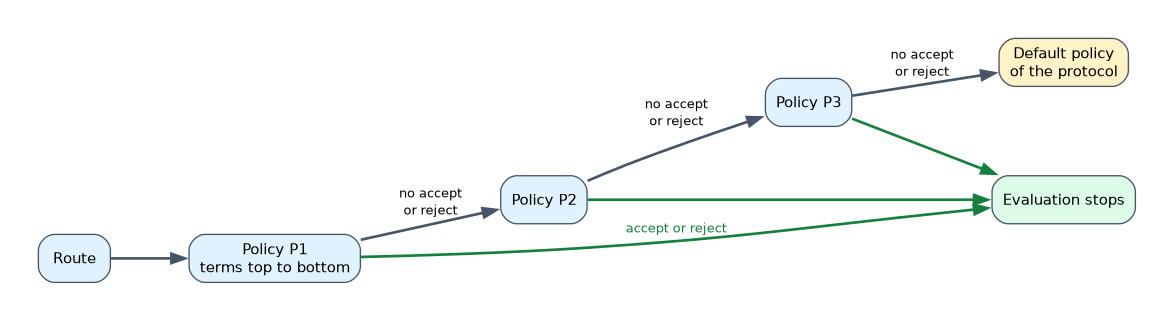 You can apply several policies in a list, called a policy chain:
user@router# set protocols bgp group EXT export [ P1 P2 P3 ]Each route is evaluated like this:
- Policies are checked left to right, P1 first.
- Inside a policy, terms are checked top to bottom.
- The first terminating action,
acceptorreject, ends evaluation for that route. - If a policy finishes without a terminating action for the route, evaluation moves to the next policy in the chain.
- If no policy in the chain accepts or rejects the route, the default policy of the protocol decides.
The order matters: if P1 ends with a term that accepts everything, P2 and P3 are never evaluated.
Effect of policies on routes and routing tables
| What the policy does | Effect |
|---|---|
| Import reject | The route is not installed in the routing table and is not used for forwarding |
Import accept with a change, such as local-preference | The route is installed with the new attribute, which can change which route is active |
| Export accept | The active route is advertised to the protocol's neighbors |
| Export reject | The route stays in the local routing table but neighbors do not receive it |
An import policy for a link-state protocol such as OSPF can stop OSPF routes from being installed in the routing table, but it cannot stop LSAs from being flooded or stored in the link-state database. Neighbors still learn the routes.
To check the result, use show route for the local table and show route advertising-protocol bgp <neighbor> or show route receive-protocol bgp <neighbor> for BGP. The test policy operational command shows which routes in the table a policy would accept.
user@router> test policy EXPORT-STATIC 0.0.0.0/0Common mistakes
Expecting static routes to appear in OSPF on their own. The OSPF default export policy rejects everything that is not OSPF. You need an export policy with from protocol static and then accept.
Applying an import policy to stop OSPF advertisements. Import affects only the local routing table. The LSAs are still flooded.
Putting a catch all accept first in a chain. The first policy's final accept ends evaluation, so later policies have no effect.
In a BGP configuration, a neighbor level export replaces the group level export. It does not combine with it, so a route the group policy handled may suddenly fall to the default.
What to remember for the exam
- Import: protocol into routing table. Export: routing table (active routes) out to a protocol.
- Default import for all protocols accepts the routes they learn.
- Default export: BGP advertises active BGP routes; OSPF, IS-IS and RIP reject everything through policy.
- RIP advertises nothing until you add an export policy.
- Chain evaluation: policies left to right, terms top to bottom, first
acceptorrejectwins, then the protocol default. - Policies live under
[edit policy-options policy-statement]and are applied under the protocol. test policychecks which routes a policy accepts.
Check yourself
You configure a static route and OSPF, but OSPF neighbors do not receive the static route. Why?
The OSPF default export policy rejects non-OSPF routes, so you must apply an export policy that accepts static routes.
A route matches no term in any policy of an export chain. What decides its fate?
The default export policy of the protocol the chain is applied to.
Can an OSPF import policy stop LSAs from being flooded to neighbors?
No. It only controls which OSPF routes are installed in the local routing table.
Topic 1 of 4 in Routing Policy and Firewall Filters
Test yourself on Routing Policy and Firewall Filters
The full Juniper JNCIA-Junos JN0-106 question bank has 1,155 questions, with timed practice exams and an explanation for every answer.
This study guide is independent and is not affiliated with, endorsed by, or sponsored by Juniper. Vendor names, certification names and exam codes are trademarks of their respective owners and are used for identification only.