Routing Fundamentals · Topic 3 of 4
Static Routing
Learn Junos static routing for JNCIA-Junos JN0-106: next-hop, qualified-next-hop floating routes, discard and reject, resolve, IPv6 and checking routes.
- 6 min
- Includes a diagram
- Static routes are configured under
[edit routing-options static]; default preference is 5. - IPv6 static routes use
set routing-options rib inet6.0 static route. - The next hop must be directly connected unless you add
resolve.
What it is
A static route is a route an administrator configures by hand. It tells the router how to reach a prefix through a fixed next hop, and it does not change unless someone edits the configuration.
In Junos OS, static routes live under [edit routing-options static] and have a default preference of 5, so they beat every dynamic protocol. They are simple and predictable, but they do not react to changes elsewhere in the network.
How it works
Basic configuration
user@router# set routing-options static route 0.0.0.0/0 next-hop 10.1.1.2
user@router# set routing-options static route 172.16.0.0/16 next-hop 10.1.2.2
user@router# commit
In hierarchy form:
routing-options {
    static {
        route 0.0.0.0/0 next-hop 10.1.1.2;
        route 172.16.0.0/16 next-hop 10.1.2.2;
    }
}
IPv6 static routes go into the inet6.0 table under rib:
user@router# set routing-options rib inet6.0 static route ::/0 next-hop 2001:db8:1::2The next hop must be reachable
By default the next-hop address must be on a directly connected subnet. If it is not, the static route does not become active and is not used for forwarding.
To use a next hop that is reachable only through another route, add resolve. Junos OS then resolves the next hop recursively through the routing table.
user@router# set routing-options static route 192.168.50.0/24 next-hop 10.9.9.9 resolveNext hop options
| Option | Effect |
|---|---|
next-hop <address> | Forwards to that address |
qualified-next-hop <address> preference <value> | Adds a next hop with its own preference, used for floating static routes |
discard | Silently drops matching packets |
reject | Drops matching packets and sends an ICMP unreachable message back |
resolve | Allows a next hop that is not directly connected |
next-table <table> | Looks the packet up again in another routing table, such as one in a routing instance |
no-readvertise | Keeps the route out of routing policy exports, so it is not advertised into a protocol |
discard and reject both drop traffic. The difference is that reject tells the sender with an ICMP unreachable message, while discard stays silent. Both are often used for a summary route, so that traffic for unused parts of the summary is dropped instead of looping.
Floating static routes with qualified-next-hop
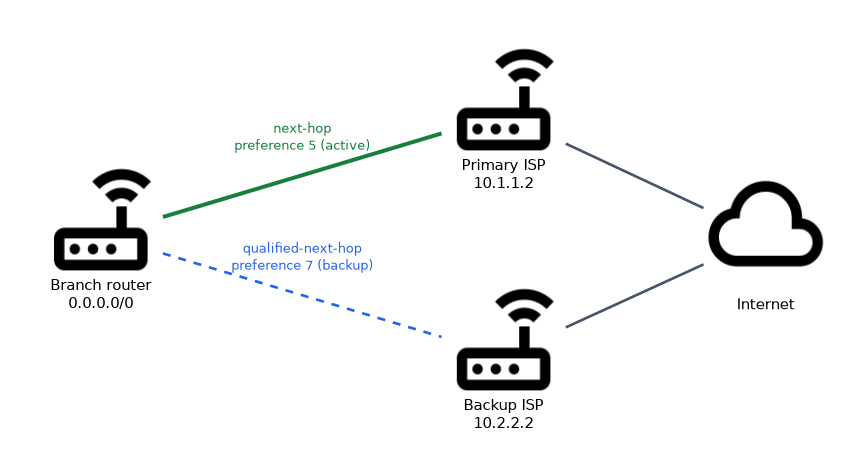 A qualified next hop gives a second next hop its own preference, so you get a primary and a backup path in one route:
user@router# set routing-options static route 0.0.0.0/0 next-hop 10.1.1.2
user@router# set routing-options static route 0.0.0.0/0 qualified-next-hop 10.2.2.2 preference 7
The next hop 10.1.1.2 uses the default preference 5 and is active. If its link goes down, the qualified next hop 10.2.2.2 with preference 7 takes over. When the primary link returns, traffic moves back.
You can also float a static route behind a dynamic protocol by giving it a preference higher than that protocol, for example 200 to sit behind OSPF and BGP.
Changing defaults for all static routes
The defaults statement sets values for every static route at once:
user@router# set routing-options static defaults preference 10A value configured on an individual route still overrides the default.
Checking static routes
| Command | Shows |
|---|---|
show route protocol static | All static routes in the routing table |
show route 0.0.0.0/0 exact | Only the exact prefix, without longer matches |
show route forwarding-table destination 172.16.1.1 | The forwarding entry the PFE uses for that address |
show configuration routing-options | The configured static routes |
user@router> show route protocol static

inet.0: 9 destinations, 10 routes (9 active, 0 holddown, 0 hidden)
+ = Active Route, - = Last Active, * = Both

0.0.0.0/0          *[Static/5] 00:20:14
                    > to 10.1.1.2 via ge-0/0/0.0
172.16.0.0/16      *[Static/5] 00:20:14
                    > to 10.1.2.2 via ge-0/0/1.0
Static routes and other protocols
A static route is used only by the router it is configured on. It is not advertised to neighbors by OSPF, IS-IS, RIP or BGP unless an export policy allows it. The Routing Policy and Firewall Filters chapter covers export policies.
A worked example
A branch router has two internet links. The engineer configures next-hop 10.1.1.2 for the primary ISP and qualified-next-hop 10.2.2.2 preference 7 for the backup ISP, both on the default route 0.0.0.0/0.
show route 0.0.0.0/0 exact shows the route active through 10.1.1.2. When the primary interface goes down, the same command shows the route through 10.2.2.2. The engineer also adds set routing-options static route 10.0.0.0/8 discard so traffic to unused internal addresses is dropped instead of sent to the ISP.
How the exam asks about this
- "What is the default preference of a static route?" → 5.
- "Which option drops packets and returns an ICMP unreachable?" →
reject. - "A static route's next hop is not on a connected subnet. What makes it work?" → The
resolveoption.
Common mistakes
Confusing discard and reject. Both drop the packet. Only reject sends an ICMP unreachable back to the source.
Using a remote next hop without resolve. By default the next hop must be directly connected; otherwise the route does not become active.
Expecting OSPF to advertise static routes automatically. Static routes stay local until an export policy redistributes them.
What to remember for the exam
- Static routes are configured under
[edit routing-options static]; default preference is 5. - IPv6 static routes use
set routing-options rib inet6.0 static route. - The next hop must be directly connected unless you add
resolve. discarddrops silently;rejectdrops and sends ICMP unreachable.qualified-next-hopwith a higher preference creates a backup next hop.
A discard or reject route for a large prefix such as 10.0.0.0/8 also catches traffic for any subnet inside it that has no more specific route. Make sure the real subnets have longer matches.
Check yourself
How do you configure a default route to 10.1.1.2 in Junos OS?
set routing-options static route 0.0.0.0/0 next-hop 10.1.1.2, then commit.What is the difference between
discardandreject?Both drop matching packets, but
rejectalso sends an ICMP unreachable message to the sender.What does
qualified-next-hop 10.2.2.2 preference 7add to a static route?A backup next hop with preference 7 that is used only when the primary next hop with preference 5 is unavailable.
Topic 3 of 4 in Routing Fundamentals
Test yourself on Routing Fundamentals
The full Juniper JNCIA-Junos JN0-106 question bank has 1,155 questions, with timed practice exams and an explanation for every answer.
This study guide is independent and is not affiliated with, endorsed by, or sponsored by Juniper. Vendor names, certification names and exam codes are trademarks of their respective owners and are used for identification only.