Firewall Security Policies · Topic 2 of 2
Security Policies and Firewall Application Scenarios
Learn Huawei firewall security policy elements, matching order, the default deny policy, configuration, and where firewalls sit in security solutions.
- 6 min
- Includes a diagram
- A rule combines zones, addresses, users, services, applications and time; all its conditions must match.
- Rules are matched top down and the first match wins.
- The default policy matches everything and denies it.
What it is
A security policy is the rule set a Huawei firewall uses to decide whether traffic may pass. Each rule has matching conditions, such as zones, addresses and services, and an action, permit or deny.
The same mechanism is used wherever the firewall sits: at the internet egress, in front of the servers in a DMZ, between departments inside the intranet, or at a branch. Those placements are the firewall's application scenarios.
How it works
Matching conditions
| Condition | Example |
|---|---|
| Source zone and destination zone | trust to untrust |
| Source address and destination address | 10.1.1.0/24, or an address set |
| User or user group | A user authenticated on the firewall |
| Service | http, https, icmp, or a custom TCP or UDP port |
| Application | An application identified by the NGFW |
| Time range | Working hours only |
All conditions in one rule must match together (logical AND). A condition left out means "any". When a rule lists several values for one condition, such as two services, a packet needs to match only one of them (logical OR).
Matching order and the default policy
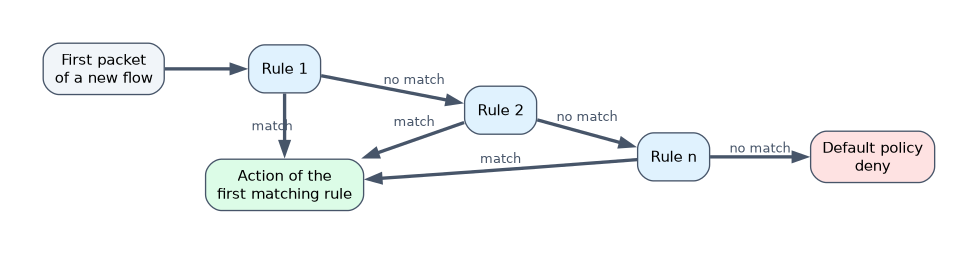 Rules are checked from top to bottom, and the first matching rule decides. Later rules are not checked. Put specific rules above general ones, or a broad rule will hide them.
If no rule matches, the default policy applies. Its action is deny, so traffic is blocked unless a rule permits it. The default policy is always last and matches any traffic.
On USG6000 series firewalls, a security policy can also control traffic between interfaces in the same zone; whether intrazone traffic is checked by default depends on the software version, so a clear permit rule is the safe design. Traffic to or from the firewall itself crosses the local zone and is also controlled.
A permit rule can attach content security profiles, such as IPS, antivirus or URL filtering, so permitted traffic is still inspected.
Configuring a security policy
[FW] security-policy
[FW-policy-security] rule name trust_to_untrust
[FW-policy-security-rule-trust_to_untrust] source-zone trust
[FW-policy-security-rule-trust_to_untrust] destination-zone untrust
[FW-policy-security-rule-trust_to_untrust] source-address 10.1.1.0 24
[FW-policy-security-rule-trust_to_untrust] action permit
This rule lets hosts in 10.1.1.0/24 start any traffic from trust to untrust. No service line is given, so every service matches. The replies return through the session table.
A rule that publishes a web server in the DMZ to internet users looks like this:
[FW-policy-security] rule name untrust_to_web
[FW-policy-security-rule-untrust_to_web] source-zone untrust
[FW-policy-security-rule-untrust_to_web] destination-zone dmz
[FW-policy-security-rule-untrust_to_web] destination-address 192.168.10.10 32
[FW-policy-security-rule-untrust_to_web] service http https
[FW-policy-security-rule-untrust_to_web] action permit
Use display security-policy rule all to list the rules in order, ending with the default rule. To change the order, rule move <rule1> before <rule2> places one rule above another.
Firewall application scenarios
| Scenario | Where the firewall sits | Main jobs |
|---|---|---|
| Internet egress | Between the intranet and the ISP links | Policy for outgoing access, source NAT, IPS, antivirus, URL filtering, attack defense |
| DMZ server publishing | Between the internet, the DMZ and the intranet | NAT Server, strict inbound policy to only the published services |
| Intranet isolation | Between departments or between users and the data center | Zones per department, least privilege access, logging |
| Data center border | In front of server areas | High performance policy, intrusion and DDoS protection |
| Branch interconnection | At headquarters and each branch | IPsec VPN tunnels over the internet |
| Remote access | At the headquarters edge | SSL VPN for mobile staff |
| High reliability | Two firewalls side by side | Hot standby so one takes over if the other fails |
At the egress, the firewall usually works in routing mode and is the gateway. Where a network must not be renumbered, it can be inserted in transparent mode. In cloud and virtualized data centers, a virtual firewall such as the USG6000V provides the same functions as software.
A worked example
The rules are, in order: rule A denies source 10.1.1.20 from trust to untrust, rule B permits 10.1.1.0/24 from trust to untrust.
Host 10.1.1.20 opens a web page: rule A matches first, so it is denied. Host 10.1.1.30 matches rule B and is permitted. An internet host trying to reach 10.1.1.30 matches neither rule, because they are for trust to untrust, so the default policy denies it.
How the exam asks about this
- "No rule matches a packet. What does the firewall do by default?" → It applies the default policy, which denies the packet.
- "Two rules both match a flow. Which one is applied?" → The one higher in the list, checked first.
- "Which scenario uses NAT Server and a policy from untrust to dmz?" → Publishing a server in the DMZ to internet users.
What to remember for the exam
- A rule combines zones, addresses, users, services, applications and time; all its conditions must match.
- Rules are matched top down and the first match wins.
- The default policy matches everything and denies it.
- On USG6000 firewalls, traffic to or from the local zone is controlled by security policy, and intrazone traffic can be too.
- Typical scenarios are internet egress, DMZ publishing, intranet isolation, data center border, branch VPN, remote access and hot standby.
Order matters. A broad permit rule placed above a specific deny rule permits the traffic you meant to block, because matching stops at the first hit.
Common mistakes
Assuming a missing service means no service. A condition left unset matches any value, so a rule without service matches all services.
Forgetting the policy for the firewall itself. Pinging or managing the firewall, or terminating an IPsec tunnel on it, involves the local zone and needs permitted traffic.
Changing the default policy to permit. It makes testing easy but turns the firewall into a router. Keep the default deny and add specific permit rules.
Check yourself
Inside one rule, how are a source zone and a service combined?
With logical AND: the packet must match both. Several values of the same condition are combined with OR.
Why does a permit rule from trust to untrust not let internet hosts start connections inward?
The rule matches only flows whose first packet goes from trust to untrust. Inbound first packets match no rule and are denied by the default policy.
Where is a firewall placed to publish a web server safely?
Between the internet and a DMZ, with NAT Server and a policy that permits only the needed services from untrust to the server.
Topic 2 of 2 in Firewall Security Policies
Test yourself on Firewall Security Policies
The full Huawei HCIA-Security H12-711 question bank has 600 questions, with timed practice exams and an explanation for every answer.
This study guide is independent and is not affiliated with, endorsed by, or sponsored by Huawei. Vendor names, certification names and exam codes are trademarks of their respective owners and are used for identification only.