Firewall Security Policies · Topic 1 of 2
Firewall Basic Principles
Learn firewall development, Huawei default security zones and levels, stateful inspection, the session table and firewall modes for HCIA-Security H12-711.
- 6 min
- Includes a diagram
- Default zones: local 100, trust 85, dmz 50, untrust 5. Higher level means more trust, and levels are unique.
- An interface must belong to a zone to forward traffic; no interface can be added to local.
- Only the first packet of a flow is checked against the security policy; later packets match the session.
What it is
A firewall is a network security device that sits between networks of different trust and controls the traffic between them. Its default stance is to block, and it lets through only the traffic that a security policy permits.
A Huawei USG or HiSecEngine firewall is a stateful firewall. It checks the first packet of a flow against the security policy, records the flow in a session table, and forwards the rest of the flow by matching that session.
How it works
How firewalls developed
| Generation | How it decides | Limitation |
|---|---|---|
| Packet filtering | Checks each packet alone against static rules on addresses, ports and protocol | No state; every packet is checked; return traffic needs its own rule |
| Proxy (application gateway) | Terminates connections and relays them at the application layer | Slow, and each application needs its own proxy |
| Stateful inspection | Checks the first packet, then tracks the flow in a session table | Little visibility into the application content |
| UTM | Adds IPS, antivirus, URL filtering and VPN to one box | Performance drops when many functions run at once |
| NGFW | Identifies applications, users and content, and processes them in one pass | Current generation |
Security zones
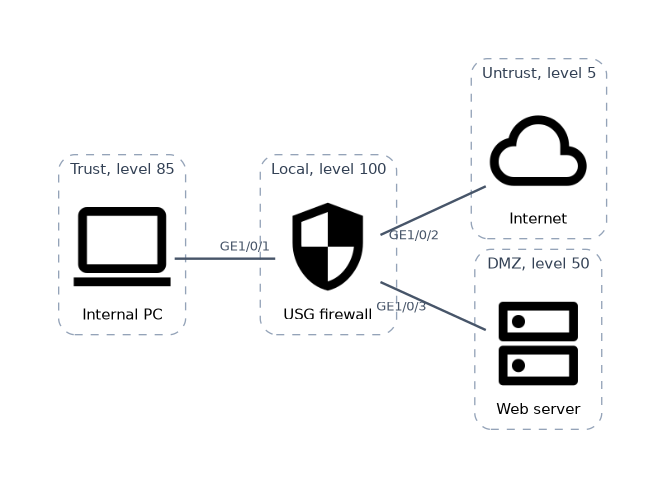 A security zone is a group of interfaces whose networks share the same trust. Policies are written between zones, not between single interfaces. An interface must be added to a zone before the firewall can forward its traffic.
| Default zone | Security level | Typical use |
|---|---|---|
| local | 100 | The firewall itself; no interface can be added to it |
| trust | 85 | The internal network |
| dmz | 50 | Servers that outside users reach, such as web and mail |
| untrust | 5 | The internet and other untrusted networks |
Levels run from 1 to 100, a higher value means more trust, and two zones cannot share a level. The four default zones cannot be deleted. Traffic from a lower level to a higher level is called inbound, and from higher to lower outbound.
<FW> system-view
[FW] firewall zone trust
[FW-zone-trust] add interface GigabitEthernet1/0/1
[FW-zone-trust] quit
[FW] firewall zone name partner
[FW-zone-partner] set priority 60
[FW-zone-partner] add interface GigabitEthernet1/0/3
The local zone matters for traffic to or from the firewall itself, such as a ping to its interface or an SSH login. That traffic flows between another zone and local, so policy controls it too.
Stateful inspection and the session table
A session is identified by the 5-tuple: source address, destination address, source port, destination port and protocol. For ICMP, the message identifier, type and code take the place of ports.
| Packet | What the firewall does |
|---|---|
| First packet of a new flow | Looks up the route and zones, matches the security policy, creates a session if permitted |
| Later packets in either direction | Match the existing session and are forwarded without a new policy check |
| Packet with no session that is not a valid first packet | Discarded, for example a TCP packet that is not a SYN when state checking is on |
Because the reply matches the session, you write one rule for the direction that starts the flow. Each session has an aging time per protocol: if no packet matches it for that long, the session is deleted.
<FW> display firewall session table
 Current Total Sessions : 1
  http  VPN: public --> public  10.1.1.10:2050 --> 203.0.113.10:80
This line shows an HTTP session from 10.1.1.10 port 2050 to 203.0.113.10 port 80. The verbose keyword adds details such as the zones and the remaining time.
Protocols such as FTP open a second connection on a port negotiated inside the first. ASPF reads that negotiation and creates a temporary server map entry, covered in the NAT chapter.
Forwarding modes
| Mode | Interfaces | Used when |
|---|---|---|
| Routing mode | Layer 3, with IP addresses | The firewall acts as a gateway between subnets |
| Transparent mode | Layer 2, no IP addresses for forwarding | The firewall is inserted into an existing network without changing its IP plan |
| Hybrid mode | Both layer 2 and layer 3 interfaces | Part of the network is routed and part is bridged |
A worked example
GigabitEthernet1/0/1 (10.1.1.1/24) is in trust and GigabitEthernet1/0/2 is in untrust. A policy permits trust to untrust. PC 10.1.1.10 opens a web page on 203.0.113.10.
The SYN is the first packet: the firewall finds the zone pair trust to untrust, matches the permit rule and creates the session. The server's SYN+ACK arrives from untrust and matches that session, so it is allowed with no untrust to trust rule.
How the exam asks about this
- "What is the security level of the dmz zone by default?" → 50.
- "Which zone represents the firewall itself?" → The local zone, level 100.
- "Why does the reply from the server not need a policy?" → It matches the session created by the first packet.
What to remember for the exam
- Default zones: local 100, trust 85, dmz 50, untrust 5. Higher level means more trust, and levels are unique.
- An interface must belong to a zone to forward traffic; no interface can be added to local.
- Only the first packet of a flow is checked against the security policy; later packets match the session.
- A session is identified by the 5-tuple and is deleted when its aging time expires.
- Firewalls developed from packet filtering through proxy, stateful inspection and UTM to NGFW.
Traffic to the firewall itself, such as a ping to its interface, is not intrazone traffic. It flows from the incoming zone to the local zone and needs to be permitted.
Common mistakes
Writing a rule for the return direction. A stateful firewall permits replies through the session table. A second rule for replies is unnecessary and can open the network wider than intended.
Giving untrust a level of 0 or local a level of 85. The values are fixed: untrust 5, dmz 50, trust 85, local 100.
Forgetting to add the interface to a zone. An interface with an IP address but no zone does not forward traffic, and no policy will help until it is added.
Check yourself
Which five fields identify a firewall session?
Source IP address, destination IP address, source port, destination port and protocol.
What happens to the second and later packets of a permitted flow?
They match the existing session and are forwarded without being checked against the security policy again.
In which forwarding mode can a firewall be added to a network without changing its IP addresses?
Transparent mode, where the firewall's interfaces forward at layer 2 like a switch.
Topic 1 of 2 in Firewall Security Policies
Test yourself on Firewall Security Policies
The full Huawei HCIA-Security H12-711 question bank has 600 questions, with timed practice exams and an explanation for every answer.
This study guide is independent and is not affiliated with, endorsed by, or sponsored by Huawei. Vendor names, certification names and exam codes are trademarks of their respective owners and are used for identification only.