Firewall Hot Standby Technologies · Topic 2 of 2
Hot Standby Networking and Configuration
Learn hot standby active/standby and load sharing modes, VRRP and routing networking, the heartbeat link and basic hrp and vrrp setup on USG firewalls.
- 6 min
- Includes a diagram
- Active/standby uses one forwarding firewall; load sharing uses both, each active for some VRRP groups.
vrrp vrid ... virtual-ip ... activeorstandbybinds the VRRP group to the VGMP state of the firewall.hrp interface <interface> remote <peer address>sets the heartbeat link, andhrp enablestarts hot standby.
What it is
Hot standby networking is the way two firewalls are cabled and configured so that one can replace the other. The two firewalls run either in active/standby mode or in load sharing mode, connected by a dedicated heartbeat link.
The basic configuration has three parts: VRRP groups on the service interfaces, the heartbeat interface, and HRP itself.
How it works
Active/standby and load sharing
| Mode | How traffic flows | VGMP state |
|---|---|---|
| Active/standby | One firewall forwards all traffic; the other only receives backups | Active on one, standby on the other |
| Load sharing | Both firewalls forward traffic, each active for some VRRP groups | Load balance on both |
Active/standby is simpler and keeps paths predictable. Load sharing uses both firewalls, but each still needs enough capacity to carry all traffic alone if its peer fails.
In load sharing, FW1 is active for VRRP group 1 and standby for group 2, and FW2 is the reverse. Half the hosts use the virtual address of group 1 as their gateway and half use group 2. Because forward and return paths can differ, quick session backup should be enabled.
Typical networking
| Networking | Upstream and downstream devices | How traffic is steered |
|---|---|---|
| Firewall service interfaces work at Layer 3, connected to switches | Switches | VRRP groups give the virtual gateway addresses |
| Firewall service interfaces work at Layer 3, connected to routers | Routers running OSPF | The standby firewall advertises routes with a much higher cost, so routers prefer the active firewall |
| Firewall service interfaces work at Layer 2 (transparent mode) | Switches or routers | The firewalls monitor VLANs and pass traffic like a bridge |
The HCIA course concentrates on the first case. With routers, hrp adjust ospf-cost enable lets the standby firewall raise its OSPF cost automatically.
The heartbeat link
The heartbeat link carries HRP and VGMP packets between the two firewalls. It is best a direct cable between interfaces of the same type, often placed in its own security zone, such as a zone called heartbeat.
If the heartbeat link fails, each firewall loses sight of its peer. Both can become active, so a second, backup heartbeat interface is recommended.
Basic configuration, active/standby with switches
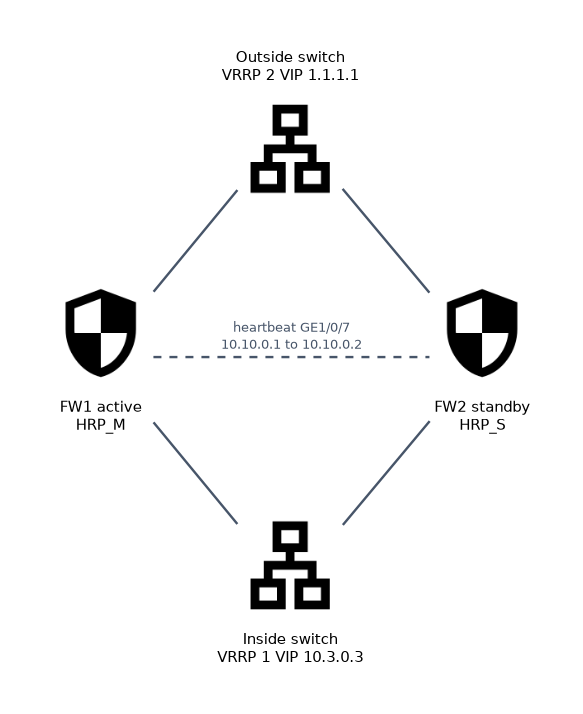 FW1 is active and FW2 is standby. Each has one interface toward the inside switch, one toward the outside switch and GigabitEthernet1/0/7 as the heartbeat.
FW1:
interface GigabitEthernet1/0/1
 ip address 10.3.0.1 255.255.255.0
 vrrp vrid 1 virtual-ip 10.3.0.3 active
#
interface GigabitEthernet1/0/3
 ip address 1.1.1.2 255.255.255.0
 vrrp vrid 2 virtual-ip 1.1.1.1 active
#
hrp interface GigabitEthernet1/0/7 remote 10.10.0.2
hrp enable
FW2 uses its own interface addresses, the same VRIDs and virtual addresses with the standby keyword, and hrp interface GigabitEthernet1/0/7 remote 10.10.0.1.
The physical IP address must be set on the interface before the VRRP virtual address. The active and standby keywords add the VRRP group to the VGMP active or standby group, so VGMP, not VRRP priority, decides the master.
After hrp enable, the prompt of the active firewall changes to HRP_M, for example HRP_M[FW1], and the standby shows HRP_S. Security policies and NAT policies are then configured once on FW1 and copied to FW2.
Verifying hot standby
| Command | What it shows |
|---|---|
display hrp state | The local and peer roles, active or standby, and their priorities |
display vrrp brief | Each VRRP group, its state (Master or Backup) and virtual IP address |
display firewall session table | Sessions, which should appear on both firewalls once backed up |
A worked example
After configuration, display vrrp brief on FW2 shows both groups in Backup state, and display hrp state shows the local role standby and the peer active. Sessions created by users on FW1 also appear in the session table of FW2.
The engineer shuts down GigabitEthernet1/0/3 on FW1 to test. FW1's VGMP priority drops, FW2 becomes Master for both VRRP groups, and user sessions continue through FW2.
How the exam asks about this
- "Which keyword in
vrrp vrid 1 virtual-ip 10.3.0.3 activeadds the VRRP group to the VGMP active group?" ->active. - "Which command specifies the heartbeat interface and the peer's heartbeat address?" ->
hrp interface GigabitEthernet1/0/7 remote 10.10.0.2. - "In load sharing mode, what state does the VGMP group show?" -> Load balance, because each firewall is active for some traffic.
What to remember for the exam
- Active/standby uses one forwarding firewall; load sharing uses both, each active for some VRRP groups.
vrrp vrid ... virtual-ip ... activeorstandbybinds the VRRP group to the VGMP state of the firewall.hrp interface <interface> remote <peer address>sets the heartbeat link, andhrp enablestarts hot standby.- The active firewall's prompt shows
HRP_Mand the standby's showsHRP_S. - Check with
display hrp stateanddisplay vrrp brief.
Load sharing only protects you if each firewall can carry all the traffic alone. If both run at 70%, a failure overloads the survivor.
Common mistakes
Using the same physical address on both firewalls. Each firewall needs its own interface address in the subnet; only the VRRP virtual address is shared.
Configuring the heartbeat only on one side. The hrp interface command, like the interface addresses, is not backed up. Each firewall needs its own hrp interface pointing at the other, and the heartbeat interface must be added to a security zone.
Expecting VRRP priority to choose the master. Once a VRRP group is added to VGMP with active or standby, the VGMP state decides which firewall is Master.
Check yourself
What is the role of the
remoteaddress in thehrp interfacecommand?It is the peer firewall's heartbeat interface address, to which HRP and VGMP packets are sent.
Why should quick session backup be enabled in load sharing mode?
Forward and return packets of one flow can pass different firewalls, so each needs the session at once.
Which prompt tells you that you are configuring the active firewall?
HRP_M, such asHRP_M[FW1]; configuration entered there is backed up to the standby.
Topic 2 of 2 in Firewall Hot Standby Technologies
Test yourself on Firewall Hot Standby Technologies
The full Huawei HCIA-Security H12-711 question bank has 600 questions, with timed practice exams and an explanation for every answer.
This study guide is independent and is not affiliated with, endorsed by, or sponsored by Huawei. Vendor names, certification names and exam codes are trademarks of their respective owners and are used for identification only.