Overview of FusionAccess · Topic 1 of 1
FusionAccess, HDP, Components and Scenarios
Learn what Huawei FusionAccess desktop cloud is, how HDP delivers desktops, the roles of WI, HDC, ITA, vAG, vLB, HDA and TCM, and the main use cases.
- 6 min
- Includes a diagram
- FusionAccess delivers desktops; the desktop VMs themselves run on FusionCompute.
- HDP is Huawei's remote display protocol; the HDP client runs on the TC or SC and the HDA sits in the VM.
- WI is the user login portal, vLB balances WIs and vAG is the access gateway.
What it is
FusionAccess is Huawei's desktop cloud solution, a form of VDI (Virtual Desktop Infrastructure). Each user's Windows or Linux desktop runs as a VM in the data center, and the user reaches it from a thin client (TC), a PC or a mobile device.
FusionAccess does not provide compute or storage of its own. The desktop VMs run on FusionCompute, and FusionAccess adds the login, user to desktop mapping, remote display protocol and desktop management on top.
How it works
Why desktop cloud
| Traditional PC | Desktop cloud |
|---|---|
| Data stored on each local disk | Data stays in the data center |
| Each PC patched and repaired on site | Desktops managed centrally from one portal |
| Hardware sized for peak, mostly idle | Resources shared and allocated on demand |
| Office tied to one machine | Same desktop reached from any supported device |
The main benefits are data security, central management, better resource use and mobile access.
HDP: the Huawei Desktop Protocol
HDP is the remote display protocol that carries the desktop between the VM and the client. The HDP client runs on the TC or in the soft client (SC), and the HDP server side is provided by the HDA inside the desktop VM.
HDP sends screen updates, keyboard and mouse input, audio and peripheral data over separate virtual channels in one connection. It classifies the displayed bitmaps by content, so text and graphics are compressed losslessly to stay sharp, while photos and video can use lossy compression to save bandwidth.
| HDP capability | What it means for the user |
|---|---|
| Smart display compression | Sharp text, smooth video, lower bandwidth |
| Audio and multimedia redirection | Sound and video playback in the remote desktop |
| Peripheral redirection | USB devices, printers and drives used from the client |
| File and clipboard redirection | Copy and paste between client and desktop, if policy allows |
| SSL encryption | Desktop traffic protected in transit |
Administrators control most of these channels with policies, for example blocking USB storage or the clipboard for a secure office.
The FusionAccess components
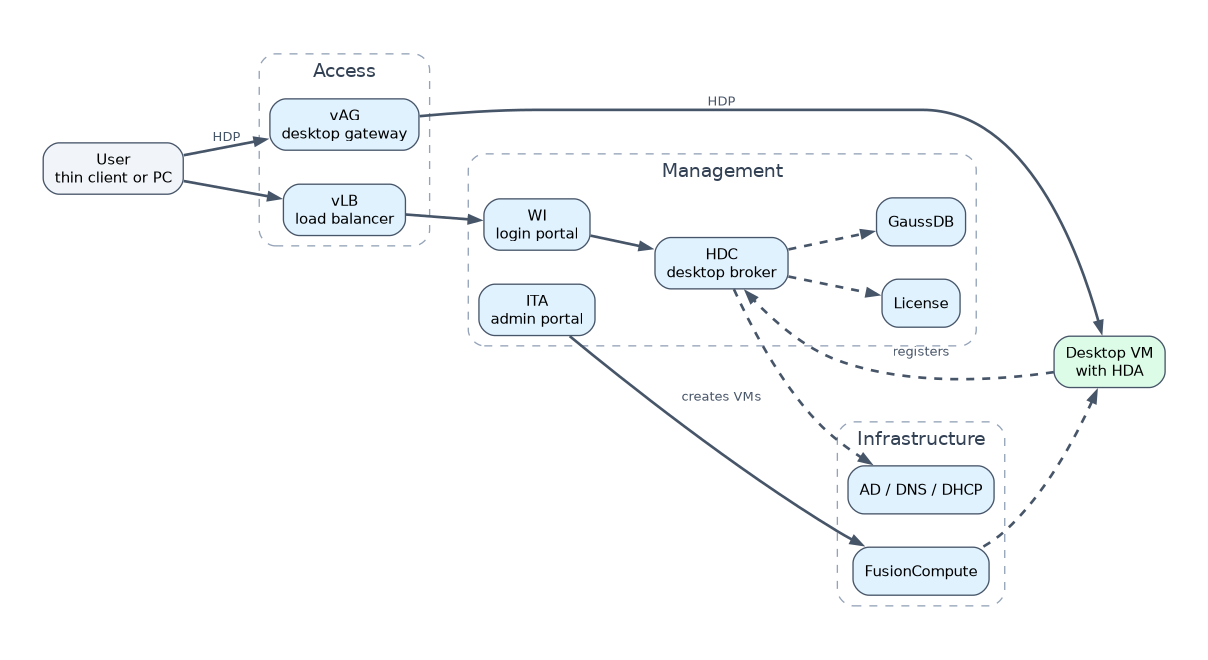 The components sit in layers. The access and control layer faces users, the management layer runs the service, and the agent runs inside every desktop.
| Component | Role |
|---|---|
| WI (Web Interface) | Login portal for users; checks the user with AD and shows the user's desktop list |
| vLB (virtual Load Balancer) | Spreads user login requests across several WIs |
| vAG (virtual Access Gateway) | Gateway for HDP desktop access, and for the VNC based self maintenance console |
| HDC (Huawei Desktop Controller) | Core component; maps users to desktops and handles VM registration and login requests |
| ITA (IT Adapter) | Administrator portal; works with HDC, FusionCompute, AD and DNS to create and manage desktops |
| License server | Manages the licenses for HDP desktop connections |
| GaussDB | Database that stores ITA and HDC data, such as users, desktops and policies |
| TCM (Thin Client Manager) | Manages thin clients: upgrades, configuration and monitoring |
| HDA (Huawei Desktop Agent) | Agent installed in each desktop VM; registers with HDC and terminates the HDP connection |
| AD / DNS / DHCP | AD holds user accounts and domain policies, DNS resolves names, DHCP gives desktop VMs their IP settings |
AD, DNS and DHCP are standard Windows services, often supplied by the customer.
How a user logs in
The HDA registers its VM with the HDC and sends heartbeats, so the HDC knows which desktops are ready. Users inside the network can connect straight to the VM, while users outside reach it through the vAG.
Application scenarios
| Scenario | Why desktop cloud fits |
|---|---|
| Standard office | Many similar desktops, managed and patched centrally |
| Secure office | Data never leaves the data center; USB and clipboard can be blocked |
| Branch office | Branch desktops managed from headquarters |
| Mobile office | Staff reach their own desktop from home or on the road through the gateway |
| Call center and education | Identical, stateless desktops that are reset after use |
| Graphics design | GPU backed desktops for 2D and 3D work |
A worked example
A bank wants customer data kept off branch PCs. It deploys FusionAccess on FusionCompute, gives tellers thin clients and blocks USB storage with a policy.
A teller logs in through WI, the HDC finds her desktop and HDP shows it. If her thin client fails, she uses another and gets the same desktop, because nothing was stored locally.
How the exam asks about this
- "Which component is installed in the user's virtual desktop so that it can be reached over HDP?" -> HDA.
- "Which component maps users to virtual desktops and handles desktop registration?" -> HDC.
- "HDP classifies displayed bitmaps and compresses them differently. True or false?" -> True; text is kept lossless and images or video can be compressed with loss.
What to remember for the exam
- FusionAccess delivers desktops; the desktop VMs themselves run on FusionCompute.
- HDP is Huawei's remote display protocol; the HDP client runs on the TC or SC and the HDA sits in the VM.
- WI is the user login portal, vLB balances WIs and vAG is the access gateway.
- HDC maps users to desktops; ITA is the administrator portal that talks to FusionCompute; GaussDB stores their data.
- TCM manages thin clients; AD authenticates users, DNS resolves names and DHCP assigns desktop IP addresses.
Do not swap WI and ITA. WI is the page end users log in to, while ITA is the management portal administrators use to provision desktops.
Common mistakes
Thinking FusionAccess hosts the VMs. FusionAccess manages and delivers desktops, but CNA hosts in FusionCompute run them.
Putting HDA on the client. HDA is inside the desktop VM; the client device runs the HDP client.
Mixing up vAG and vLB. vLB balances login requests across WIs, while vAG forwards desktop access traffic and the self maintenance console.
Check yourself
What does the HDC do in FusionAccess?
It is the core controller that maps users to desktops and handles VM registration and login requests from the HDA and WI.
Why does HDP classify displayed bitmaps?
So it can compress text losslessly to keep it sharp and compress images or video with loss to save bandwidth.
Which FusionAccess component manages thin clients?
TCM, the Thin Client Manager, which handles thin client upgrades, configuration and monitoring.
Topic 1 of 1 in Overview of FusionAccess
Test yourself on Overview of FusionAccess
The full Huawei H13-511 question bank has 600 questions, with timed practice exams and an explanation for every answer.
This study guide is independent and is not affiliated with, endorsed by, or sponsored by Huawei. Vendor names, certification names and exam codes are trademarks of their respective owners and are used for identification only.