FusionAccess Service Provisioning · Topic 2 of 3
Template Creation
Learn how FusionAccess turns a prepared VM into a full copy or linked clone template, how base and delta disks work, and how templates are updated.
- 5 min
- Includes a diagram
- The template type, full copy or linked clone, is chosen when the template is created.
- Full copy desktops have independent system disks; changes persist and storage use is high.
- Linked clone desktops share a read only base disk and keep changes in their own delta disks.
What it is
Template creation turns the prepared and encapsulated VM into a VM template that FusionAccess can create desktops from. The key decision is the template type, because it fixes how every desktop made from it stores its system disk.
FusionAccess offers two main types: full copy and linked clone. They differ in storage use, persistence and how updates reach the desktops.
How it works
Full copy templates
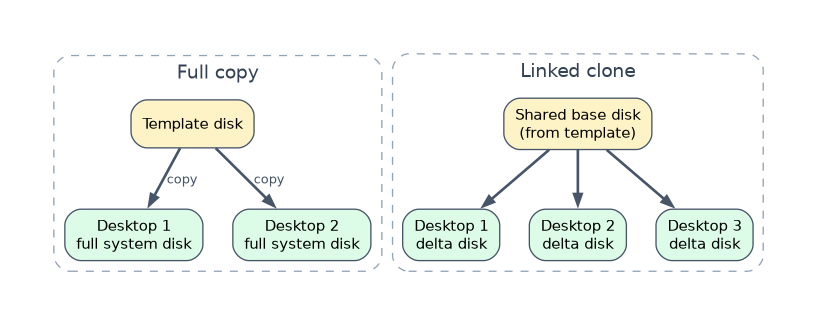
A full copy desktop gets a complete, independent copy of the template's system disk. After creation it has no link to the template.
The template is generalized with Sysprep during encapsulation. Each new desktop boots, receives its own name and SID, and then joins the AD domain, which makes creation slower than for linked clones.
Linked clone templates
A linked clone desktop does not get its own full system disk. All desktops of a group share one read only base disk made from the template, and each desktop has its own small delta disk that records only its changes.
Because most of the data is shared, linked clones are created quickly and use far less storage. The linked clone template is prepared in the domain before it is converted, rather than generalized with Sysprep.
Full copy versus linked clone
| Feature | Full copy | Linked clone |
|---|---|---|
| System disk | Own complete copy | Shared base disk plus own delta disk |
| Storage used | High | Low |
| Creation speed | Slower | Fast |
| Changes to the system disk | Kept | Can be reset when the desktop shuts down |
| Updating software | Done in each desktop | Update the template once, then the VM group |
| Typical user | Dedicated user who installs own software | Standard or task worker with the same image |
| Typical desktop group | Dedicated | Static or dynamic pool |
Keeping user data with linked clones
Restoring the system disk throws away anything the user saved there. Linked clone users therefore keep their files on a separate user data disk or in a network folder through folder redirection.
This split is what makes linked clones easy to maintain. The system disk stays standard and disposable, while the user's data survives every reset.
Creating the template
| Step | What happens |
|---|---|
| Create the template VM | In ITA, choose the cluster, specifications and network for the VM |
| Configure user login (option) | Lets members of a chosen AD group log in to the template VM |
| Prepare and encapsulate | Install the OS, Tools, HDA and apps, then encapsulate |
| Convert to template | Mark the VM as a full copy or linked clone template |
The Configure user login option matters when administrators need domain accounts to log in to the template VM, for example to install software. Only members of the AD group chosen there can log in.
Updating templates
With full copy, a template change affects only desktops created afterward. Existing desktops are updated one by one, like normal PCs, or by software distribution tools.
With linked clone, the administrator updates the template, for example with a new patch, and then updates the VM group to the new version. Every desktop in the group picks up the new base disk, which makes patching hundreds of desktops a single task.
A worked example
A call center has 300 agents who all use the same CRM client and save nothing locally. The administrator creates a linked clone template, so the 300 desktops share one base disk and each only stores a small delta disk.
Each month she patches the template and updates the VM group. Agent settings and files live in redirected folders, so the system disk reset loses nothing important.
How the exam asks about this
- "Which desktop type shares a read only base disk among many VMs?" -> Linked clone.
- "Which desktop type is best for a user who installs personal software that must persist?" -> Full copy.
- "When creating a template VM, select Configure user login if the members of which group need to log in to the VM?" -> The AD group chosen in the setting.
What to remember for the exam
- The template type, full copy or linked clone, is chosen when the template is created.
- Full copy desktops have independent system disks; changes persist and storage use is high.
- Linked clone desktops share a read only base disk and keep changes in their own delta disks.
- Linked clone system disks can be reset, so user data belongs on a data disk or redirected folder.
- Updating a linked clone template and its VM group updates every desktop in the group at once.
Restoring a linked clone desktop's system disk deletes anything stored on it. Never leave user data on the system disk of a linked clone desktop.
Common mistakes
Thinking full copy desktops follow template updates. A full copy is independent once created; only linked clones pick up an updated base disk.
Choosing linked clone for users who customize their system. Their changes may be lost on reset, so they need full copy desktops.
Assuming linked clones need no planning for storage. They save capacity, but the shared base disk carries the read load of all desktops in the group.
Check yourself
What are the base disk and delta disk in a linked clone desktop?
The base disk is the shared, read only system disk made from the template, and the delta disk is each desktop's own disk that records its changes.
Why is linked clone easier to patch than full copy?
The administrator patches the template once and updates the VM group, instead of updating every desktop separately.
Where should a linked clone user's files be stored?
On a separate user data disk or in a network folder through folder redirection, because the system disk can be reset.
Topic 2 of 3 in FusionAccess Service Provisioning
Test yourself on FusionAccess Service Provisioning
The full Huawei H13-511 question bank has 600 questions, with timed practice exams and an explanation for every answer.
This study guide is independent and is not affiliated with, endorsed by, or sponsored by Huawei. Vendor names, certification names and exam codes are trademarks of their respective owners and are used for identification only.