Terraform State and Backend Operations · Topic 1 of 3
Remote Backends and Remote State
Terraform Professional 002: backend block rules, partial configuration, state migration, S3 locking, the cloud block and terraform_remote_state.
- 5 min
- Includes a diagram
- The
terraformblock takes constants only, so backend values that vary come through-backend-config. -migrate-statecopies state;-reconfiguredoes not.use_lockfilewrites a.tflockfile; a blocked apply errors unless-lock-timeoutis set.
What it is
A remote backend stores state somewhere a whole team can reach, with locking and access control. HCP Terraform (formerly Terraform Cloud) plays the same role through a cloud block.
Remote state configuration also covers reading another configuration's outputs. The terraform_remote_state data source lets a network stack hand subnet IDs to an application stack, at a cost in access that you need to understand.
How it works
Configuring a backend
terraform {
  backend "s3" {
    bucket       = "acme-tf-state"
    key          = "network/terraform.tfstate"
    region       = "us-east-1"
    use_lockfile = true
    encrypt      = true
  }
}| Rule | Detail |
|---|---|
| Constant values only | No variables, locals or other named references, and no functions, inside the terraform block |
| One destination | A backend block cannot coexist with a cloud block |
| Backend changes | Terraform asks you to run terraform init again |
| Credentials | Use environment variables or the target system's credential files, not the block |
| Plain text copies | Backend settings are written to .terraform/terraform.tfstate and to plan files, so do not commit .terraform |
Partial configuration
Because variables are not allowed, per-environment values come in at init time. Leave them out of the block and supply them with -backend-config.
terraform init -backend-config=prod.s3.tfbackend
terraform init -backend-config="key=prod/terraform.tfstate"
A file is the better choice for anything sensitive, because shells keep command-line flags in their history.
What init does when the backend changes
| Flag | Effect |
|---|---|
-migrate-state | Copies existing state to the new backend, prompting to confirm |
-force-copy | Same as -migrate-state, and answers yes to the prompts |
-reconfigure | Uses the new settings and does not migrate any state |
-backend=false | Skips backend initialization |
-reconfigure is right only when the state is already where the new settings point. Using it after moving to an empty location makes Terraform see empty state, and the next plan proposes to create everything again.
Locking on the S3 backend
use_lockfile = true writes a .tflock file next to the state. DynamoDB locking is deprecated.
A second terraform apply against locked state errors with Error acquiring the state lock. It does not queue, unless you set -lock-timeout. The GCS backend also supports locking, and it stores workspace state as <prefix>/<name>.tfstate.
Moving to HCP Terraform
Stop running plans and applies, then replace the backend with a cloud block. The organization must already exist, and the destination workspace must never have performed a run; init creates a missing one.
terraform {
  cloud {
    organization = "acme"
    workspaces {
      name = "network-prod"
    }
  }
}HCP Terraform requires named workspaces, so init prompts you to rename a CLI workspace called default. Use the same Terraform version that last wrote the state while you migrate, so the move and the upgrade stay separate changes.
Reading another configuration's outputs
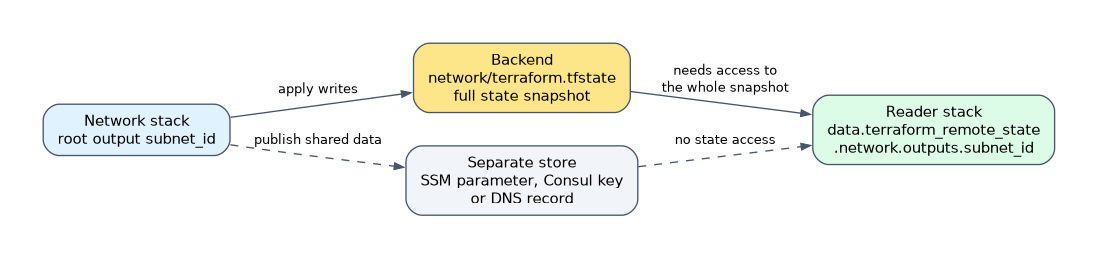
data "terraform_remote_state" "network" {
  backend = "s3"
  config = {
    bucket = "acme-tf-state"
    key    = "network/terraform.tfstate"
    region = "us-east-1"
  }
}
The value is data.terraform_remote_state.network.outputs.subnet_id. Trace it this way: the network stack must declare a root output "subnet_id", and the reader goes through the outputs attribute.
| Fact | Consequence |
|---|---|
| Only root outputs are exposed | An output in a nested module needs a passthrough output in the root |
defaults argument | Supplies fallbacks when the state is empty or lacks an output |
workspace argument | Selects a workspace if the backend supports them |
| Reader needs the whole snapshot | Reading outputs requires access to the full state, which can include secrets |
Because of that last row, HashiCorp recommends publishing shared data to a separate store where you can. Examples are SSM parameters, Consul keys or DNS records. On HCP Terraform or Terraform Enterprise, the tfe_outputs data source reads outputs without full state access.
How the exam asks about this
- "Use a variable for the bucket name in the backend block." It fails; use partial configuration with
-backend-config. - "A second pipeline starts an apply while the first holds the lock on an S3 backend with use_lockfile." The second gets Error acquiring the state lock.
- "An application stack needs a value from a network module's nested output." Add a root output in the network stack, and read it through
outputs.
What to remember for the exam
- The
terraformblock takes constants only, so backend values that vary come through-backend-config. -migrate-statecopies state;-reconfiguredoes not.use_lockfilewrites a.tflockfile; a blocked apply errors unless-lock-timeoutis set.backendandcloudare mutually exclusive.terraform_remote_stateexposes root outputs only, and its reader needs access to the entire snapshot.tfe_outputsis the narrower option on HCP Terraform and Terraform Enterprise.
Marking an output sensitive does not protect it from a terraform_remote_state reader's access. That reader can reach the full state, so do not use this pattern to share a stack that holds secrets with a less trusted team.
Common mistakes
Running -reconfigure when state should move. It discards the old backend settings without copying anything. If the new location is empty, the plan proposes creating every resource.
Pointing -migrate-state at a backend change and skipping verification. Confirm the state arrived before deleting the old copy. For HCP Terraform, check the workspace's States page, then add its variables and credentials.
Expecting a blocked apply to wait. Terraform stops with a lock error by default. Waiting happens only when -lock-timeout is set.
Check yourself
How do you give each environment a different S3 key if variables are not allowed?
Leave
keyout of the backend block and pass it at init with-backend-config, as a file or a key and value pair.What is the difference between
-migrate-stateand-reconfigure?-migrate-statecopies existing state to the new backend.-reconfigureaccepts the new settings and moves no state.Can
terraform_remote_stateread a value from a nested module's output?Not directly, because only root outputs are exposed. The other configuration must pass it through with a root output.
Topic 1 of 3 in Terraform State and Backend Operations
Test yourself on Terraform State and Backend Operations
The full HashiCorp Terraform Infrastructure Engineer Professional question bank has 600 questions, with timed practice exams and an explanation for every answer.
This study guide is independent and is not affiliated with, endorsed by, or sponsored by HashiCorp. Vendor names, certification names and exam codes are trademarks of their respective owners and are used for identification only.