Terraform State and Backend Operations · Topic 2 of 3
Managing State, Drift and Inspection
Terraform Professional 002: detect drift with refresh only mode, keep or revert the change, use moved and removed blocks and inspect state safely.
- 5 min
- Includes a diagram
- A refresh-only apply updates state and outputs, never infrastructure.
- A plain apply reverts drift to match the configuration.
moved,removedandimportblocks are reviewable; the state commands act at once.
What it is
State is Terraform's record of which real object belongs to which address. Drift is when a real object no longer matches that record, usually because someone changed it outside Terraform.
Managing state means changing that record safely, without changing the real object by accident. Inspecting state means reading the record with the right tool, and knowing which tools print secrets.
How it works
Detecting drift
A normal terraform plan first reads existing remote objects, then reports objects that changed outside Terraform and proposes changes back to the configuration. -refresh=false turns that read off, so the plan can miss external changes and be wrong.
| Command | What it does |
|---|---|
terraform plan -refresh-only | Shows only how state would change to match reality |
terraform apply -refresh-only | Records those changes in state, and changes no infrastructure |
terraform plan -detailed-exitcode | Exit 0 no changes, 1 error, 2 changes, which suits scheduled drift checks |
terraform apply -replace=ADDRESS | Forces replacement of one instance; replaces terraform taint |
terraform apply -refresh-only replaces terraform refresh, which overwrites state without showing you the updates first.
Walkthrough: choosing a remediation
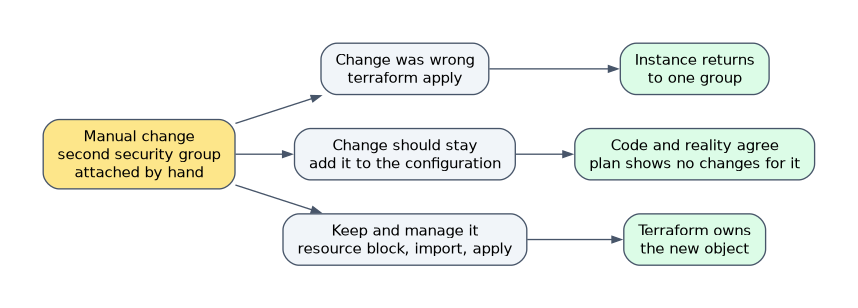 During an incident, someone attaches a second security group to a Terraform-managed instance by hand. The configuration lists one group.
| Decision | Steps | Result |
|---|---|---|
| The change was wrong | terraform apply | The instance returns to one group |
| The change should stay | Edit the configuration to include it, then terraform plan shows no changes for it | Code and reality agree |
| Keep the new group, and manage it | Add a resource block, import the group, reference it, apply | Terraform owns the new object |
A refresh-only apply on its own does not finish the job. State now matches reality, but the configuration still says one group, so the next plain apply reverts the change.
If you only want to stop Terraform fighting over one attribute, ignore_changes works for updates. It does not apply on create.
Changing the record without touching objects
| Goal | Preferred | Command alternative |
|---|---|---|
| Rename or move into a module | moved block | terraform state mv |
| Stop managing, keep the object | removed block with destroy = false | terraform state rm |
| Bring in an existing object | import block | terraform import |
removed {
  from = aws_instance.legacy
  lifecycle {
    destroy = false
  }
}
The blocks go through plan and review, so they are safer in a team. terraform state rm removes the binding only, leaves the real object, and takes the lock by default.
An import block id can be any expression that evaluates to a string and is known at plan. -generate-config-out is experimental and fails if the file already exists.
Run a preview before a risky state command, and quote any bracketed address.
terraform state pull > before-change.tfstate
terraform state mv -dry-run aws_instance.a aws_instance.b
terraform state rm -dry-run 'aws_subnet.this["db"]'
Inspecting state
| Command | Shows | Sensitive values |
|---|---|---|
terraform state list | Addresses only; filter by address or -id | Not shown |
terraform state show ADDRESS | Attributes of one instance | Redacted |
terraform show | Latest snapshot or a plan file, readable | Redacted |
terraform show -json | Machine-readable state or plan | Plain text |
terraform state pull | Raw state to stdout, for tools such as jq | Plain text |
terraform output | All root outputs | <sensitive> |
terraform output NAME, -json, -raw | Named or machine-readable output | Plain text |
Reading addresses
| Address | Meaning |
|---|---|
aws_instance.web | A single instance, or all instances as a filter |
aws_instance.web[0] | One count instance |
aws_instance.web["a"] | One for_each instance |
module.net.aws_subnet.this | A resource inside module net |
data.aws_ami.base | A data source, which also appears in state |
terraform state list module.net includes the module's submodules. The list is sorted by module depth, so root resources come first.
terraform state list -id=sg-1234abcdThat form answers a common production question: which address manages this cloud object?
How the exam asks about this
- "A console change must stay, and the plan keeps trying to undo it." Update the configuration to match, so the plan is clean.
- "Stop managing this instance, but keep it running." Use a removed block with destroy = false or terraform state rm.
- "See state changes from an outside edit without changing infrastructure." Run terraform plan -refresh-only.
What to remember for the exam
- A refresh-only apply updates state and outputs, never infrastructure.
- A plain apply reverts drift to match the configuration.
moved,removedandimportblocks are reviewable; the state commands act at once.removedwithdestroy = falseandterraform state rmboth leave the object running.state listfinds addresses, andstate showreads one instance.terraform show -json,terraform state pullandterraform output NAMEprint sensitive values in plain text.
terraform destroy -target is not a way to stop managing a resource. It destroys the real object, which is exactly what a "keep it running" requirement rules out.
Common mistakes
Stopping at a refresh-only apply. It aligns state, not the configuration. Unless you also change the code, the next normal apply puts the object back.
Deleting a resource block and applying. Terraform sees an object in state with no configuration and plans to destroy it. Add a removed block or use terraform state rm first.
Assuming sensitive hides values in every output. Redaction applies to human-readable views. JSON output, raw state and a named output print the value.
Check yourself
What does
terraform apply -refresh-onlychange?Only state and root output values, so they match real objects. It changes no infrastructure and no configuration.
Which exit code from
terraform plan -detailed-exitcodemeans changes are present?Exit code 2. Exit code 0 means no changes, and 1 means an error.
Which command finds the Terraform address for a known cloud object ID?
terraform state list -id=ID, which lists the resource with that ID in state.
Topic 2 of 3 in Terraform State and Backend Operations
Test yourself on Terraform State and Backend Operations
The full HashiCorp Terraform Infrastructure Engineer Professional question bank has 600 questions, with timed practice exams and an explanation for every answer.
This study guide is independent and is not affiliated with, endorsed by, or sponsored by HashiCorp. Vendor names, certification names and exam codes are trademarks of their respective owners and are used for identification only.