HCP Terraform / Enterprise Operations · Topic 2 of 3
Multiple Environments and Version Upgrades
Terraform Professional (002): separate environments with workspaces and projects, resolve variable precedence, and upgrade Terraform across workspaces.
- 5 min
- Includes a diagram
- Priority sets beat everything, including
-var. - Workspace-specific variables beat ordinary variable sets.
*.auto.tfvarsbeatsterraform.tfvars, and both sit below variable sets.
What it is
In HCP Terraform, each workspace has one set of inputs and one state file, so a workspace per environment gives strict separation. Projects group those workspaces for permissions and shared settings, and variable sets supply values at the right level.
Each workspace also selects its own Terraform version, so upgrades happen one workspace at a time, in a safe order.
How it works
Laying out environments
| Approach | How it works | Trade-off |
|---|---|---|
| One branch, variables differ | All workspaces track main; values differ per workspace | Simple; a merge reaches every environment |
| One branch per environment | Each workspace tracks a long-lived branch | Clear promotion; branches can drift apart |
| Separate configurations, shared modules | Each environment has its own directory | Most isolated; test new module versions in staging first |
In a monorepo, set a working directory on each workspace, and add shared module directories to its automatic run triggering. A CLI-driven configuration can select workspaces by tags and project.
terraform {
  cloud {
    organization = "acme"
    workspaces {
      project = "payments"
      tags    = { layer = "app" }
    }
  }
}
Projects
Every workspace belongs to exactly one project, and new workspaces land in the Default Project unless you choose otherwise. A project gives a team scoped access, and a project-scoped variable set or policy set reaches all its current and future workspaces.
Workspaces do not share state automatically: grant access with remote state sharing, and only between workspaces that need it.
Use terraform_remote_state to read outputs, and a run trigger to queue a dependent workspace after a successful apply. Whether that run applies by itself follows the separate auto-apply setting for run triggers.
Variable precedence
For one variable, the highest source that sets it wins.
| Rank | Source |
|---|---|
| 1 | Priority variable sets: global, then organization-owned, then project-owned |
| 2 | Command line -var or -var-file (CLI workflow) |
| 3 | Local TF_VAR_ variables (CLI workflow) |
| 4 | Workspace-specific variables |
| 5 | Project-owned variable sets: workspace-scoped, then project-scoped |
| 6 | Organization-owned variable sets: workspace-scoped, then project-scoped |
| 7 | Global variable sets |
| 8 | *.auto.tfvars files |
| 9 | terraform.tfvars file |
When sets share scope and ownership, the set whose name sorts first wins.
Trace this example for region in a CLI-driven run.
| Source | Value |
|---|---|
terraform.tfvars | us-east-1 |
| Global set | us-east-2 |
| Project-scoped set | us-west-1 |
| Workspace variable | eu-west-1 |
-var flag | eu-central-1 |
- With all of these,
-varwins:eu-central-1. - Without the flag, the workspace variable wins:
eu-west-1. - Without that too, the project-scoped set beats the global set:
us-west-1. - If the global set is marked priority, it beats everything:
us-east-2.
Terraform Enterprise ignores terraform.tfvars. Use a priority set for a value teams must not change.
Upgrading Terraform across workspaces
A workspace uses the version set in its settings, an exact version or a constraint, and changing it needs workspace admin access. New workspaces start on the release current at creation, so a workspace set to an exact version stays there until you change it.
- Survey. Use the Explorer's Terraform Versions view, and read the upgrade guide for the new version.
- Update
required_version. Every constraint in the module tree must allow the new version, or the run fails. - Test with a speculative plan. It can use a different version from the workspace, so you can test without changing settings. Look for a plan with no unexpected changes.
- Change the workspace version and merge.
- Apply. The next apply writes state with the new version. Merging alone does not update the state file.
An Allow empty apply run applies a plan with no infrastructure changes, so state can be upgraded when a version requires it, most notably 0.13.
Order across workspaces
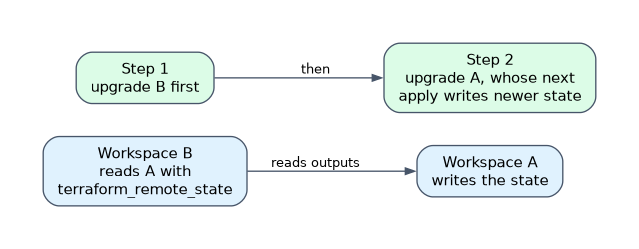 A CLI that does not support a state file format fails with a request to upgrade, and downgrades are not guaranteed. If workspace B reads workspace A's state through
terraform_remote_state, the safer order is to upgrade B before A, so B can still read A's newer state.
Upgrade lower environments first, and roll out to production only after checking results. To change many workspaces consistently, manage the terraform_version argument on tfe_workspace resources with the tfe provider.
How the exam asks about this
- "Test a new Terraform version without changing the workspace." Run a speculative plan with the new version.
- "A workspace variable and a global set define the same key." The workspace variable wins, unless the set is a priority set.
- "After the merge, state still shows the old version." The state updates only when an apply runs, using allow empty apply if there are no changes.
What to remember for the exam
- Priority sets beat everything, including
-var. - Workspace-specific variables beat ordinary variable sets.
*.auto.tfvarsbeatsterraform.tfvars, and both sit below variable sets.- Every
required_versionin the root and its modules must be satisfied. - Speculative plans can use a different Terraform version from the workspace.
- A workspace belongs to exactly one project.
Plan to upgrade the workspaces that read a state before the workspace that writes it. Once newer state is written, an older reader is not guaranteed to read it.
Common mistakes
Expecting terraform.tfvars to override a workspace variable. It has the lowest precedence, and Terraform Enterprise ignores it entirely. Set the value in the workspace.
Stopping after changing the version setting. The state file keeps its old version until an apply writes it. Plan for that final step.
Sharing state with the whole organization. It is convenient but gives every workspace read access to outputs. Share only with the workspaces that need it.
Check yourself
Which wins, a -var flag or a priority global variable set?
The priority global variable set, because priority sets rank above command line values.
How do you test a new Terraform version without changing a workspace?
Run a speculative plan with the new version, which can differ from the workspace's selected version and cannot be applied.
What updates the state file's Terraform version?
An apply using the new version, which may need an allow empty apply run if the plan has no changes.
Topic 2 of 3 in HCP Terraform / Enterprise Operations
Test yourself on HCP Terraform / Enterprise Operations
The full HashiCorp Terraform Infrastructure Engineer Professional question bank has 600 questions, with timed practice exams and an explanation for every answer.
This study guide is independent and is not affiliated with, endorsed by, or sponsored by HashiCorp. Vendor names, certification names and exam codes are trademarks of their respective owners and are used for identification only.