Core Terraform Workflow · Topic 1 of 3
The Terraform Workflow, Init and Validate
Terraform Associate (004): the write, plan and apply workflow, what terraform init sets up, and what terraform validate checks and what it skips.
- 5 min
- Includes a diagram
- Core workflow: write, plan, apply; init comes first in every new working directory.
terraform initconfigures the backend, downloads modules, installs providers and writes.terraform.lock.hcl.initis safe to rerun and never changes infrastructure; rerun it after provider, module or backend changes.
What it is
The core Terraform workflow has three steps: write configuration, plan the changes, and apply them. Before the first plan, terraform init prepares the working directory, and terraform validate and terraform fmt help while you write.
terraform init installs what the configuration needs and sets up the backend. terraform validate checks that the configuration is internally correct without contacting any remote service.
How it works
Write, plan, apply
| Step | Individual practitioner | Team |
|---|---|---|
| Write | Edit HCL in an editor, run plan often to check | Work on a branch in version control |
| Plan | Review the plan in the terminal | The plan is shown on the pull request for review |
| Apply | Type yes to approve | Merge, then apply from a pipeline or HCP Terraform |
The workflow loops. After an apply, you write the next change and plan again. HCP Terraform runs the same plan and apply steps remotely and adds approvals, policies and shared state.
What terraform init does
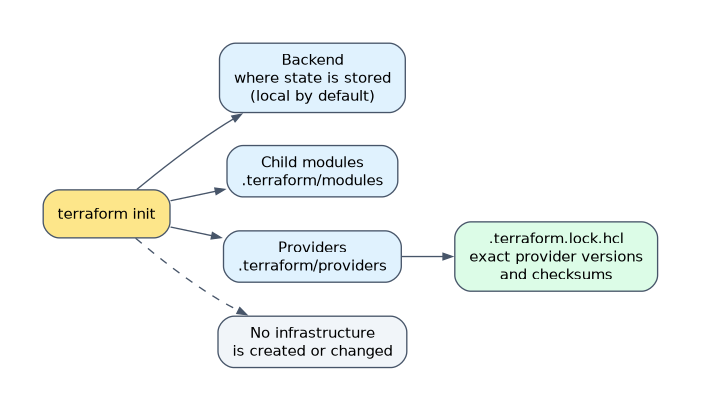
terraform init| Task | Result |
|---|---|
| Backend initialization | Configures where state is stored, local by default |
| Child modules | Downloads modules from their sources into .terraform/modules |
| Providers | Installs required providers into .terraform/providers |
| Dependency lock file | Creates or updates .terraform.lock.hcl with exact provider versions and checksums |
init is the first command for a new or freshly cloned configuration. It never creates, changes or deletes infrastructure, and it is safe to run more than once.
Run it again when you add or change a provider, add a module or change its source or version, or change the backend configuration. Terraform stops with an error asking for terraform init if one of these is out of date.
Useful init options
| Option | Use |
|---|---|
-upgrade | Upgrade providers and modules to the newest versions the constraints allow |
-reconfigure | Reconfigure the backend and ignore the saved configuration, without migrating state |
-migrate-state | Reconfigure the backend and copy existing state to the new backend |
-backend=false | Skip backend setup, for example to install providers just for validation |
What to commit after init
init creates a hidden .terraform directory that holds the downloaded providers and modules and the backend settings. It is rebuilt by running init again, so it does not belong in version control.
| Commit to version control | Keep out of version control |
|---|---|
.tf configuration files | The .terraform directory |
.terraform.lock.hcl | terraform.tfstate and its backups |
Non-secret .tfvars files | .tfvars files that hold secrets |
What terraform validate checks
terraform validatevalidate checks syntax and internal consistency: valid HCL, known block types and argument names, correct value types, required arguments present and references that point to things declared in the configuration.
It does not contact remote state or provider APIs. It cannot tell whether an image ID exists, whether credentials work or whether a name is already taken in the cloud.
Validation needs an initialized directory, because providers supply the schemas for resource arguments. In a pipeline, terraform init -backend=false followed by terraform validate checks code without touching any state. Add -json for machine-readable output.
How the exam asks about this
- "A colleague clones a repository and
terraform planfails because providers are missing." Runterraform initfirst. - "Which command checks a configuration for errors without accessing remote state or provider APIs?"
terraform validate. - "A module's source was changed to a new Git tag." Run
terraform initagain (orterraform init -upgrade) so the new module version is downloaded.
What to remember for the exam
- Core workflow: write, plan, apply; init comes first in every new working directory.
terraform initconfigures the backend, downloads modules, installs providers and writes.terraform.lock.hcl.initis safe to rerun and never changes infrastructure; rerun it after provider, module or backend changes.terraform validatechecks syntax, types and references, not cloud reality.validaterequires an initialized directory but does not read remote state or call provider APIs.-migrate-statecopies state to a new backend;-reconfiguredoes not.
A configuration that passes terraform validate can still fail at plan or apply. Validate cannot see missing cloud objects, permission errors or quota limits.
Common mistakes
Thinking init creates resources. init only prepares the working directory. Nothing exists in the cloud until terraform apply runs.
Expecting validate to catch everything. A wrong but well-formed value, such as an image ID that does not exist, passes validation. It only fails when the provider calls the API during plan or apply.
Forgetting init after a backend change. Changing the backend block requires terraform init, with -migrate-state to move existing state or -reconfigure to start fresh.
Check yourself
What are the three steps of the core Terraform workflow?
Write configuration, plan to preview the changes, and apply to make them.
terraform initprepares the working directory before the first plan.Which four things does
terraform initset up?The backend for state, child modules, required providers, and the dependency lock file
.terraform.lock.hcl.Will
terraform validatereport that an AMI ID in the configuration does not exist?No. Validate checks syntax and internal consistency only and does not call provider APIs, so a missing AMI shows up at plan or apply.
Topic 1 of 3 in Core Terraform Workflow
Test yourself on Core Terraform Workflow
The full HashiCorp Terraform Associate 004 question bank has 600 questions, with timed practice exams and an explanation for every answer.
This study guide is independent and is not affiliated with, endorsed by, or sponsored by HashiCorp. Vendor names, certification names and exam codes are trademarks of their respective owners and are used for identification only.