Core Terraform Workflow · Topic 2 of 3
Plan and Apply
Terraform Associate (004): generate and review an execution plan, save it with -out, read plan symbols, and apply changes with or without approval.
- 5 min
- Includes a diagram
terraform planpreviews changes and never modifies infrastructure or state.terraform applywithout a plan file plans again and asks foryes; with a saved plan file it applies without asking.-auto-approveskips the approval prompt.
What it is
An execution plan is Terraform's preview of what it will create, update, replace or destroy to make real infrastructure match the configuration. terraform plan builds and shows the plan without changing anything.
terraform apply carries out a plan. It calls the providers to make the changes and then writes the results to state.
How it works
Generating a plan
terraform plan refreshes state from the real objects by default, compares the configuration with that refreshed state and proposes the actions needed. It never changes infrastructure or state.
Variable values come from terraform.tfvars and any *.auto.tfvars files, which load automatically, plus -var and -var-file options and TF_VAR_ environment variables.
| Option | Effect |
|---|---|
-out=FILE | Save the plan to a file for a later terraform apply FILE |
-var and -var-file | Set input variable values |
-destroy | Plan to destroy every managed object |
-refresh-only | Plan only to update state to match real objects |
-refresh=false | Skip the refresh and trust current state |
-replace=ADDRESS | Plan to replace one object even if nothing changed |
-target=ADDRESS | Limit the plan to the given resources and their dependencies, for exceptional cases only |
Reading the plan
| Symbol | Meaning |
|---|---|
+ | Create |
- | Destroy |
~ | Update in place |
-/+ | Destroy, then create a replacement |
+/- | Create the replacement first, then destroy (create_before_destroy) |
<= | Read a data source during apply |
The plan ends with a summary such as Plan: 2 to add, 1 to change, 0 to destroy. A line marked # forces replacement shows which argument change makes Terraform replace an object rather than update it.
Saved plans
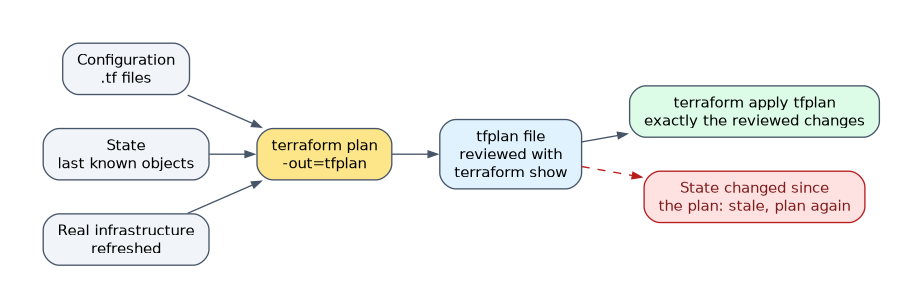
terraform plan -out=tfplan
terraform show tfplan
terraform apply tfplan
A saved plan guarantees that apply makes exactly the reviewed changes. terraform show displays it in readable form, and terraform show -json tfplan gives machine-readable output for tools.
If state changes after the plan was saved, Terraform refuses to apply it as stale, and you must plan again. Plan files can contain sensitive values, so store them as carefully as state.
Plans in automation
Pipelines often add -detailed-exitcode to terraform plan. The exit code is 0 when there are no changes, 1 on an error and 2 when the plan contains changes, so a script can decide whether an apply is needed.
Applying changes
Run without a plan file, terraform apply creates a new plan, shows it and waits for you to type yes. -auto-approve skips the prompt, which suits automation but removes the review step.
Run with a saved plan file, apply does not ask for approval, because the plan was already reviewed.
During apply, Terraform follows the dependency graph and creates independent resources in parallel, ten at a time by default (-parallelism). After the changes it records new IDs and attributes in state.
When an apply fails part way
Terraform does not roll back. Objects created before the error stay in place and are recorded in state; the failed one is reported.
Fix the cause and run terraform apply again. Terraform plans only the remaining changes, because state already lists what succeeded.
Replacing an object
To force replacement of one object, for example a damaged server, use the replace option. It replaces the deprecated terraform taint command and shows the replacement in the plan first.
terraform apply -replace="aws_instance.web"How the exam asks about this
- "Operators must apply exactly what a reviewer approved." Run
terraform plan -out=FILE, review it, thenterraform apply FILE. - "Which two commands refresh state by default?"
terraform planandterraform apply. - "An apply created two of three resources and then failed." Fix the error and run apply again; Terraform does not roll back and continues from state.
What to remember for the exam
terraform planpreviews changes and never modifies infrastructure or state.terraform applywithout a plan file plans again and asks foryes; with a saved plan file it applies without asking.-auto-approveskips the approval prompt.- Plan symbols:
+create,-destroy,~update in place,-/+replace,<=read. - Apply updates state with every change it makes; a failed apply leaves completed changes in place.
terraform apply -replace=ADDRESSreplaces the deprecatedterraform taint.
-target is for exceptional recovery work, not routine use. HashiCorp warns that targeting can leave state and configuration out of step with the rest of the configuration.
Common mistakes
Thinking plan writes state. terraform plan refreshes in memory to compute the plan but does not save anything to state. Apply, including apply -refresh-only, writes state; plan never does.
Expecting a rollback after a failed apply. Terraform keeps what it created and records it. The next apply finishes the job.
Reading ~ as replace. ~ is an in-place update. Replacement shows as -/+ or +/-, with the argument that forces it marked in the plan.
Check yourself
What happens when you run
terraform apply tfplanwith a saved plan file?Terraform applies exactly the saved plan without asking for approval, and refuses if state has changed since the plan was made.
What does
-/+mean in a plan?The object will be destroyed and a replacement created, because an argument that cannot be updated in place has changed.
Which command replaces the deprecated
terraform taint?terraform apply -replace=ADDRESS, which plans and performs the replacement of that one object in a normal reviewed run.
Topic 2 of 3 in Core Terraform Workflow
Test yourself on Core Terraform Workflow
The full HashiCorp Terraform Associate 004 question bank has 600 questions, with timed practice exams and an explanation for every answer.
This study guide is independent and is not affiliated with, endorsed by, or sponsored by HashiCorp. Vendor names, certification names and exam codes are trademarks of their respective owners and are used for identification only.