Managing operations · Topic 3 of 3
Cloud Audit Logs, Log Sinks, Security Command Center and Incidents
Configure Cloud Audit Logs and Data Access logs, export with aggregated sinks to a SIEM, monitor Security Command Center and handle incidents.
- 6 min
- Includes a diagram
- Admin Activity and System Event logs are always on and kept 400 days; Data Access is mostly off by default.
- Configure Data Access logs per service with auditConfigs; exempt noisy service accounts.
- Aggregated sinks at org or folder level capture all children; grant the writer identity access.
What it is
Cloud Audit Logs record who did what, where and when in Google Cloud. Log sinks route those logs to central storage or to external security tools. Security Command Center (SCC) turns configuration checks and threat detection into findings, and incident response turns findings into action.
How it works
Types of audit logs
| Log | Contents | On by default | Retention in Cloud Logging |
|---|---|---|---|
| Admin Activity | Changes to configuration and metadata, such as IAM changes or VM creation | Always, cannot be disabled | 400 days in the _Required bucket |
| System Event | Google system actions that change resources | Always, cannot be disabled | 400 days in _Required |
| Data Access | Reads of configuration (ADMIN_READ) and reads and writes of user data (DATA_READ, DATA_WRITE) | No, except BigQuery | 30 days in _Default, configurable |
| Policy Denied | Access refused by a security policy, such as VPC Service Controls | Yes, can be excluded | 30 days in _Default, configurable |
Data Access logs can be large and are charged, so enable them for the services that hold sensitive data. They are configured in the IAM policy's auditConfigs, at organization, folder or project level.
auditConfigs:
- service: storage.googleapis.com
  auditLogConfigs:
  - logType: DATA_READ
  - logType: DATA_WRITE
    exemptedMembers:
    - serviceAccount:backup@prod-app.iam.gserviceaccount.com
Key fields in each entry are protoPayload.authenticationInfo.principalEmail, protoPayload.methodName, protoPayload.resourceName and the caller's IP address.
Log sinks and aggregated sinks
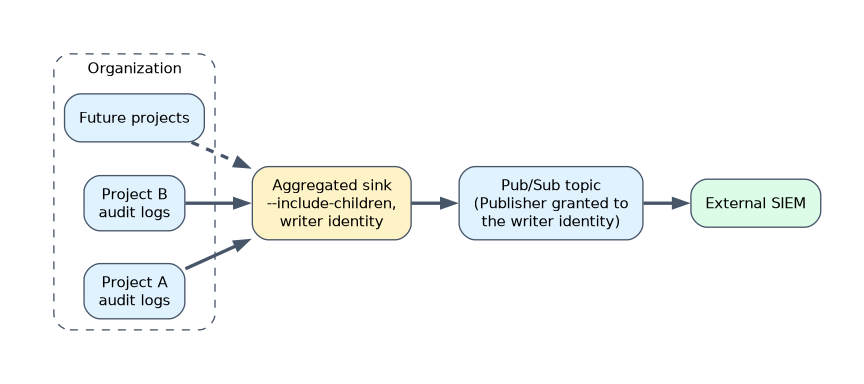 A sink sends matching log entries to a destination. Every project has
 _Required and _Default sinks; you add your own.
| Destination | Use |
|---|---|
| Cloud Logging bucket | Central searchable store, with Log Analytics and locked retention |
| Cloud Storage | Cheap long-term archive, with retention policies and Bucket Lock |
| BigQuery | SQL analysis and dashboards |
| Pub/Sub | Streaming to external SIEM and SOAR tools |
| Another project | Forward to a sink in a central project |
An aggregated sink on an organization or folder with --include-children collects logs from every project below it, including future ones. An intercepting aggregated sink also stops those logs from reaching the child projects' own sinks.
gcloud logging sinks create org-audit-to-siem \
  pubsub.googleapis.com/projects/sec-logging/topics/siem-feed \
  --organization=123456789012 --include-children \
  --log-filter='logName:"cloudaudit.googleapis.com"'
The sink has a writer identity service account. Grant it permission on the destination, such as Pub/Sub Publisher on the topic, or no logs arrive.
Exporting to external security systems
| Target | Path |
|---|---|
| Splunk | Aggregated sink to Pub/Sub, then the Dataflow Pub/Sub to Splunk template, or a Pub/Sub based add-on |
| Google Security Operations | Direct ingestion of Google Cloud logs and SCC findings |
| Other SIEMs | Pub/Sub subscription pulled by the SIEM, or files from Cloud Storage |
Security Command Center
SCC is usually activated for the whole organization and collects findings from Google detectors and integrated services.
| Tier | Main capabilities |
|---|---|
| Standard | Basic posture management: findings from integrated services such as Sensitive Data Protection, findings export and notifications, limited Compliance Manager. New Standard activations do not include Security Health Analytics; organizations migrated from the legacy Standard tier keep a subset of its detectors |
| Premium | All Security Health Analytics detectors with compliance mapping (CIS, PCI DSS, NIST, ISO 27001), Event Threat Detection, Container Threat Detection, VM Threat Detection, attack path simulation, security posture and custom modules |
The Enterprise tier is deprecated and shuts down in May 2027, when its organizations move to Premium, so plan designs around Standard and Premium only.
| Operation | How |
|---|---|
| Real-time alerts | Notification configs publish matching findings to Pub/Sub |
| Analysis and reporting | Continuous export of findings to BigQuery |
| Noise reduction | Mute rules for accepted risks, such as findings on a sandbox folder |
| Access | SCC roles, such as Security Center Admin Viewer or Findings Editor, at organization or folder level |
Event Threat Detection reads logs to find threats such as anomalous IAM grants, malware or cryptomining connections, and data exfiltration from BigQuery.
Responding to and remediating incidents
| Phase | Google Cloud actions |
|---|---|
| Detect | SCC findings, log-based alerts in Cloud Monitoring, SIEM rules |
| Triage | Audit logs for the principal and method; Log Analytics to scope impact |
| Contain | Disable or delete keys and service accounts, remove IAM grants, isolate the VM with firewall rules, revoke sessions |
| Preserve | Snapshot disks and export logs for forensics before rebuilding |
| Eradicate and recover | Rebuild from trusted images; rotate credentials and keys |
| Improve | Add organization policies, detectors or automation to prevent a repeat |
Automate repeatable responses: an SCC notification to Pub/Sub can trigger a Cloud Run function that, for example, removes public access from a bucket.
A worked example
SCC Premium raises an Event Threat Detection finding: a service account key was used from an unknown country to grant Owner to an external account. The notification reaches the SOC through Pub/Sub and the SIEM.
The engineer deletes the key, removes the grant, and uses Admin Activity logs from the central bucket to list every action by that account. The fix is permanent: iam.disableServiceAccountKeyCreation and domain restricted sharing are enforced on the organization.
How the exam asks about this
- "Collect audit logs from all current and future projects into one place." An aggregated sink at the organization with include children.
- "Auditors must see who read objects in a sensitive bucket." Enable Data Access logs (DATA_READ) for Cloud Storage on that project.
- "Send critical Security Command Center findings to the on-call system in real time." A notification config publishing to Pub/Sub.
What to remember for the exam
- Admin Activity and System Event logs are always on and kept 400 days; Data Access is mostly off by default.
- Configure Data Access logs per service with auditConfigs; exempt noisy service accounts.
- Aggregated sinks at org or folder level capture all children; grant the writer identity access.
- Pub/Sub is the path to external SIEMs; Cloud Storage and locked buckets for long retention.
- SCC Standard gives basic posture management only; Premium adds Security Health Analytics, threat detection, compliance and posture.
A sink without permission for its writer identity fails silently from the user's point of view. Always grant the writer identity on the destination and check that logs arrive.
Common mistakes
Expecting Data Access logs to be on. Except for BigQuery, they must be enabled. Without them, no one can answer who read the data.
Creating sinks project by project. New projects are missed. Use an aggregated sink at organization or folder level.
Choosing SCC Standard for threat detection. Event, container and VM threat detection need Premium.
Check yourself
Which audit logs cannot be disabled?
Admin Activity and System Event audit logs.
What must you do after creating a sink to a Pub/Sub topic in another project?
Grant the sink's writer identity Pub/Sub Publisher on that topic.
Which SCC tier includes Event Threat Detection?
Security Command Center Premium.
Topic 3 of 3 in Managing operations
Test yourself on Managing operations
The full Google Cloud Professional Cloud Security Engineer question bank has 749 questions, with timed practice exams and an explanation for every answer.
This study guide is independent and is not affiliated with, endorsed by, or sponsored by Google Cloud. Vendor names, certification names and exam codes are trademarks of their respective owners and are used for identification only.